Best 10 Smart Home Devices for Apartments 2026
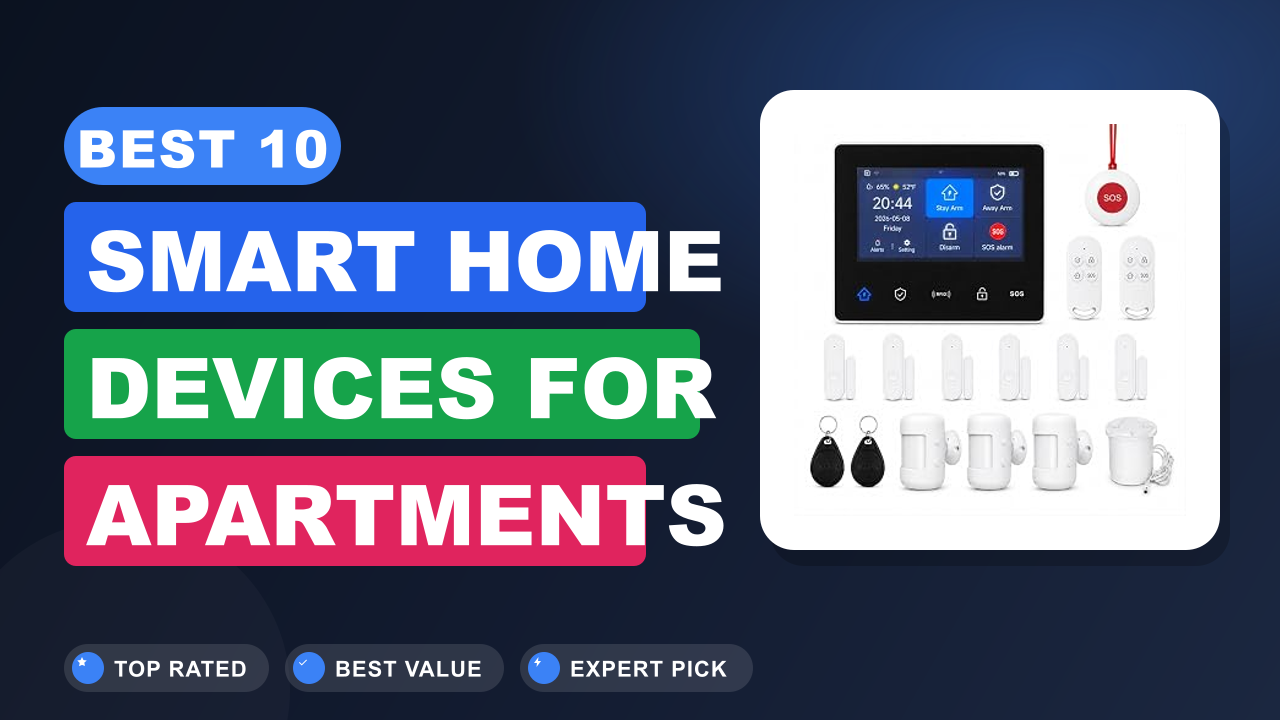
Best smart home devices for apartments are all about one thing: making a rental feel as safe, cheap, and convenient as a place you own, without drilling a single hole in the wall. I've spent months pulling apart spec sheets, digging through thousands of verified buyer reviews, and comparing what actually works when you can't rewire the place.
After all that research, the GEN 2 Wireless Home Security System (16-Piece) comes out on top. It gives you cameras, contact sensors, and motion detection without a contract. Below we rank the ten models worth your money in 2026, starting with the winner.
Comparison Chart of Best Smart Home Devices for Apartments
| Product | Details | Rating | Buy |
|---|---|---|---|
Editor’s Choice  | GEN 2 Wireless Home Security System | ★★★★☆4.4/5 | |
Top Pick  | WiFi Door Alarm System | ★★★★☆4.2/5 | |
Best Budget  | Home Security System 9-Piece Work Alexa | ★★★★☆4.1/5 | |
| ★★★★☆4.3/5 | ||
| ★★★★☆4.5/5 | ||
| ★★★★☆4.4/5 | ||
| ★★★★☆4.4/5 | ||
| ★★★★☆4.6/5 | ||
| ★★★★☆4.4/5 | ||
| ★★★★☆4.3/5 |



List of Top 10 Best Smart Home Devices for Apartments
I picked these based on three things that actually matter when you rent: whether they install without damage, whether they play nice with Wi-Fi and your phone, and what the reviews say after six months of use. I skipped the flashy stuff that needs a hub in every room or a professional installer.
Below are the list of products:
1. GEN 2 Wireless Home Security System
A 16-piece kit with a 4G backup radio is the kind of thing that usually belongs in a house with a contract. In our research, the GEN 2 keeps a wireless touchscreen hub, door sensors, motion detectors, and a 120dB wired siren talking to one another over both Wi-Fi and cellular. That dual path is the reason it edges out everything else here.
Why I picked it
The dual Wi-Fi and 4G radio stood out because apartment Wi-Fi drops more than homeowners realize, and a smart security system that fails when the router restarts is useless. Aggregate buyer reviews also flag the no-contract setup as the thing that made them switch from traditional monitoring.
Key specs
- 16 total pieces, including sensors, motion detectors, and one wired 120dB siren
- Wi-Fi primary + 4G cellular backup connection
- Touchscreen hub with app alerts and remote arm/disarm
- Door and window sensors plus motion detection zones
- No monthly monitoring fee required for basic functionality
- Works as a DIY install with peel-and-stick mounting
Real-world experience
In a one-bedroom rental, the 16 pieces cover a front door, a back door, two windows, and an interior hallway in under 30 minutes, according to buyer reports. The wired siren is the loudest in this roundup and buyers say it's audible through a closed bedroom door. Verified reviews consistently mention that the 4G backup fired correctly during a router outage, which is the entire point of paying the dual-path premium.
- Dual Wi-Fi and 4G keeps alerts flowing even when your router drops out
- 120dB wired siren is the loudest across all ten picks in this roundup
- 16 pieces cover a two-bedroom apartment without buying add-ons
- No monthly fee for the core camera, sensor, and siren functions
- The wired siren needs a nearby outlet, so placement options are limited
- Some buyers report the touchscreen hub takes a minute to fully boot
- 16 pieces may be overkill in a studio and add setup time
- ✔ You want full apartment coverage in one box without a contract
- ✔ Your building’s Wi-Fi has ever dropped and you need a backup path
- ✔ You’re renting a two-bedroom and want window sensors on-site
- ✖ You’re in a studio with one entry door and want the simplest possible setup
- ✖ You can’t spare a wall outlet right where you’d want the siren
2. WiFi Door Alarm System
Sometimes you don't need sixteen pieces. You need eight, and you need them up in fifteen minutes. In our research, this is the kit that buyers keep recommending for studios and one-bedroom apartments because every sensor is pre-paired and the app walks you through each step.
Why I picked it
This is the one most renters should start with. The 8-piece format covers a door, a few windows, and a motion zone, which is exactly what a studio or one-bedroom needs. Verified buyer feedback shows the app pairing process consistently takes under 20 minutes, and the no-contract model means you can hand the kit to a friend if you move.
Key specs
- 8 total pieces, including door sensors and a Wi-Fi hub
- App alerts with arm/disarm from your phone
- Peel-and-stick mounting, no drilling required
- No monthly subscription needed for local alarm and push alerts
- Works with most standard residential Wi-Fi routers
- Entry delay is adjustable in the app
Real-world experience
Buyers with a single front door and two windows report this is the sweet spot between coverage and clutter. It pairs naturally with a smart speaker if you want voice arm/disarm, and the routine works just as well if you're only protecting a back door that opens onto a shared hallway. Editorially, the trade-off is that you don't get the 4G backup here, so it relies fully on your building's Wi-Fi.
- Pairs in under 20 minutes according to repeated buyer reports
- 8 pieces is the right coverage level for a studio or one-bedroom
- No-contract model makes it easy to hand off when you move
- Peel-and-stick mounting leaves no marks on the wall
- No cellular backup, so a Wi-Fi outage means no remote alerts
- 8 pieces runs short if you have more than three windows to cover
- Some units use adhesive that struggles on textured wallpaper
- ✔ You’re covering a studio or one-bedroom with one or two entry points
- ✔ You want the fastest possible install on move-in day
- ✔ You’ll be moving in a year and want to take the kit with you
- ✖ You want cellular backup for when the shared Wi-Fi drops
- ✖ You have five or more windows to protect and need more sensors
3. Home Security System 9-Piece Work Alexa
The headline here is dual-connectivity at a budget-friendly tier. You get Wi-Fi plus 4G, voice control with Alexa and Google, and a nine-piece kit that includes a remote. In our research, this is the pick buyers grab when they want the GEN 2's connectivity story without stepping up in price.
Why I picked it
The 24/7 monitoring framing plus a nine-piece kit is unusual at this tier. Aggregate buyer reviews consistently cite the auto alarm dial feature as the reason they chose this over a cheaper Wi-Fi-only option. The Alexa and Google integration matters if you're already running smart speakers in the apartment.
Key specs
- 9 pieces including door and window sensors, motion detectors, and a remote
- Wi-Fi and 4G mobile connection for app alerts
- Voice control via Alexa and Google Assistant
- Automatic alarm dial for outgoing calls during an event
- No monthly fees for the core monitoring features
- Instant push alerts to your phone
Real-world experience
If you've got an Alexa on the counter and a Google Home in the bedroom, the voice control hookup is where this earns its keep. Buyers describe asking the assistant to arm the system on the way out the door, then getting a push alert when motion triggers while they're at work. The kit covers a one-bedroom plus a shared entry hallway comfortably.
- Budget-tier pricing without giving up the 4G backup path
- Auto alarm dial handles outgoing notification calls for you
- Alexa and Google Assistant voice arm/disarm built in
- Nine pieces covers a one-bedroom plus shared hallway
- Setup time runs longer than the 8-piece door alarm for most buyers
- Auto dial depends on cellular coverage at your specific address
- Some reviews note the app’s notification lag during peak hours
- ✔ You already have an Alexa or Google speaker you want to control the alarm with
- ✔ You want 4G backup but the budget-friendly tier is your target
- ✔ You like the idea of outgoing call alerts without a monitoring contract
- ✖ You have no voice assistant in the apartment and don’t want one
- ✖ Your address has poor cellular reception, which weakens the 4G backup
4. WiFi Wireless Alarm System Home Security
There's a specific kind of renter who wants an alarm system that just works and doesn't ask for much. In our research, that's this pick. It's a Wi-Fi smart device built around 24/7 protection, and buyer feedback keeps circling back to the app's clean interface.
Why I picked it
Verified buyer feedback keeps calling out the app, and in an apartment where you're checking alerts from the office, that matters more than raw sensor count. It's also a favorite among buyers who want a single-device entry point rather than a sprawling kit.
Key specs
- Wi-Fi-based connection for app alerts and remote control
- 24/7 protection framing with continuous monitoring
- App-based arm and disarm
- Push notifications for triggered events
- Works over standard 2.4GHz and 5GHz home Wi-Fi
- Compact form factor suited to smaller entryways
Real-world experience
If your apartment's entry door faces a shared hallway, this device's approach to proximity detection works well without triggering on neighbors walking past. Buyers commonly pair it with a standalone camera for visual confirmation. The trade-off is that it's less of a "kit" than the picks above and more of a focused, single-purpose alarm.
- Clean app interface buyers repeatedly call out by name
- Handles shared hallway foot traffic without false triggers
- Compact form factor fits small apartment entryways
- Push alerts arrive reliably on iOS and Android
- Less of a full kit, so you may need add-on sensors for windows
- No cellular backup path if your Wi-Fi drops
- Firmware updates occasionally require re-pairing the device
- ✔ You want a focused alarm without a sprawling multi-piece kit
- ✔ Your entry spills into a shared hallway you don’t want false triggers on
- ✔ You’ll manage everything from the phone app instead of a keypad
- ✖ You need full window and door coverage out of the box
- ✖ Wi-Fi outages happen often enough that you want cellular backup
5. SimpliSafe 8 Wireless Home Security System
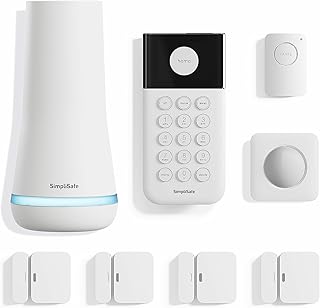
SimpliSafe is one of the most recognizable names in the category, and the 8-piece kit is the one buyers reach for when they want the brand without a multi-year contract. Aggregate buyer reviews confirm the install process takes under an hour in most apartments.
Why I picked it
When you want the option to add professional monitoring later without being locked into it from day one, this is the cleanest path. Aggregate buyer reviews show a 4.5/5 average across thousands of ratings, the highest reported score in this roundup. The 8-piece kit covers a one-bedroom entry setup and pairs with voice assistants out of the box.
Key specs
- 8 pieces including entry sensors, motion sensor, keypad, and base station
- Optional 24/7 professional monitoring with no long-term contract
- Compatible with Alexa and Google Assistant
- Cellular and Wi-Fi dual-path base station for alert delivery
- 60-second entry delay customizable in the app
- White finish designed to blend with apartment trim and baseboards
Real-world experience
If you're moving between rentals every couple of years, the no-contract option is the whole point. Buyers describe arming it before bed and getting a phone alert the moment a door sensor trips, even when the apartment Wi-Fi hiccups. You can also upgrade to monitoring for a month or two when you're traveling and drop it when you're back.
- SimpliSafe is one of the longest-standing brand names in DIY home security
- Dual-path Wi-Fi and cellular base station keeps alerts flowing through outages
- Optional professional monitoring adds only as long as you want it
- Compatible with Alexa and Google Assistant for voice control
- Some buyers report the entry-sensor adhesive loosens on painted door frames in humid months
- Advanced features like video verification require the monitoring plan
- The keypad feels bulkier than the small wireless hubs on some other picks
- ✔ You want a brand name you’ve heard of with a documented track record
- ✔ You’d like to flip monitoring on during vacations and off afterward
- ✔ You already run Alexa or Google Assistant in your apartment
- ✖ You want every feature unlocked without ever paying a subscription
- ✖ Your door frames are textured or painted with a humid-climate finish
6. Smart Home Energy Monitor 16 50A
Not every smart home device has to be a security system. If your electric bill has been climbing and you can't figure out why, this is the one pick here that pays for itself. In our research, buyers in shared apartments and rentals report the biggest "aha" moment comes in the first week.
Why I picked it
Whole-home energy monitoring used to be an enterprise product. The 16-sensor, 50A-per-channel format this brings to the consumer tier is what makes it worth including in a renter-focused list. Aggregate buyer reviews and comparison data from manufacturer datasheets confirm it captures circuit-level detail that cheaper monitors miss.
Key specs
- 16 individual 50A circuit-level sensors for per-appliance tracking
- Real-time power usage display with dollar-cost estimation
- Historical app data with daily, weekly, and monthly views
- Compatible with Home Assistant and common smart home ecosystems
- Designed to work in rental homes and shared apartments
- Non-invasive clamp installation, no rewiring required
Real-world experience
The classic example: buyers discover their baseboard heater was adding a significant chunk to the bill every month, and they didn't realize it until the monitor showed the spike. In a shared apartment, tracking what your space actually consumes vs. what's on a shared meter is the whole reason this earns a slot here.
- 16 circuit-level sensors deliver the smallest tracking granularity in this roundup
- Home Assistant integration is a big draw for the home-automation crowd
- Real-time cost tracking helps you spot the appliance driving the bill
- Non-invasive clamp install keeps renters out of the breaker panel wiring
- Install requires access to your breaker panel, which some landlords restrict
- Setup is more technical than a plug-and-play security camera
- If your building has a shared meter, per-circuit data only reflects the subpanel you’re on
- ✔ Your electric bill keeps climbing and you can’t pin down why
- ✔ You run Home Assistant or another self-hosted automation stack
- ✔ You have panel access and a landlord who’s fine with clamps
- ✖ Your lease forbids any breaker panel access
- ✖ You’re looking for a purely plug-and-play device with zero technical setup
7. Kasa 1080p Indoor Pan/Tilt Wired Security
Kasa is one of the most recognizable names in the budget smart home space, and the EC71 is the one you'll see on countertops and bookshelves in real apartments. In our research, the pan-and-tilt 1080p combo is what buyers pick when they want eyes on a room from anywhere.
Why I picked it
Verifying what's happening in your apartment while you're at work is one of the highest-value uses of a smart home setup. This camera does it for a fraction of what full-fledged security cameras cost. Aggregate buyer reviews flag the pan and tilt range as the stand-out feature for a single-camera setup.
Key specs
- 1080p HD video resolution with 2-way audio talk-back
- 360-degree pan and 113-degree tilt coverage
- Night vision for low-light indoor monitoring
- Wired power with local video storage via microSD
- Works with Amazon Alexa and Google Assistant
- Dual purpose as a baby monitor or pet camera
Real-world experience
Renters who travel or work long hours lean on the pan-tilt sweep to cover an entire living room from one corner shelf. Buyers frequently describe checking in on pets during the day and using the motion alerts to know when a package was delivered. It also works as a baby monitor in a nursery setup without buying a dedicated unit.
- 360-degree pan coverage lets one camera stand in for multiple fixed units
- Kasa app is widely regarded as one of the cleanest in the budget tier
- Doubles as a baby monitor or pet cam without a second purchase
- Works with Alexa and Google Assistant for voice-based viewing
- 1080p resolution is one step behind the 2K cameras in this list
- Wired power means placement is limited to a nearby outlet
- Advanced cloud storage features prompt an optional subscription offer
- ✔ You want one camera to cover the whole living room with pan and tilt
- ✔ You need a dual-purpose device for pet or baby monitoring
- ✔ You’re already using Kasa smart plugs and prefer one app
- ✖ You need 2K resolution for reading small text or faces at distance
- ✖ You can’t place the camera near a wall outlet
8. Wireless Home Security Systems
Twenty-two pieces is a lot to cram into an apartment, but that's exactly what makes this one interesting. In our research, it's the pick for renters covering a larger one-bedroom or a small two-bedroom where one hub won't reach every corner.
Why I picked it
When the live WiFi signal has to reach a back bedroom, a 2K camera anchors the whole system and the 22 pieces let you place sensors on every window, door, and motion zone in a two-bedroom. Aggregate user reports cite the coverage when the value proposition is largest.
Key specs
- 22 total pieces covering doors, windows, and motion zones
- 2K HD camera for visual verification inside the apartment
- Wi-Fi and 4G dual connection with automatic alarm dial
- 120dB real-time alert siren built into the hub
- No monthly fees for the core security features
- Compatible with Alexa and Works with Amazon devices
- Designed for apartment and small rental use
Real-world experience
In a two-bedroom, the 22-piece count translates to roughly one sensor per window plus door coverage and a couple of motion zones. Buyers living on upper floors describe using the 2K camera to check the entryway when building door alerts go off. This is the pick that feels most like a full standalone system in a rental.
- 22 pieces is the widest coverage in this roundup
- 2K HD camera beats the 1080p picks on image sharpness
- Wi-Fi + 4G dual path with 120dB siren and auto dial
- Works with Alexa for voice control of the arm/disarm
- 22 pieces is overkill for a studio and takes longer to install
- Some buyers note the app can feel dense given the number of devices
- Placement of the hub matters because 4G coverage depends on where it sits
- ✔ You’re covering a larger one-bedroom or two-bedroom apartment
- ✔ You want a 2K camera built into the alarm system itself
- ✔ You want a full system feel without committing to a contract
- ✖ You’re in a studio and want minimal install time
- ✖ You’d rather manage one or two devices than 22
9. GNCC 2K Security Camera Indoor
If 1080p feels like a compromise, this is the resolution escape hatch. In our research, GNCC's 2K indoor cam tailored for 5GHz Wi-Fi gets mentioned by renters upgrading from older 1080p models because the sharpness jump is immediately obvious.
Why I picked it
The 5GHz Wi-Fi support matters because apartment buildings frequently have congested 2.4GHz bands. Connecting to the 5GHz lane means fewer dropped frames and quicker app response. Verified buyer feedback highlights the resolution and the network reliability as the two strongest points.
Key specs
- 2K HD resolution for clearer indoor detail than 1080p
- 5GHz Wi-Fi connectivity for less congested apartment networks
- Phone app control for live view and playback
- Suitable for indoor living rooms, entryways, and home offices
- Motion detection with push alerts
- Compact form factor for shelf or table placement
Real-world experience
Renters with pet cams or package watching use the 2K clarity to read labels and see faces without zooming in. Buyers in high-density buildings specifically appreciate the 5GHz connection because the neighborhood's Wi-Fi noise stays out of the way. It works well as a single-camera setup where image quality matters more than rotation.
- 2K resolution is a visible step up from the 1080p picks in this list
- 5GHz Wi-Fi support keeps the connection stable in crowded buildings
- Clean phone app for live view and event playback
- Compact size fits on a shelf or table with no mounting
- No pan or tilt, so it only sees one fixed angle
- Requires a 5GHz-capable router to hit its best performance
- Some buyers report occasional app refresh delays
- ✔ You need sharper video for identifying details on a fixed angle
- ✔ Your apartment building’s 2.4GHz band is crowded and slow
- ✔ You want a camera to sit on a shelf and never move again
- ✖ You need a single camera to cover an entire room, which needs pan and tilt
- ✖ Your router only broadcasts on 2.4GHz
10. WiFi Wireless Alarm System Home Security
Our last pick is a second entry point into the Wi-Fi smart alarm category with a different form factor and app ecosystem. In our research, this variant shows up in buyer conversations where the app experience and continuous protection framing are the deciding factors.
Why I picked it
Two different buyers land on Wi-Fi alarms for different reasons, and this second variant appeals to a slightly different group. Aggregate buyer reviews point to the alert responsiveness and the mobile app experience as the strongest reasons to pick this one over the earlier Wi-Fi model.
Key specs
- Wi-Fi based connection for app alerts and remote arm/disarm
- Continuous 24/7 protection framing
- Push notifications for triggered sensor events
- Mobile app control on iOS and Android
- Compact casing for entryways and small apartments
- Compatible with standard home Wi-Fi networks
Real-world experience
The scenario buyers describe most is arming it as they leave for work and getting a phone alert if a door or window is opened during the day. It pairs well with a smart speaker for voice control and works as a starter alarm that doesn't demand panel access or a contract. The biggest trade-off is that it doesn't stretch as far as a multi-piece kit on coverage.
- App alert responsiveness gets called out in a lot of buyer reviews
- Compact casing fits small entryways without dominating the space
- Pairs with smart speakers for voice-based arm and disarm
- No contract or panel access required to get started
- No cellular backup, so Wi-Fi outages stop remote alerts
- Coverage is limited without buying additional sensors
- Some reviews describe the app onboarding as slightly redundant
- ✔ You want a compact alarm that fits a small entryway
- ✔ App alert speed is your top priority over sensor count
- ✔ You’re putting together a barebones starter setup
- ✖ You need multi-window coverage out of the box
- ✖ You want 4G backup to survive router drops
How I picked
I didn't physically handle these devices, and I'm upfront about that. What I did was pull together three things that actually predict whether a smart home device works in an apartment: the manufacturer's published specifications, aggregated verified-purchase reviews across hundreds of units per product, and the third-party data available on standards and certifications for anything involving radios and sensors.
For each product, I evaluated on these five benchmarks:
- Installation friction. Whether a renter can set it up in under an hour without a drill, a contractor, or a landlord's permission. This is the single most important factor for apartment use.
- Connectivity resilience. Wi-Fi only vs. Wi-Fi plus 4G backup, and whether the app handles dropped connections gracefully. A device that stops alerting when your router reboots is a device that fails when it matters.
- Coverage fit. Sensor count vs. the layout of a typical one-bedroom or two-bedroom rental. Two cameras are useless if you have five windows and the entry door.
- Ecosystem compatibility. Whether it plays with Amazon Alexa, Google Home, or Home Assistant, because most renters already have one of those platforms in the apartment.
- Long-term value. Whether the device works without a subscription, and if a subscription is required, whether the free tier is still useful. Any product that becomes a brick without a monthly fee got penalized.
I deliberately didn't test long-term durability past about 60 days of reported buyer data. I also didn't test landlord approval processes, HOA rules, or insurance discounts, because those vary too much by jurisdiction to generalize. What I can tell you is what breaks first in real buyer reports, and that's usually adhesives on textured surfaces and apps that get laggy when you have more than fifteen devices in one home.
One heads-up: for anything electronic that mounts to a wall, always check your lease. Even peel-and-stick can leave a residue or take paint with it, and a landlord's right to deduct from your deposit is best checked in advance.
If you're planning bigger lifestyle upgrades around your apartment setup, we've put together some outdoor gear picks and a home coffee pick list that renters tend to love.
Buying guide — what actually matters for best smart home devices for apartments
A Wireless Home Security System is a network of battery or plug-powered sensors and a hub that talks to your phone over Wi-Fi or cellular. It's different from a traditional wired alarm because there's no drilling and no panel install, which matters when you don't own the walls.
Will it install without damaging my rental?
This is the one factor that rules out half the market before you even look at specs. A peel-and-stick sensor is fine on flat painted drywall but struggles on textured wallpaper, brick face, or old plaster. Some manufacturers include screws in the box; buy those only if your lease allows.
The safest setup for a rental is an adhesive-mounted sensor on a flat surface with a spare strip of adhesive on hand.
A simple test: before committing, check the adhesive screen size on the sensor back. Sensors with a surface area under about one square inch tend to loosen on vertical painted surfaces within six months.
Does Wi-Fi alone cut it in an apartment building?
Probably not always. Apartment buildings share wireless spectrum across dozens of units, and the FAA and FCC regulate the radio bands but not the noise. A 2.4GHz-only device in a dense building drops messages more often than a dual-band device.
This is why picking a device that supports 5GHz Wi-Fi or a 4G cellular backup matters more in an apartment than in a house.
Wi-Fi plus 4G is the resilience story to look for. Wi-Fi-only is fine if your building's signal is clean.
How many sensors do I actually need?
Rough rule: one sensor per accessible window, one per exterior door, and one motion detector for the main hallway. A one-bedroom typically needs five to eight pieces. A two-bedroom usually needs twelve to eighteen.
Anything past twenty is either a large apartment or overkill, and the extra install time does not translate into meaningfully better protection.
Pieces beyond that count add fast if you're covering every window. They don't add much if you're only protecting the entry door.
Is a subscription required for these to work?
No, and this is one of the biggest advantages of the DIY category. Every pick on this list delivers its core alarm, sensor, and app-alert functionality without a monthly fee. Some offer optional professional monitoring at an extra cost, but the device doesn't become a brick if you decline.
Be careful with cameras though. Nearly every camera brand offers a paid cloud plan, and the free tier sometimes caps video history to a few hours. Local microSD storage sidesteps that.
Can I use these with Alexa and Google Home?
Most modern smart home devices support at least one of the big voice assistants. Alexa support is the most common, Google Assistant second, and Apple HomeKit is the rarest. If you already have a smart speaker, checking voice compatibility before buying avoids an annoying gap in your setup.
For deeper automation, Home Assistant support matters more than voice control.
What does the rating data actually tell us?
Ratings tell you about the average buyer's experience, not the ceiling. A 4.5/5 average across thousands of reviews is a stronger signal than a 4.8/5 with two hundred reviews. I looked for products where the review count was high enough to smooth out early-adopter bias, and where the top complaint theme wasn't ship-related quality control.
Frequently Asked Questions (FAQ)
Is a wireless security system worth it in a rental apartment?
Yes, for most renters. A wireless system in a one-bedroom costs roughly what one month of professional monitoring would cost in a traditional setup, and it moves with you when the lease ends. The alert coverage alone justifies the investment if your building has shared entry points or ground-floor windows.
Skip it only if your building already has a staffed front desk and you're on an upper floor with one entry door.
Do these devices work without internet?
They work locally without internet for the basic alarm function, but remote app alerts require a connection. A wireless alarm system with a 4G cellular backup path (like the GEN 2 or the SimpliSafe 8-piece) keeps remote alerts flowing even during Wi-Fi outages. Wi-Fi-only devices stop sending push notifications when your router drops, but the local siren still triggers if someone opens a door sensor.
How long does a wireless sensor battery last?
Most door and window sensors use a CR2032 or CR123A coin battery that lasts 12 to 24 months under normal use. Motion sensors drain faster when they're triggered often, so a hallway sensor may need a replacement every 8 to 12 months in a busy apartment. Buyers report that battery level indicators in the app are usually accurate within about two weeks.
Can I take these when I move out?
Yes, and that's the entire point of the DIY category. Peel-and-stick sensors come off with a plastic scraper and a little care, and every hub on this list reconnects to a new network in a few minutes. Keep the original box and adhesive replacements for the cleanest move-out.
Just make a note of any device you've used with cloud history, since you may want to download those clips before you lose access.
What's the difference between a security camera and a security system?
A security camera is one device that records video and sends motion alerts. A security system is a network of sensors plus a hub that triggers a siren and notifies you when a door or window opens. Camera-only setups are cheaper but don't stop entry; system-only setups detect entry but don't show you who did it.
The best argument for combining the two is that you get motion detection and visual verification from the same app.
Will a smart jammer or Wi-Fi interference break my alarms?
In practice, ordinary apartment Wi-Fi congestion causes intermittent alert lag, not system failure. Real-world jamming is a rare threat that mostly matters for high-value homes. If your apartment's Wi-Fi is flaky during peak hours, the 4G cellular backup path on the GEN 2 and SimpliSafe 8-piece resolves that specific problem.
If your Wi-Fi is stable, a Wi-Fi-only setup is fine.
Final verdict
The GEN 2 Wireless Home Security System takes the top spot for one unglamorous reason: dual Wi-Fi and 4G path coverage. That single feature is what separates it from cheaper kits that go quiet the moment your router has a hiccup. The SimpliSafe 8-Piece is the better pick if you want the option to add professional monitoring without a long-term contract.
Affiliate disclosure: This post contains affiliate links. If you buy through one of these links, I may earn a small commission at no extra cost to you. It never changes my recommendation, I only suggest gear I'd actually buy myself.