
Is the Samsung XE500C13-K03US Chromebook 3 Still a Great Buy? Our In-Depth Review!
In today’s fast-paced digital world, finding a reliable, portable, and budget-friendly laptop can feel like searching for a needle in a haystack. Many users, from students to casual browsers, are looking for a device that offers quick performance, excellent battery life, and seamless access to their online world without breaking the bank. Enter the Samsung XE500C13-K03US Chromebook 3, a device that has consistently garnered attention for its compelling blend of simplicity and efficiency. But does it still hold up? Let’s dive deep into what makes this Chromebook a noteworthy option.
First Impressions & Design: Compact, Durable, and Ready for Anything
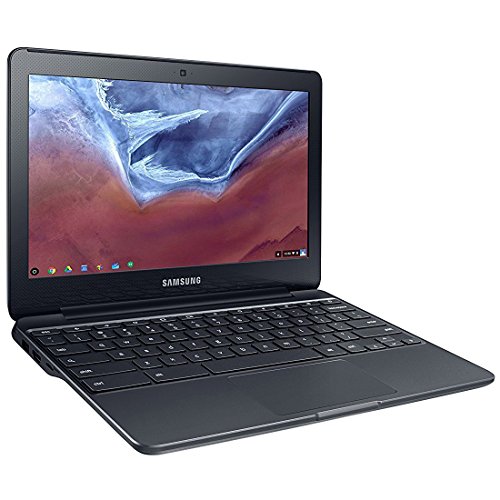
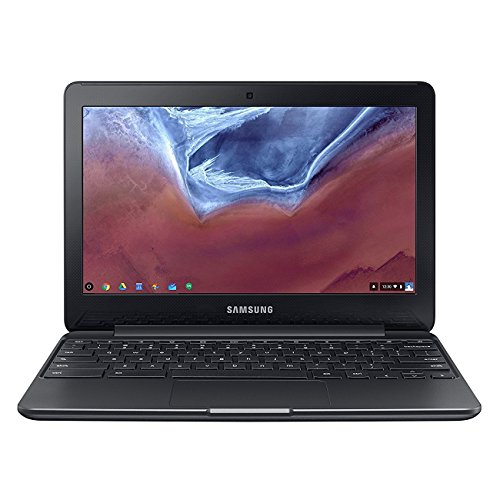
When you first unbox the Samsung XE500C13-K03US Chromebook 3, its design philosophy becomes immediately clear: practicality meets portability. It’s incredibly lightweight and compact, making it an ideal companion for slipping into a backpack or tote bag. Samsung opted for a durable, textured chassis that not only looks sleek but also provides a surprising amount of grip, helping prevent accidental slips.
The 11.6-inch HD display, while not the highest resolution on the market, is perfectly adequate for everyday tasks like web browsing, document editing, and video streaming. It offers decent brightness and viewing angles, ensuring your content looks good whether you’re working on an essay or catching up on your favorite show. The chiclet-style keyboard is comfortable for extended typing sessions, a crucial feature for students and anyone who spends a lot of time writing. And with its spill-resistant design, you get an extra layer of peace of mind.
Performance & User Experience: Speed, Simplicity, and Seriously Long Battery Life
At the heart of the Samsung Chromebook 3 is Google’s Chrome OS, an operating system renowned for its speed, security, and simplicity. Powered by an Intel Celeron N3060 processor and 4GB of RAM, this Chromebook boots up in mere seconds. You’ll experience snappy performance for web-based applications, streaming video, and even light multitasking. It’s important to remember that Chrome OS is primarily cloud-based, meaning it excels with internet connectivity and relies heavily on Google’s suite of applications (Docs, Sheets, Slides, Gmail, etc.) and the vast array of Android apps available from the Google Play Store.
One of the standout features that truly defines the user experience of the Samsung XE500C13-K03US Chromebook 3 is its phenomenal battery life. Samsung advertises up to 11 hours on a single charge, and in real-world testing, it often comes very close to that mark. This means you can easily get through a full school day, a long flight, or an entire afternoon of work without needing to hunt for a power outlet. This extended battery life is a game-changer for on-the-go users.
For a deeper look and to check current pricing, you can find the Samsung XE500C13-K03US Chromebook 3 here: https://www.amazon.com/dp/B073WQSB12?tag=usfm-20&linkCode=ogi&th=1&psc=1
Pros of the Samsung XE500C13-K03US Chromebook 3
- Exceptional Battery Life: Easily one of its strongest selling points, offering all-day power.
- Highly Portable: Lightweight, compact, and durable – perfect for travel and daily commutes.
- Fast & Secure Chrome OS: Quick boot times, automatic updates, and built-in virus protection provide a hassle-free experience.
- Affordable Price Point: Offers incredible value for its feature set, making it accessible for budget-conscious buyers.
- Spill-Resistant Keyboard: Added durability against minor accidents.
- Access to Android Apps: Expand your functionality beyond web apps with the Google Play Store.
Cons to Consider
- Limited Local Storage: Like most Chromebooks, it has modest internal storage (typically 16GB or 32GB eMMC), relying heavily on cloud storage.
- Not for Heavy-Duty Tasks: While great for everyday use, it’s not designed for intensive video editing, graphic design, or demanding PC gaming.
- Dependent on Internet Connectivity: While offline functionality is improving, it performs best with a stable internet connection.
User Impressions: What Real Users Are Saying
Users consistently praise the Samsung XE500C13-K03US Chromebook 3 for its reliability and ease of use. Many parents appreciate it as a durable and cost-effective solution for their children’s schoolwork, citing its simple interface and robust design. Students love the long battery life, allowing them to take notes and work on projects throughout the day without worrying about power. Casual users find it perfect for browsing, email, streaming, and social media, appreciating its quick performance and lightweight form factor. The virtually maintenance-free nature of Chrome OS is also a frequent highlight, as users rarely encounter the slowdowns or virus issues common with traditional operating systems.
Who is the Samsung XE500C13-K03US Chromebook 3 Best For?
This Chromebook shines brightest for specific user groups:
- Students (K-12 and College): Its portability, battery life, and affordability make it an excellent tool for online research, essay writing, and digital coursework.
- Casual Home Users: Perfect for web browsing, email, social media, streaming Netflix, and light productivity tasks.
- Secondary Device Owners: If you already have a powerful desktop or laptop for demanding tasks, this Chromebook serves as an ideal, lightweight companion for travel or quick access.
- Budget-Conscious Buyers: For those seeking a reliable computing device without a hefty price tag, the Samsung XE500C13-K03US Chromebook 3 delivers exceptional value.
Final Verdict: A Smart, Simple, and Seriously Efficient Choice
The Samsung XE500C13-K03US Chromebook 3 isn’t about raw power or cutting-edge features; it’s about delivering a consistently reliable, highly portable, and incredibly efficient computing experience at an accessible price. For anyone seeking a device that handles everyday tasks with ease, boasts outstanding battery life, and simplifies the user experience, this Chromebook continues to be an excellent choice. It’s a testament to the fact that you don’t need to spend a fortune to get a capable and enjoyable digital companion.
Ready to Simplify Your Digital Life?
If you’re looking for an affordable, highly portable, and reliable device that excels at web-based tasks and offers incredible battery life, the Samsung XE500C13-K03US Chromebook 3 is definitely worth your consideration. Don’t miss out on a Chromebook that truly delivers on its promise of value and performance.
Click here to check the latest price and customer reviews on Amazon: https://www.amazon.com/dp/B073WQSB12?tag=usfm-20&linkCode=ogi&th=1&psc=1
FAQ
Q. What operating system does the Samsung XE500C13-K03US Chromebook 3 run?
A. This Chromebook runs on Google’s Chrome OS, an operating system designed for speed, simplicity, and security, relying heavily on cloud-based applications and services.
Q. What are the key specifications of this model (processor, RAM, storage)?
A. The Samsung XE500C13-K03US Chromebook 3 typically features an Intel Celeron N3060 processor, 4GB of LPDDR3 RAM, and 16GB of eMMC internal storage, which is complemented by cloud storage via Google Drive.
Q. Is the Samsung XE500C13-K03US suitable for students or light productivity tasks?
A. Yes, it is very well-suited for students and users who primarily use web-based applications, email, word processing (Google Docs), spreadsheets, and online research. Its lightweight design and long battery life make it highly portable and convenient for academic or casual use.
Q. Does this Chromebook model have a touchscreen display?
A. No, the Samsung XE500C13-K03US Chromebook 3 does not typically feature a touchscreen display. It operates using a standard keyboard and trackpad for navigation.
Q. What kind of battery life can I expect from the Samsung XE500C13-K03US?
A. The Samsung Chromebook 3 is known for its excellent battery life, often providing up to 11 hours or more on a single charge, depending on usage patterns and specific tasks, making it ideal for on-the-go use without needing frequent recharging.
Q. Can I download and use Android applications from the Google Play Store on this Chromebook?
A. Yes, the Samsung XE500C13-K03US Chromebook 3 fully supports Android applications through the Google Play Store, expanding its functionality beyond web-based apps and allowing users to access a wide range of mobile apps.
Q. What ports are available on the Samsung XE500C13-K03US Chromebook 3?
A. This model typically includes one USB 3.0 port, one USB 2.0 port, an HDMI port for connecting to an external display, a microSD card slot for expandable storage, and a headphone/mic combo jack.
Related Posts:
– 10 Best Apps for Apple CarPlay: Your Ultimate Guide to a Smarter Drive
– 5 Best Wireless CarPlay Adapters for iPhone in

