
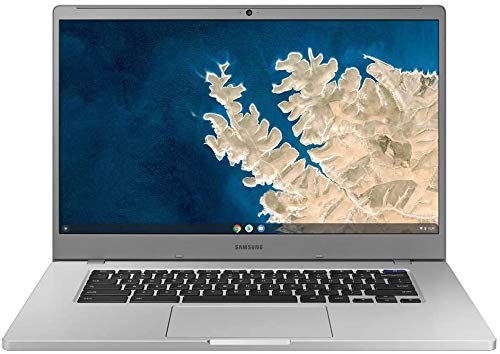
Samsung Chromebook 4+ Review: Is This 15.6-inch Full HD Workhorse Your Perfect Budget Companion?

In the bustling world of laptops, Chromebooks have carved out a significant niche, offering simplicity, speed, and incredible value. But finding one that combines a generous screen size with ample storage without breaking the bank can be a challenge. Enter the Samsung XE350XBA-K05US Chromebook 4+, a sleek and capable machine designed to hit that sweet spot.
If you’re on the hunt for a reliable, easy-to-use laptop for productivity, online learning, or simply enjoying your favorite content, you’ve landed in the right place. We’re diving deep into the Samsung Chromebook 4+ (model XE350XBA-K05US) to see if it lives up to its promise as a versatile, budget-friendly companion.
First Impressions: Platinum Titan Elegance Meets Practicality
Right out of the box, the Samsung XE350XBA-K05US Chromebook 4+ makes a positive statement with its Platinum Titan finish. It feels surprisingly sturdy for its price point, with a minimalist design that exudes professionalism. Despite housing a large 15.6-inch display, Samsung has managed to keep the bezels relatively slim, giving it a modern aesthetic. It’s certainly not the lightest laptop on the market, but for a 15.6-inch device, it’s quite portable and slides easily into most backpacks.
Key Features Under the Hood
Let’s peel back the layers and examine what makes this Chromebook tick:
- Expansive 15.6-inch Full HD (1920×1080) Display: This is arguably the biggest selling point. Unlike many budget Chromebooks stuck with smaller or lower-resolution screens, the Chromebook 4+ offers a vast canvas for multitasking, watching movies, or browsing the web without feeling cramped. The Full HD resolution ensures crisp text and vibrant colors, making it a joy for consuming content or tackling spreadsheets.
- Intel Celeron Processor N4000: While not a powerhouse, the Celeron N4000 is perfectly adequate for the tasks Chrome OS excels at. It’s built for efficiency, allowing the system to run smoothly for web browsing, Google Docs, streaming, and light Android app usage.
- 4GB RAM: This is the standard memory configuration for most entry-level Chromebooks. For a few tabs open, casual browsing, and media consumption, 4GB works well with Chrome OS’s lightweight nature.
- 128GB SSD (Solid State Drive): This is a game-changer for a Chromebook at this price. Most Chromebooks offer a much smaller 32GB or 64GB eMMC storage. The 128GB SSD provides significantly more space for local files, downloading Android apps, and enjoying faster boot times and overall responsiveness compared to slower eMMC storage.
- Chrome OS: The star of the show! Chrome OS is renowned for its simplicity, lightning-fast boot-up times, robust security, and seamless integration with Google’s ecosystem. It’s essentially a web-first operating system, perfect for anyone who spends most of their time online. Plus, it now supports a vast array of Android apps from the Google Play Store, expanding its functionality beyond just web browsing.
- Excellent Connectivity: You’ll find a good selection of ports, including USB-C for charging and data transfer, and USB-A for older peripherals, ensuring you can connect your essential devices.
The Chrome OS Experience: Simple, Secure, Speedy
If you’re new to Chrome OS, prepare to be impressed by its sheer simplicity. Boot-up takes mere seconds, and you’re instantly greeted by a familiar browser-like interface. Updates happen automatically in the background, keeping your system secure and up-to-date without interruption. For anyone deeply embedded in the Google ecosystem (Gmail, Google Drive, Google Docs, etc.), the integration is flawless. The Samsung XE350XBA-K05US Chromebook 4+ truly shines as a dedicated internet machine.
Who Is This Chromebook Best For?
The Samsung Chromebook 4+ isn’t trying to be a high-end gaming rig or a video editing workstation. Instead, it’s a focused machine that excels in specific areas, making it ideal for:
- Students: Perfect for online classes, research, writing papers in Google Docs, and managing school projects. The large screen is a boon for split-screen multitasking.
- Casual Home Users: For checking emails, social media, browsing news, watching YouTube or Netflix, and light online shopping, this Chromebook is a dream.
- Those on a Budget: It delivers a premium experience without the premium price tag.
- Secondary Device Users: If you already have a powerful desktop, this makes an excellent portable companion for travel or couch surfing.
- Users Who Prioritize Simplicity and Security: Chrome OS handles the heavy lifting, so you don’t have to worry about complex maintenance or viruses.
Pros and Cons: A Balanced View
Every product has its strengths and weaknesses. Here’s an honest look at where the Samsung XE350XBA-K05US Chromebook 4+ stands:
Pros:
- Spacious 15.6-inch Full HD Display: A major advantage for productivity and entertainment.
- Generous 128GB SSD Storage: Ample space for a Chromebook, a big step up from typical eMMC.
- Fast Boot Times and Seamless Chrome OS Experience: Get to work or play in seconds.
- Solid Build Quality for the Price: Feels more premium than its cost suggests.
- Excellent Battery Life: You can typically expect all-day usage on a single charge.
- Access to Android Apps: Expand your horizons beyond web apps with the Google Play Store.
Cons:
- Intel Celeron N4000 is Entry-Level: While fine for most tasks, heavy multi-tabbing or demanding Android apps might cause some slowdowns.
- 4GB RAM can be Limiting: Power users might find it restrictive for very intensive multitasking.
- No Touchscreen or 2-in-1 Functionality: If you prefer interacting with your screen directly or using it as a tablet, this isn’t the model for you.
- No Backlit Keyboard: Typing in dimly lit environments can be challenging.
User Impressions: What it’s Like to Live With It
Users consistently praise the Samsung XE350XBA-K05US Chromebook 4+ for its reliability and straightforward performance. Many highlight the joy of having a larger screen, noting how it transforms the experience of everything from online classes to watching movies. The 128GB SSD is frequently mentioned as a huge relief, allowing more flexibility than previous Chromebooks they might have owned. It’s often described as a “no-fuss” machine – you open it, it works, and it just gets out of your way.
If you’re a student looking for a dependable machine for assignments, a home user who mainly browses and streams, or someone who appreciates the sheer simplicity of Chrome OS, this model delivers. You can learn more about this specific model and its features on its Amazon product page: Samsung XE350XBA-K05US Chromebook 4+.
The Verdict: A Value Champion
The Samsung XE350XBA-K05US Chromebook 4+ is a compelling package for its price. It thoughtfully addresses common Chromebook limitations, most notably by offering a generous 15.6-inch Full HD display and a much-appreciated 128GB SSD. While its Intel Celeron N4000 processor and 4GB RAM mean it’s not built for heavy-duty tasks, it excels at what it’s designed for: providing a smooth, secure, and highly efficient computing experience for web-centric users.
If you’re seeking an affordable, large-screen laptop for productivity, education, or media consumption, and you appreciate the simplicity and security of Chrome OS, then the Samsung XE350XBA-K05US Chromebook 4+ is an outstanding choice and a true value champion.
Ready to Upgrade Your Everyday Computing?
If the Samsung XE350XBA-K05US Chromebook 4+ sounds like the perfect fit for your needs, offering that ideal balance of screen size, storage, and Chrome OS simplicity, don’t miss out!
Click here to check out the Samsung XE350XBA-K05US Chromebook 4+ on Amazon and bring home your new productivity companion today!
https://www.amazon.com/dp/B08V1ZMRZL?tag=usfm-20&linkCode=ogi&th=1&psc=1
FAQ
Q. What is Chrome OS and what are its main advantages for this Samsung Chromebook 4+?
A. Chrome OS is a lightweight, cloud-centric operating system developed by Google. Its main advantages on the Samsung XE350XBA-K05US Chromebook 4+ include extremely fast boot times (often under 10 seconds), automatic background updates for enhanced security and features, built-in virus protection, and deep integration with Google services like Google Drive. It is ideal for web browsing, cloud-based productivity apps, and running Android applications.
Q. Is the Intel Celeron Processor N4000 and 4GB RAM sufficient for daily use on this Chromebook?
A. Yes, the Intel Celeron N4000 processor and 4GB of RAM are well-suited for the typical usage of this Chromebook. It provides a smooth experience for common tasks such as web browsing, emailing, streaming videos in Full HD, light document editing, and using multiple Android applications simultaneously. While not designed for heavy-duty video editing or intensive gaming, it handles everyday productivity and entertainment with ease.
Q. What kind of storage is the 128GB SSD, and is it expandable?
A. The 128GB SSD (Solid State Drive) provides fast boot-up times and quick access to your files and applications, significantly outperforming traditional hard drives. While the internal 128GB SSD is generally not user-upgradeable, it offers a generous amount of local storage for a Chromebook. Additionally, the Samsung Chromebook 4+ includes a built-in microSD card slot, allowing for easy and affordable expansion of storage for photos, videos, and documents.
Q. Does the 15.6″ Full HD display offer a good viewing experience for this Chromebook?
A. Absolutely. The 15.6-inch Full HD (1920×1080) display on the Samsung Chromebook 4+ offers a spacious and crisp viewing experience. The larger screen size is excellent for multitasking, making it easier to work with multiple tabs or applications side-by-side. The Full HD resolution ensures sharp text, vibrant images, and an immersive experience whether you’re streaming movies, browsing websites, or working on documents.
Q. Can I install traditional Windows software or macOS applications on this Samsung Chromebook 4+?
A. No, the Samsung XE350XBA-K05US Chromebook 4+ runs on Google’s Chrome OS, which is a distinct operating system from Windows or macOS. It cannot natively install or run software designed for those platforms. Instead, it relies on web-based applications, progressive web apps (PWAs), and a vast ecosystem of Android apps available through the Google Play Store, providing a robust suite of tools for most users.
Q. What are the key connectivity options available on this Samsung Chromebook 4+?
A. The Samsung Chromebook 4+ typically offers a practical selection of ports for connectivity. This includes USB-C ports (often supporting power delivery and external display output), a USB-A port for connecting legacy peripherals, a 3.5mm headphone/microphone combo jack, and a microSD card slot for expandable storage. For wireless connectivity, it supports modern Wi-Fi standards (e.g., Wi-Fi 5 or Wi-Fi 6) for fast internet access and Bluetooth for connecting wireless accessories like mice, keyboards, or headphones.
Q. What is the typical battery life of the Samsung XE350XBA-K05US Chromebook 4+?
A. The Samsung Chromebook 4+ is known for its impressive battery longevity. While actual battery life can vary depending on usage patterns, screen brightness, and Wi-Fi conditions, users can generally expect to get up to 10-12 hours or even more on a single charge. This makes it an excellent choice for students or professionals who need a device that can last a full day of work or classes without needing to be plugged in.
Related Posts:
– 10 Best Apps for Apple CarPlay: Your Ultimate Guide to a Smarter Drive
– 5 Best Wireless CarPlay Adapters for iPhone in

