
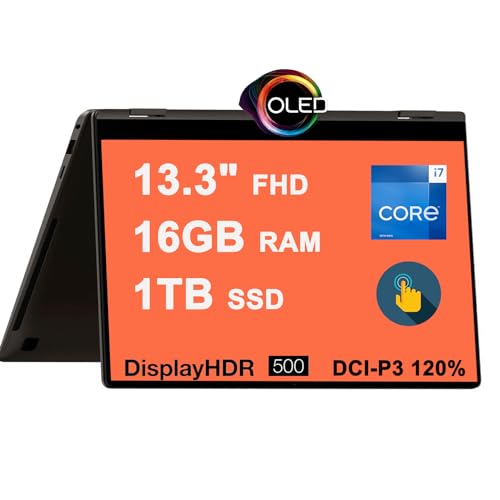
SAMSUNG Galaxy Book3 360 2-in-1 Review: Your Ultimate Convertible Companion?
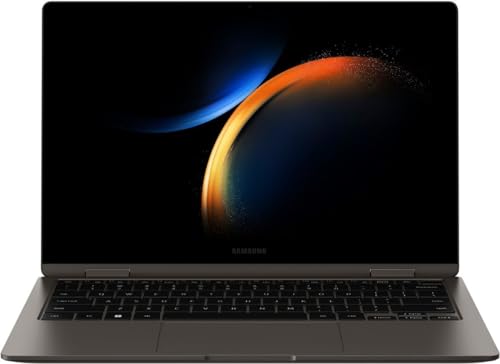
Are you on the hunt for a laptop that effortlessly transitions between work and play, offering power, portability, and a stunning visual experience? Look no further than the SAMSUNG Galaxy Book3 360 2-in-1. This versatile machine from Samsung aims to be your go-to device for everything from intense productivity sessions to creative endeavors and casual browsing. In this detailed review, we’ll dive deep into what makes this convertible laptop tick, its standout features, who it’s perfect for, and a few points to consider.
Why the SAMSUNG Galaxy Book3 360 2-in-1 Stands Out
The Galaxy Book3 360 is more than just a laptop; it’s a dynamic computing experience designed for modern users. Its 2-in-1 convertible design means it can instantly switch from a traditional laptop to a tablet, tent mode, or stand mode, adapting to your needs in any situation.
Design & Portability: Elegance on the Go
One of the first things you’ll notice about the SAMSUNG Galaxy Book3 360 2-in-1 is its sleek, premium design. Crafted with a thin and light aluminum chassis, it feels incredibly robust yet remains exceptionally portable. Weighing in at just a few pounds and featuring a slim profile, it easily slips into a backpack or tote, making it an ideal companion for students, commuters, or anyone who needs to work from different locations. Its 360-degree hinge is smooth and sturdy, allowing for seamless transitions between modes without feeling flimsy.
The Stunning AMOLED Display: A Visual Feast
Prepare to be captivated by the SAMSUNG Galaxy Book3 360 2-in-1’s display. It boasts a vibrant Full HD (1920×1080) AMOLED touchscreen, a technology synonymous with Samsung’s premium screens. This means you’ll enjoy incredibly deep blacks, brilliant contrast, and vivid colors that pop, making everything from streaming movies to editing photos an absolute joy. The touch responsiveness is superb, and the included S Pen further enhances interaction, turning the display into a digital canvas or notebook.
Performance That Keeps Up: Power for Your Everyday
Under the hood, the SAMSUNG Galaxy Book3 360 2-in-1 is equipped to handle your daily tasks with ease. Depending on the configuration, you’ll find an Intel Core i5 or i7 processor, paired with ample RAM (typically 8GB or 16GB) and a fast NVMe SSD. This combination ensures snappy performance, quick boot-ups, and smooth multitasking. Whether you’re juggling multiple browser tabs, working on a presentation, or dabbling in some light video editing, this laptop delivers a consistently fluid experience.
The Versatile S Pen Experience: Unleash Your Creativity
A standout feature that truly defines the 2-in-1 experience is the inclusion of the S Pen. This is not just a stylus; it’s a powerful tool for note-taking, sketching, annotating documents, and precise navigation. The S Pen offers remarkably low latency and excellent pressure sensitivity, mimicking the feel of pen on paper. This makes the Galaxy Book3 360 an invaluable asset for artists, designers, students, and professionals who frequently annotate or brainstorm ideas.
Connectivity & Battery Life: Stay Connected, Stay Productive
The Galaxy Book3 360 comes equipped with a good selection of ports, including Thunderbolt 4, USB-A, HDMI, and a microSD card slot, ensuring you can connect most of your peripherals without needing a dongle farm. For wireless connectivity, Wi-Fi 6E provides blazing-fast and reliable internet access. And when it comes to battery life, you can expect all-day endurance from a single charge, letting you leave your power brick behind for most of your day.
Pros and Cons: A Balanced View
No product is perfect, and the SAMSUNG Galaxy Book3 360 2-in-1 is no exception. Here’s a balanced look at its advantages and a few points to consider:
The Brilliant Advantages
- Stunning AMOLED Display: Unrivaled visual quality for work and entertainment.
- Included S Pen: Enhances productivity and creativity significantly.
- Sleek & Portable Design: Easy to carry, premium look and feel.
- Versatile 2-in-1 Functionality: Adapts to any usage scenario.
- Solid Performance: Handles daily tasks and moderate workloads with ease.
- Excellent Battery Life: Powers you through a full day of use.
Points to Consider
- No Dedicated Graphics Card: Not ideal for heavy gaming or intensive graphics work.
- Glossy Display: Can be prone to reflections in brightly lit environments.
- Slightly Higher Price Point: Reflects its premium features and build quality.
Real-World User Impressions
Users frequently praise the SAMSUNG Galaxy Book3 360 2-in-1 for its incredible display and the natural feel of the S Pen. Many highlight its portability as a major selling point, making it a favorite for those who are always on the move. Students love its versatility for note-taking in tablet mode and then switching to laptop mode for writing papers. Professionals appreciate its ability to act as a presentation tool or a digital whiteboard. While some power users might wish for a dedicated GPU, for the vast majority of tasks, its performance is considered more than adequate.
Who is the SAMSUNG Galaxy Book3 360 2-in-1 Best For?
This laptop truly shines for specific user groups:
- Students: Perfect for taking digital notes with the S Pen, reading textbooks in tablet mode, and working on assignments in laptop mode.
- Creatives & Artists (Light-to-Moderate): The AMOLED display and S Pen make it excellent for sketching, digital painting, and graphic design (as long as GPU-intensive tasks aren’t primary).
- Professionals on the Go: Its lightweight design, long battery life, and versatile modes make it ideal for presentations, client meetings, and working remotely.
- Anyone Seeking Versatility: If you want a device that can truly replace both your tablet and your laptop, and adapt to any situation, the Galaxy Book3 360 is an outstanding choice.
Final Verdict & Our Recommendation
The SAMSUNG Galaxy Book3 360 2-in-1 is a compelling package that delivers on its promises. It’s a beautifully designed, highly functional, and powerful convertible laptop that offers a premium experience for everyday computing, creative tasks, and productivity. Its stunning AMOLED display and the incredibly useful S Pen are significant differentiators that elevate it above many competitors in its class.
If you value portability, a vibrant display, and the flexibility of a 2-in-1 device with excellent pen input, the SAMSUNG Galaxy Book3 360 2-in-1 comes highly recommended.
Ready to Elevate Your Computing Experience?
Don’t miss out on the chance to own a laptop that adapts to your dynamic lifestyle. Experience the stunning visuals, fluid performance, and creative freedom that the SAMSUNG Galaxy Book3 360 2-in-1 offers.
Click here to check out the SAMSUNG Galaxy Book3 360 2-in-1 and discover its full potential on Amazon today!
https://www.amazon.com/dp/B0D83W91R6?tag=usfm-20&linkCode=ogi&th=1&psc=1
FAQ
Q. What does “360 2-in-1” signify for the SAMSUNG Galaxy Book3 360?
A. The “360 2-in-1” designation means the SAMSUNG Galaxy Book3 360 features a flexible hinge that allows the screen to rotate a full 360 degrees. This enables the device to transform seamlessly between multiple modes: a traditional laptop, a tablet (by folding the keyboard completely back), and intermediate modes like tent or stand for presentations and media viewing.
Q. Does the SAMSUNG Galaxy Book3 360 come with a stylus or S Pen, and is its display a touchscreen?
A. Yes, the SAMSUNG Galaxy Book3 360 features a highly responsive touchscreen display, which is essential for its 2-in-1 functionality. Many configurations of this model typically include or are compatible with Samsung’s S Pen, allowing for precise drawing, note-taking, and intuitive navigation directly on the screen.
Q. What kind of performance can I expect from the SAMSUNG Galaxy Book3 360?
A. The SAMSUNG Galaxy Book3 360 is generally equipped with modern, powerful processors (e.g., Intel Core i5 or i7), ample RAM (commonly 8GB or 16GB), and fast solid-state drive (SSD) storage. This combination ensures smooth multitasking, efficient handling of productivity applications, web browsing, streaming, and light to moderate creative tasks. It’s designed for robust everyday computing.
Q. How portable is the SAMSUNG Galaxy Book3 360, and what about its battery life?
A. The Galaxy Book3 360 is designed with portability in mind, featuring a thin and light profile that makes it easy to carry. Battery life is typically optimized for all-day usage, providing several hours of productivity on a single charge, though actual battery performance can vary based on specific usage patterns and settings.
Q. What are the primary use cases or ideal users for the SAMSUNG Galaxy Book3 360 2-in-1?
A. The SAMSUNG Galaxy Book3 360 is ideal for users who need a versatile device that can adapt to different needs. It’s excellent for students needing a device for notes and assignments, professionals requiring a laptop for work presentations and mobile productivity, and creatives who benefit from touchscreen and S Pen capabilities for digital art or design work. Its multi-mode functionality makes it highly adaptable.
Q. What types of ports and connectivity options are available on the SAMSUNG Galaxy Book3 360?
A. The SAMSUNG Galaxy Book3 360 typically offers a comprehensive set of connectivity options. This often includes multiple USB-C ports (some with Thunderbolt support for high-speed data transfer, video output, and charging), and potentially traditional USB-A ports, an HDMI port, and a microSD card slot. For wireless connectivity, it usually features the latest Wi-Fi standards (like Wi-Fi 6E) and Bluetooth.
Q. Is the SAMSUNG Galaxy Book3 360 suitable for demanding tasks like professional video editing or gaming?
A. While the Galaxy Book3 360 is powerful for everyday tasks and moderate creative work, it is primarily designed as a productivity and versatile creative laptop, not a dedicated workstation or gaming machine. For very demanding professional video editing or high-end gaming, a laptop with a dedicated graphics card (dGPU) would generally provide a more optimal experience, as the Galaxy Book3 360 typically relies on integrated graphics.
Related Posts:
– 10 Best Apps for Apple CarPlay: Your Ultimate Guide to a Smarter Drive
– 5 Best Wireless CarPlay Adapters for iPhone in

