
SAMSUNG Galaxy Book3 360 2-in-1 Review: Your Versatile Creative Companion?
In the ever-evolving world of laptops, the demand for versatility is at an all-time high. Enter the SAMSUNG Galaxy Book3 360 2-in-1, a device that promises to seamlessly blend the productivity of a laptop with the intuitive experience of a tablet. Designed for those who crave flexibility without compromising on power or aesthetics, this convertible powerhouse aims to be your go-to gadget for work, creativity, and entertainment.
But does it truly live up to the hype? Let’s dive deep into what makes the SAMSUNG Galaxy Book3 360 2-in-1 tick, exploring its standout features, everyday performance, and who stands to benefit most from its unique capabilities.
First Impressions & Design: Sleek, Sturdy, and Stunningly Flexible
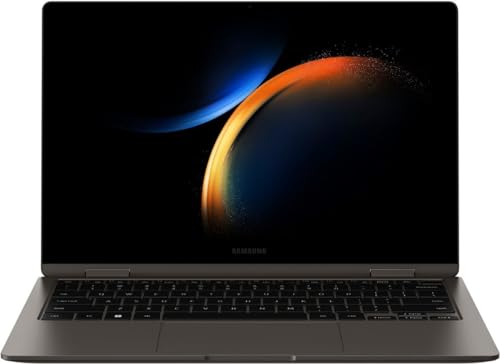
Right out of the box, the SAMSUNG Galaxy Book3 360 2-in-1 impresses with its sleek, minimalist design. Clad in a refined aluminum chassis, it exudes a premium feel that belies its lightweight nature. Samsung has clearly prioritized portability, making it easy to slip into your bag and carry anywhere.
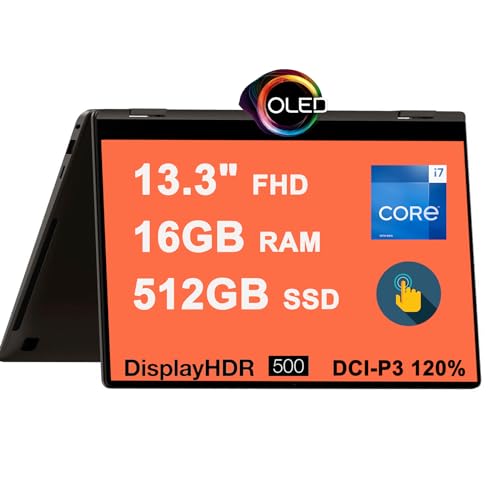
The star of the show, of course, is the 360-degree hinge. This engineering marvel allows you to effortlessly transform the device from a traditional laptop into a tablet, tent, or stand mode. Whether you’re typing away on a report, sketching ideas, or watching a movie, the Book3 360 adapts to your needs. The hinge feels robust and holds its position firmly, inspiring confidence in its long-term durability.
The Display: A Visual Feast with AMOLED Brilliance
One of the most captivating features of the SAMSUNG Galaxy Book3 360 2-in-1 is its stunning AMOLED display. If you’ve ever experienced Samsung’s smartphone screens, you’ll know what to expect: vibrant colors, incredibly deep blacks, and exceptional contrast. This makes everything from browsing photos to watching 4K videos an absolute joy. Text is crisp, and images pop with lifelike accuracy, making it a dream for creative professionals or anyone who simply appreciates a beautiful screen.
The touchscreen is highly responsive, and the included S Pen elevates the experience further. This isn’t just a basic stylus; it’s precise, comfortable to hold, and fantastic for taking notes, annotating documents, or unleashing your inner artist. For students, professionals, or digital creatives, the S Pen integration is a significant value add.
Performance: More Than Just a Pretty Face
Beneath its elegant exterior, the SAMSUNG Galaxy Book3 360 2-in-1 packs a punch. Equipped with a capable Intel Core processor (typically 13th or 14th Gen i5 or i7), ample RAM, and a speedy NVMe SSD, it handles everyday tasks with remarkable fluidity.
- Multitasking: Juggling multiple browser tabs, word processing, spreadsheets, and video calls is a breeze.
- Productivity: Microsoft Office suite, Slack, Zoom – all run smoothly, ensuring you stay productive throughout your day.
- Light Creative Work: Photo editing in applications like Adobe Photoshop Express or light video editing is manageable, thanks to the integrated Intel Iris Xe graphics.
- Entertainment: Streaming high-definition content is fantastic, with the AMOLED screen and capable speakers delivering an immersive experience.
While it’s not designed for heavy-duty gaming or professional 3D rendering, for the vast majority of users, the performance is more than sufficient and consistently reliable.
Battery Life and Connectivity
Battery life on the SAMSUNG Galaxy Book3 360 2-in-1 is generally good, offering a full workday of mixed usage for many users. Of course, intensive tasks like video editing or prolonged streaming will drain it faster, but for casual browsing, document creation, and video calls, you can expect solid endurance.
Connectivity options are robust, typically including multiple USB-C ports (one with Thunderbolt 4 support for fast data transfer and external display connectivity), a USB-A port, and an HDMI port, ensuring you can connect most of your peripherals without needing a dongle farm. Wi-Fi 6E provides lightning-fast wireless speeds, and Bluetooth 5.1 ensures stable connections with your accessories.
User Impressions: What People Are Saying
Users consistently praise the SAMSUNG Galaxy Book3 360 2-in-1 for its stunning display, thin and light design, and the versatility offered by its 360-degree hinge and included S Pen. Many appreciate the snappy performance for daily tasks and the seamless integration within the Samsung ecosystem if they also own a Galaxy phone or tablet. The keyboard is generally considered comfortable for extended typing sessions, and the large trackpad is responsive.
Some minor feedback points sometimes include integrated graphics not being suited for hardcore gaming (which is expected for this category) and, occasionally, fan noise under heavy load. However, the overall sentiment is overwhelmingly positive, emphasizing its premium feel and excellent all-around performance for a convertible laptop. You can check out more user reviews and current pricing by visiting the product page directly: SAMSUNG Galaxy Book3 360 2-in-1 on Amazon.
Pros and Cons
Let’s break down the key advantages and potential drawbacks:
Pros:
* Gorgeous AMOLED Display: Unmatched vibrancy and contrast for visuals.
* Incredibly Versatile 360-Degree Design: Laptop, tablet, tent, stand modes for every scenario.
* S Pen Included: Excellent for productivity, creativity, and navigation.
* Premium, Lightweight Build: Easy to carry, looks and feels high-end.
* Solid Performance: Handles daily tasks, productivity, and light creative work with ease.
* Good Port Selection: Reduces the need for adapters.
* Excellent for Media Consumption: Display and audio combine for a great experience.
Cons:
* Integrated Graphics: Not suitable for demanding gaming or heavy graphics rendering.
* Price: A premium device comes with a premium price tag.
* Battery Life: Good, but not necessarily class-leading compared to some ARM-based alternatives.
Who Is the SAMSUNG Galaxy Book3 360 2-in-1 Best For?
The SAMSUNG Galaxy Book3 360 2-in-1 is an ideal choice for a diverse range of users who value flexibility, premium features, and a sleek design:
- Students: Perfect for note-taking with the S Pen, essay writing, and media consumption between classes. The tablet mode is great for reading textbooks.
- Creative Professionals (Light-to-Medium Usage): Digital artists, designers, or anyone who sketches, annotates, or does photo editing on the go will appreciate the S Pen and AMOLED screen.
- Business Professionals: Its portability, strong performance for office tasks, and versatile modes for presentations or client interactions make it a strong contender.
- Frequent Travelers: Its thin, light build and multi-mode functionality make it an excellent travel companion for work or entertainment.
- Casual Users & Media Enthusiasts: If you primarily browse the web, stream videos, manage emails, and enjoy a beautiful display, this device offers an exceptional experience.
Conclusion: A Premium Convertible Worth Considering
The SAMSUNG Galaxy Book3 360 2-in-1 is more than just a laptop; it’s a versatile computing experience designed for the modern user. Its stunning AMOLED display, robust 360-degree hinge, and the invaluable S Pen set it apart from many competitors. While it comes with a premium price, the combination of elegant design, solid performance, and incredible flexibility makes it a compelling choice for anyone seeking a device that can truly do it all.
If you’re looking for a laptop that can effortlessly transform to meet your every need, offers a visual feast, and helps you stay productive and creative, the SAMSUNG Galaxy Book3 360 2-in-1 is definitely worth a closer look.
Ready to experience the ultimate in versatility and visual brilliance? Click here to check the latest prices and availability for the SAMSUNG Galaxy Book3 360 2-in-1 on Amazon!
FAQ
Q. What does “360 2-in-1” signify for the SAMSUNG Galaxy Book3 360?
A. The “360 2-in-1” designation means the laptop features a hinge that allows the screen to rotate a full 360 degrees. This enables it to transform seamlessly between a traditional laptop mode, a tablet mode, tent mode, and stand mode, offering versatile usage scenarios from typing to drawing and media consumption.
Q. What kind of display does the Galaxy Book3 360 feature, and is it suitable for creative professionals?
A. The SAMSUNG Galaxy Book3 360 boasts a vibrant AMOLED touchscreen display. This technology delivers exceptionally vivid colors, deep blacks, and high contrast, making it ideal for creative tasks like photo and video editing, digital art, and graphic design. Its touch capabilities and S Pen support further enhance the creative workflow.
Q. What are the typical performance specifications of the SAMSUNG Galaxy Book3 360, and what can it handle?
A. The Galaxy Book3 360 typically comes equipped with modern Intel Core processors (e.g., i5 or i7), ample RAM (often 8GB, 16GB, or more), and fast NVMe SSD storage. This configuration allows it to handle demanding multitasking, productivity applications, light to moderate content creation, and smooth media consumption with ease.
Q. How is the battery life on the SAMSUNG Galaxy Book3 360, and what charging options are available?
A. The Galaxy Book3 360 is designed for good all-day battery life, though actual duration varies based on usage and configuration. It typically features a sizable battery and supports fast charging, often via USB-C, allowing users to quickly power up and stay productive or entertained while on the go.
Q. How portable and durable is the design of the SAMSUNG Galaxy Book3 360?
A. The Galaxy Book3 360 is crafted with portability in mind, featuring a slim and lightweight design that makes it easy to carry for daily commutes or travel. It utilizes a durable aluminum chassis, providing a premium feel and robust construction while maintaining its sleek profile.
Q. Does the SAMSUNG Galaxy Book3 360 come with an S Pen included, or do I need to purchase it separately?
A. Yes, the SAMSUNG Galaxy Book3 360 typically comes with the S Pen included in the box. This is a significant advantage, allowing users to immediately take advantage of its drawing, note-taking, and navigation capabilities without an additional purchase.
Q. Who is the ideal user for the SAMSUNG Galaxy Book3 360 2-in-1?
A. The Galaxy Book3 360 is ideal for a wide range of users, including students who need versatility for notes and lectures, professionals requiring a portable and powerful device for presentations and productivity, and creative individuals like artists or designers who can leverage the S Pen and vibrant display. It’s also great for anyone seeking a premium, adaptable laptop for daily computing and entertainment.
Related Posts:
– 10 Best Apps for Apple CarPlay: Your Ultimate Guide to a Smarter Drive
– 5 Best Wireless CarPlay Adapters for iPhone in

