
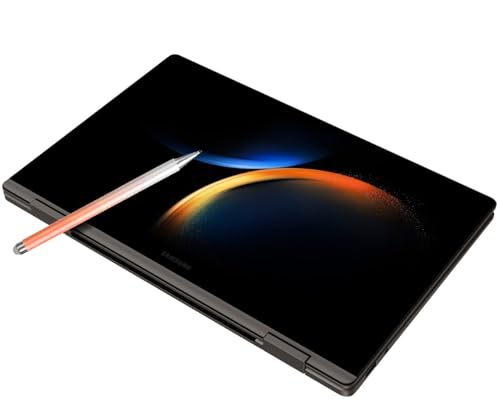
Unlock Your Potential: A Deep Dive into the SAMSUNG Galaxy Book3 360 2-in-1
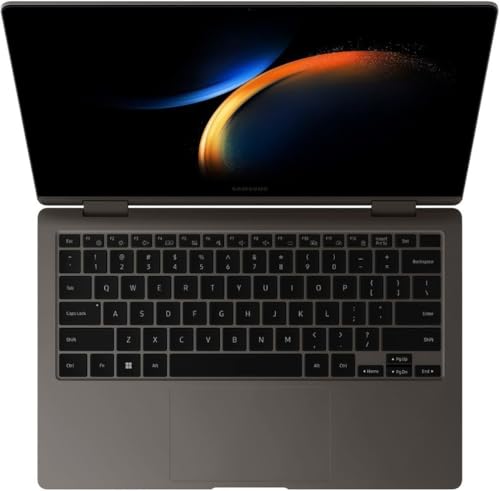
Are you on the hunt for a laptop that truly does it all? Something that seamlessly transitions from a powerful workhorse to a creative canvas, then transforms into an entertainment hub? Look no further than the SAMSUNG Galaxy Book3 360 2-in-1. This versatile machine isn’t just another laptop; it’s a statement of flexibility and premium performance, designed for those who demand more from their tech.
In this detailed review, we’ll explore what makes the Galaxy Book3 360 stand out, covering its key features, what users love, its minor drawbacks, and who will benefit most from this innovative device.
First Impressions: Sleek Design Meets Unrivaled Flexibility
From the moment you unbox the SAMSUNG Galaxy Book3 360 2-in-1, its premium build quality is evident. Samsung has crafted a sleek, thin, and lightweight device that feels incredibly robust despite its portability. The minimalist design gives it a professional and sophisticated look, perfect for any setting, from a bustling coffee shop to a quiet study space.
But the true magic lies in its “360” hinge. This allows the device to transform effortlessly into multiple modes:
* Laptop Mode: Traditional use for typing and productivity.
* Tent Mode: Ideal for watching movies or video calls in tight spaces.
* Stand Mode: Perfect for presentations or showcasing content.
* Tablet Mode: For comfortable browsing, drawing, or note-taking on the go.
This adaptability is a game-changer, making the Galaxy Book3 360 incredibly versatile for a wide range of tasks and environments.
Key Features That Shine
Let’s dive into the core components that make the SAMSUNG Galaxy Book3 360 2-in-1 a compelling choice:
- Dazzling AMOLED Touchscreen Display: Prepare to be mesmerized. The Galaxy Book3 360 boasts a vibrant AMOLED display that delivers incredibly deep blacks, stunning contrast, and vivid colors. Whether you’re streaming 4K content, editing photos, or simply browsing the web, the visual experience is truly immersive. The touch responsiveness is fluid and precise, making interaction intuitive and enjoyable, especially when paired with the included S Pen.
- Responsive S Pen Included: One of the biggest advantages of the Galaxy Book3 360 is the inclusion of the S Pen right in the box. This isn’t just a basic stylus; it’s a powerful tool for creativity and productivity. From precise note-taking in lectures to sketching digital art or annotating documents, the S Pen offers a natural, pen-on-paper feel with impressive low latency.
- Robust Performance for Everyday Demands: Powered by a modern Intel Core processor (depending on the configuration), ample RAM, and fast SSD storage, the Galaxy Book3 360 is built for smooth multitasking. It handles everyday productivity tasks like web browsing, document creation, video conferencing, and even light photo/video editing with ease. You’ll experience snappy boot times and quick application loading.
- Seamless Samsung Ecosystem Integration: If you’re already a fan of Samsung’s smartphones, tablets, or earbuds, the Galaxy Book3 360 will feel right at home. Features like Quick Share for effortless file transfer, Second Screen to extend your display with a Samsung tablet, and easy pairing with Galaxy Buds enhance your overall productivity and entertainment experience within the Samsung ecosystem.
- Comfortable Keyboard and Large Trackpad: For extended typing sessions, a good keyboard is crucial. The Galaxy Book3 360 features a comfortable, backlit keyboard with satisfying key travel. The large, responsive trackpad also makes navigation a breeze, supporting multi-touch gestures for efficient workflow.
User Impressions: What People Love (and What Could Be Better)
Users consistently rave about the SAMSUNG Galaxy Book3 360 2-in-1 for its:
- Exceptional Screen Quality: The AMOLED display is frequently cited as a major highlight, praised for its stunning visuals and touch capabilities.
- Versatility: The 360-degree hinge and S Pen functionality truly deliver on the promise of a multi-purpose device, adapting to various work styles and entertainment needs.
- Portability: Its thin and light design makes it an ideal companion for commuters, students, and frequent travelers.
- Battery Life: While dependent on usage, users generally report solid battery life that gets them through a significant portion of their day.
However, no product is perfect, and there are a few points to consider:
- Integrated Graphics: While powerful enough for everyday tasks and light creative work, the integrated Intel graphics mean this isn’t a gaming powerhouse or suited for heavy-duty video rendering.
- Glossy Screen: Like most touchscreens, the glossy finish can lead to reflections in brightly lit environments.
- Port Selection: While it offers essential ports, some power users might wish for a wider variety of connectivity options, though USB-C hubs can easily mitigate this.
Who Is the SAMSUNG Galaxy Book3 360 2-in-1 Best For?
The SAMSUNG Galaxy Book3 360 2-in-1 is an excellent choice for a specific type of user:
- Students: Its lightweight design, long battery life, and S Pen for note-taking make it perfect for lectures, research, and collaborative projects.
- Professionals on the Go: If you need a flexible device for presentations, mobile work, and staying productive away from your desk, its versatility and sleek design are a huge plus.
- Creatives & Digital Artists: The vibrant AMOLED display and precise S Pen transform this laptop into a digital canvas for sketching, drawing, and light photo editing.
- Samsung Ecosystem Enthusiasts: If you own other Samsung devices, the seamless integration features will significantly enhance your digital life.
- Anyone Seeking Versatility: If you don’t want to choose between a laptop and a tablet, this 2-in-1 offers the best of both worlds in one elegant package.
Final Verdict: Adaptability Meets Excellence
The SAMSUNG Galaxy Book3 360 2-in-1 truly embodies the spirit of adaptability without compromising on performance or design. Its stunning AMOLED display, included S Pen, robust build, and seamless integration with the Samsung ecosystem make it a highly compelling option for anyone seeking a versatile and premium Windows laptop. While it might not be for hardcore gamers or those needing dedicated graphics power, for productivity, creativity, and entertainment on the go, it truly shines.
Ready to experience the ultimate in laptop flexibility and performance?
Click here to check out the SAMSUNG Galaxy Book3 360 2-in-1 and elevate your digital experience today!
FAQ
Q.1 What does “2-in-1” signify for the SAMSUNG Galaxy Book3 360 2-in, and how does it enhance usability?
A.1 The “2-in-1” designation means the SAMSUNG Galaxy Book3 360 can seamlessly transform between a traditional laptop and a tablet. Its durable 360-degree hinge allows you to fold the screen all the way back, enabling versatile modes like laptop, tent, stand, and tablet, offering unparalleled flexibility for productivity, entertainment, and creative work.
Q.2 What kind of display does the SAMSUNG Galaxy Book3 360 2-in feature, and what are its benefits?
A.2 The SAMSUNG Galaxy Book3 360 2-in boasts a stunning Super AMOLED touchscreen display. This advanced display technology delivers incredibly vibrant colors, true blacks, and exceptional contrast, making it ideal for immersive content consumption, detailed creative tasks, and comfortable viewing in various lighting conditions. It’s also highly responsive for touch input.
Q.3 Is the S Pen included with the SAMSUNG Galaxy Book3 360 2-in, and what are its primary uses?
A.3 Yes, the S Pen is typically included in the box with the SAMSUNG Galaxy Book3 360 2-in. It provides precise input capabilities, perfect for taking notes directly on the screen, sketching, drawing, annotating documents, or simply navigating the interface with greater accuracy than a finger. Its low latency ensures a natural and fluid writing or drawing experience.
Q.4 What are the typical performance specifications of the SAMSUNG Galaxy Book3 360, and for whom is this device best suited?
A.4 The SAMSUNG Galaxy Book3 360 2-in usually comes equipped with powerful Intel Core processors (e.g., i5 or i7), generous RAM (e.g., 8GB or 16GB), and fast SSD storage. This configuration makes it highly suitable for a broad range of users, from students and professionals handling daily productivity tasks and multitasking to creatives engaged in photo editing, digital art, and light video editing.
Q.5 What is the expected battery life of the SAMSUNG Galaxy Book3 360, and what charging capabilities does it offer?
A.5 Battery life for the SAMSUNG Galaxy Book3 360 2-in varies based on usage, but it is generally designed to provide extended power for all-day productivity on a single charge. It supports fast charging via a versatile USB-C adapter, allowing you to quickly replenish the battery so you can get back to work or entertainment with minimal downtime.
Q.6 How portable is the SAMSUNG Galaxy Book3 360 2-in, and what are its key connectivity options?
A.6 The SAMSUNG Galaxy Book3 360 is engineered for high portability, featuring a remarkably slim and lightweight design that makes it effortless to carry in a bag or backpack. For connectivity, it typically includes a variety of ports such as multiple USB-C (often with Thunderbolt 4 support), a USB-A port, an HDMI port, and a microSD card slot, complemented by cutting-edge wireless capabilities like Wi-Fi 6E and Bluetooth 5.1/5.3.
Q.7 Can the SAMSUNG Galaxy Book3 360 2-in handle demanding creative applications like professional video editing or complex graphic design?
A.7 While the SAMSUNG Galaxy Book3 360 2-in is very capable for many creative tasks thanks to its robust processors, ample RAM, and excellent display, its integrated graphics make it more suited for photo editing, digital drawing, and moderate video editing projects. For extremely demanding, professional-grade 4K video editing or complex 3D rendering, a device with a dedicated discrete graphics card might offer a smoother and faster experience. However, for most mainstream creative work, it performs admirably.
Related Posts:
– 10 Best Apps for Apple CarPlay: Your Ultimate Guide to a Smarter Drive
– 5 Best Wireless CarPlay Adapters for iPhone in

