
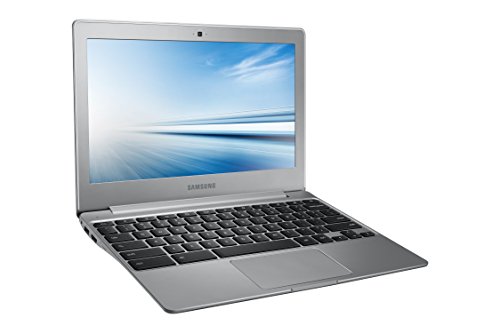
Samsung Chromebook 2 XE500C12-K01US 11.6 Inch Laptop Review: Is This Budget Chromebook Right for You?
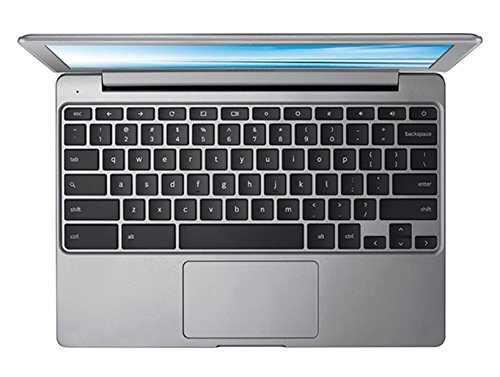
Looking for an affordable, reliable, and super-portable laptop that won’t break the bank? The Samsung Chromebook 2 XE500C12-K01US 11.6 Inch Laptop (Intel Celeron) might be exactly what you need. Chromebooks have carved out a significant niche for their simplicity, security, and lightning-fast performance, especially for those living in the cloud. But does this specific Samsung model, powered by an Intel Celeron processor, still hold up in today’s digital landscape? Let’s dive deep into what makes this particular Chromebook a potential standout option and if it aligns with your digital lifestyle.
First Impressions: Design and Build Quality
The Samsung Chromebook 2 immediately impresses with its sleek, minimalist design. While it won’t be mistaken for a high-end metal unibody laptop, its faux-stitched leather-like lid gives it a surprisingly sophisticated and premium feel for its price point. It’s incredibly lightweight at just 2.65 pounds, making it an ideal companion for students, commuters, or anyone who needs to toss their laptop into a bag without a second thought. The 11.6-inch display hits a sweet spot for portability, balancing screen real estate with a compact footprint. The build feels sturdy enough for everyday use, proving that budget doesn’t necessarily mean flimsy.
Performance and Everyday Use: The Intel Celeron Inside
At the heart of the Samsung Chromebook 2 XE500C12-K01US 11.6 Inch Laptop (Intel Celeron) is, as the name suggests, an Intel Celeron processor. Now, if you’re coming from a high-powered Windows or macOS machine, the “Celeron” might give you pause. However, it’s crucial to understand that Chrome OS is designed to be incredibly lightweight and efficient.
For its intended purpose, this Chromebook performs admirably. Web browsing is zippy, multiple tabs open smoothly, and streaming HD video from YouTube or Netflix is seamless. For tasks like drafting documents in Google Docs, creating presentations in Slides, managing emails, and staying connected on social media, this laptop shines. Its instant-on capability means you’re ready to work or browse in mere seconds after opening the lid, a significant advantage over many traditional laptops. It’s not built for heavy-duty video editing, graphic design, or intense gaming, but for cloud-centric tasks, it’s remarkably responsive.
Key Features That Shine
- Chrome OS Simplicity: The operating system is incredibly easy to learn and use. If you’re familiar with Google services like Gmail, Drive, and Chrome browser, you’ll feel right at home. Updates are automatic and happen in the background, keeping your system secure and up-to-date without interruption.
- Fantastic Battery Life: One of the undisputed champions of Chromebooks is their battery longevity, and the Samsung Chromebook 2 XE500C12-K01US 11.6 Inch Laptop (Intel Celeron) lives up to this reputation. You can expect to get a full day’s work or entertainment out of a single charge, making it perfect for long classes, flights, or days away from a power outlet.
- Portability: Weighing under 3 pounds and with an 11.6-inch screen, it’s designed for life on the go. It easily slips into backpacks, tote bags, and even some larger purses.
- Robust Security: Chrome OS boasts multiple layers of security, including sandboxing, verified boot, and automatic updates, making it highly resistant to viruses and malware. You can browse and work with greater peace of mind.
- Fanless Design: The Intel Celeron processor allows for a fanless design, meaning this Chromebook runs virtually silent. No annoying whirring, just quiet productivity.
The Pros: Why You’ll Love the Samsung Chromebook 2
- Exceptional Affordability: Offers incredible value for its price.
- Outstanding Battery Life: Get through your day without constantly searching for an outlet.
- Blazing Fast Boot-Up: Ready to go in seconds.
- Lightweight and Portable: Perfect for students and travelers.
- Easy to Use and Maintain: Chrome OS is intuitive and self-updating.
- Strong Security Features: Built to keep your data safe.
- Quiet Operation: Fanless design ensures silent computing.
The Cons: Where It Falls Short
- Limited Offline Functionality (Historically): While Chrome OS has improved significantly with Android app support, traditional desktop software cannot be installed. Heavy reliance on an internet connection for full functionality.
- Modest Internal Storage: Typically comes with limited eMMC storage, relying heavily on cloud storage (Google Drive).
- Not for Power Users: It’s not designed for intensive tasks like video editing, serious gaming, or running demanding professional software.
- Screen Resolution: The 11.6-inch display at its resolution is perfectly adequate for the price but won’t offer the crispness of higher-end QHD or 4K screens.
User Impressions: Real-World Experience
Users consistently praise the Samsung Chromebook 2 XE500C12-K01US 11.6 Inch Laptop (Intel Celeron) for its simplicity and reliability. Many highlight it as an excellent secondary device for quick tasks, web browsing, and email. Students particularly love it for its lightweight design, long battery life, and affordability, making it perfect for taking notes in class, researching papers, and accessing online learning platforms. While some wish for more local storage or the ability to run Windows applications, most acknowledge that for what it is—a budget-friendly, cloud-centric laptop—it excels. The keyboard is generally considered comfortable for extended typing sessions, and the trackpad is responsive enough for everyday navigation.
Who is the Samsung Chromebook 2 XE500C12-K01US Best For?
- Students: Ideal for note-taking, research, online learning, and basic productivity. Its portability and long battery life are huge advantages for campus life.
- Casual Home Users: Perfect for web browsing, email, social media, streaming videos, and light document creation.
- Budget-Conscious Buyers: If you need a functional laptop but have a strict budget, this Chromebook offers incredible value.
- As a Secondary Device: A great addition to a more powerful desktop or laptop for quick access to the web and cloud services.
- Users Heavily Invested in the Google Ecosystem: If you already rely on Gmail, Google Drive, Google Docs, etc., this Chromebook integrates seamlessly into your workflow.
Final Verdict: Is the Samsung Chromebook 2 XE500C12-K01US Still a Smart Buy?
Absolutely. The Samsung Chromebook 2 XE500C12-K01US 11.6 Inch Laptop (Intel Celeron) remains a highly viable option for a specific kind of user. It’s not trying to be a desktop replacement, nor is it meant for demanding creative work. What it is, however, is a fast, secure, incredibly portable, and remarkably affordable device that excels at online tasks. For those who live and work in the cloud, value simplicity, and need a reliable machine that won’t weigh them down or break the bank, this Samsung Chromebook continues to be a fantastic choice.
Ready to simplify your digital life? Click here to check out the Samsung Chromebook 2 XE500C12-K01US 11.6 Inch Laptop (Intel Celeron) on Amazon and see current pricing!
FAQ
Q. What exactly is a Chromebook and what are its main advantages for a user?
A. A Chromebook is a laptop that runs on Google’s Chrome OS, an operating system based on the Chrome web browser. Its main advantages include very fast boot times, automatic updates, built-in virus protection, long battery life, and a focus on cloud-based applications and storage, making it very secure and easy to maintain with minimal setup.
Q. What are the core specifications of the Samsung Chromebook 2 XE500C12-K01US?
A. The Samsung Chromebook 2 XE500C12-K01US features an 11.6-inch display, is powered by an Intel Celeron N2840 processor, typically comes with 2GB or 4GB of RAM, and offers 16GB of eMMC flash storage. It’s designed for portability and efficient performance for web-centric tasks.
Q. Is the Samsung Chromebook 2 suitable for offline work or does it always require an internet connection?
A. While Chromebooks thrive with an internet connection as many applications are web-based, the Samsung Chromebook 2 XE500C12-K01US can perform many tasks offline. Google Docs, Sheets, and Slides, for example, can be set up for offline access, and local files can be viewed and edited. However, full functionality and cloud synchronization always require an internet connection.
Q. Can I run traditional Windows or macOS software on this device, such as Photoshop or Microsoft Office?
A. No, you cannot directly install and run traditional Windows or macOS software like Adobe Photoshop or the full desktop version of Microsoft Office on the Samsung Chromebook 2 XE500C12-K01US. It runs Chrome OS, which primarily uses web applications. For Office, you would typically use the web-based Microsoft Office 365 or Google Docs equivalents.
Q. What kind of storage does the Samsung Chromebook 2 XE500C12-K01US offer and is it expandable?
A. The Samsung Chromebook 2 XE500C12-K01US typically comes with 16GB of eMMC flash storage. This is relatively small, as Chromebooks are designed to rely heavily on cloud storage (like Google Drive). Yes, the storage is expandable via an SD card slot, allowing you to add more space for local files and media.
Q. Is this Chromebook a good option for students or for general web browsing and media consumption?
A. Yes, the Samsung Chromebook 2 XE500C12-K01US is an excellent and cost-effective option for students, general web browsing, email, social media, and media consumption (streaming videos, music). Its lightweight design, long battery life, quick boot times, and secure Chrome OS make it ideal for these types of activities where cloud-based productivity and internet access are primary.
Q. What is the expected battery life of the Samsung Chromebook 2 XE500C12-K01US?
A. The Samsung Chromebook 2 XE500C12-K01US is known for its impressive battery life, often lasting up to 9-10 hours on a single charge under typical usage conditions. This makes it very suitable for all-day use in academic or casual settings without needing to carry a charger.
Q. Does this Chromebook support Android apps from the Google Play Store?
A. Unfortunately, the Samsung Chromebook 2 XE500C12-K01US (specifically the XE500C12 model) is one of the older Chromebook models that does NOT support Android apps from the Google Play Store. This feature was rolled out to newer Chromebooks. It primarily relies on web-based applications and extensions available through the Chrome Web Store.
Related Posts:
– 10 Best Apps for Apple CarPlay: Your Ultimate Guide to a Smarter Drive
– 5 Best Wireless CarPlay Adapters for iPhone in

