
Unveiling the Samsung Chromebook Plus V2 Light Titan 2-in-1: Your Portable Productivity Powerhouse?
Are you on the hunt for a versatile, lightweight, and incredibly practical laptop that seamlessly adapts to your daily needs? Look no further than the Samsung Chromebook Plus V2 Light Titan 2-in-1. This isn’t just another Chromebook; it’s a sleek, adaptable companion designed to enhance your productivity, creativity, and entertainment on the go. In this detailed review, we’ll dive deep into what makes this device stand out, its true strengths, its minor quirks, and whether it’s the perfect fit for your lifestyle.
First Impressions: Design and Build
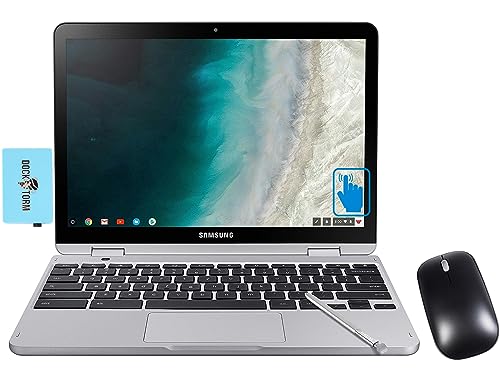
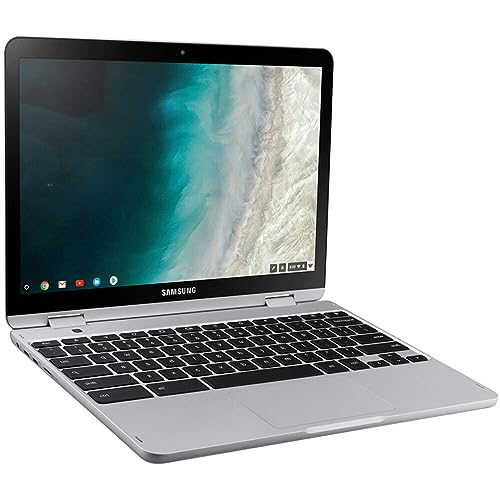
Right out of the box, the Samsung Chromebook Plus V2 Light Titan 2-in-1 impresses with its sophisticated “Light Titan” finish, a subtle yet premium shade of grey that exudes professionalism. Its compact design and lightweight build (just under 3 pounds) make it incredibly easy to slip into a backpack or tote, almost making you forget it’s there. The hinge feels sturdy, allowing for a smooth transition between laptop, tablet, tent, and stand modes – a testament to its 2-in-1 flexibility.
Key Features That Shine
The magic of the Samsung Chromebook Plus V2 lies in its thoughtfully integrated features, designed to make your daily tasks a breeze:
- Versatile 2-in-1 Design: This is arguably its biggest selling point. The ability to flip the screen 360 degrees transforms your laptop into a powerful tablet, perfect for note-taking, sketching, or consuming media. Whether you’re typing up a report or lounging on the couch browsing the web, the Samsung Chromebook Plus V2 Light Titan 2-in-1 adapts effortlessly.
- Built-in Stylus (Pen): Gone are the days of fumbling for an external stylus. The integrated pen slides neatly into a slot on the side of the device, always ready for action. It’s incredibly responsive, making it ideal for handwritten notes, annotating PDFs, or unleashing your artistic side with drawing apps. This feature truly elevates the tablet experience.
- Vibrant Full HD Display: The 12.2-inch Full HD (1920×1080) touch screen delivers crisp visuals and vibrant colors, making everything from streaming videos to browsing photos a delightful experience. The brightness is adequate for indoor use, and the touch response is consistently smooth and accurate.
- Optimized for Chrome OS: Powered by Chrome OS, the Chromebook Plus V2 offers a fast, secure, and user-friendly computing experience. It boots up in seconds, updates automatically in the background, and integrates seamlessly with Google’s ecosystem. With access to millions of Android apps via the Google Play Store, your functionality options are vastly expanded.
- Solid Performance for Everyday Tasks: Equipped with an Intel Celeron 3965Y processor and 4GB of RAM, this Chromebook handles daily tasks with admirable efficiency. Browsing multiple tabs, streaming video, light photo editing, and using office applications run smoothly. While it’s not a gaming powerhouse, it’s perfectly capable for most productivity and entertainment needs.
- Dual Cameras: Uniquely, it features two cameras: a front-facing 1MP camera for video calls and a 13MP camera on the keyboard deck (which becomes a rear camera in tablet mode). The latter is a thoughtful addition for snapping quick photos or scanning documents in tablet mode.
The Good, The Bad, and The Beautiful: Pros & Cons
Every product has its strengths and weaknesses, and the Samsung Chromebook Plus V2 is no exception.
Pros:
- Exceptional Portability: Lightweight and compact, it’s an ideal travel companion.
- Versatile 2-in-1 Design: The seamless transition between laptop and tablet modes, enhanced by the excellent stylus, offers unmatched flexibility.
- Integrated Stylus: Always there when you need it, and highly responsive for notes and drawing.
- Long Battery Life: Easily gets you through a full day of mixed use on a single charge.
- Fast and Secure Chrome OS: Quick boot times, automatic updates, and built-in security features.
- Access to Android Apps: Expands functionality significantly beyond basic web browsing.
- Premium Build Quality: Feels robust and well-made, despite its light weight.
Cons:
- Performance Limits: While great for everyday tasks, it’s not designed for intensive video editing, heavy gaming, or complex software.
- Limited Storage: With 32GB or 64GB eMMC storage, you’ll rely heavily on cloud storage (Google Drive is integrated) or external drives.
- Keyboard & Trackpad: While decent, they aren’t class-leading. The keyboard can feel a bit cramped for extended typing sessions, and the trackpad is responsive but not exceptionally smooth.
- Screen Brightness: Can be a bit dim for outdoor use or very brightly lit environments.
User Impressions and Who It’s Best For
Users consistently praise the Samsung Chromebook Plus V2 Light Titan 2-in-1 for its sheer convenience and adaptability. Students find it perfect for taking notes in lectures (especially with the stylus!), collaborating on projects, and accessing online textbooks. Professionals appreciate its quick boot-up times, secure environment for cloud-based work, and extreme portability for business trips or working from cafes. Casual users love it for its simplicity, media consumption capabilities, and the ability to browse, shop, and stay connected with ease.
This Chromebook is an excellent choice for:
- Students (K-12 and College): For note-taking, research, assignments, and online learning.
- Casual Users: For web browsing, email, social media, streaming, and light productivity.
- Travelers/Commuters: Its lightweight and long battery life make it ideal for on-the-go computing.
- Creative Hobbyists: Those who enjoy digital sketching, journaling, or light graphic design.
- Anyone seeking a secondary, highly portable device that’s quick to start and secure.
If your primary need is a powerful workstation for demanding software, video editing, or high-end gaming, you might need to look at more traditional, higher-spec laptops. But for everyone else seeking a smart, efficient, and highly versatile companion, this Chromebook delivers.
Final Verdict: Is It Your Next Companion?
The Samsung Chromebook Plus V2 Light Titan 2-in-1 truly excels at what it’s designed to do: provide a fast, flexible, and feature-rich computing experience in a remarkably portable package. Its 2-in-1 design, excellent built-in stylus, and robust Chrome OS foundation make it an undeniable value proposition. It’s a delightful blend of tablet convenience and laptop productivity, perfect for navigating today’s hybrid world.
If you’re ready to embrace a seamless, secure, and incredibly adaptable way of working and playing, the Samsung Chromebook Plus V2 Light Titan 2-in-1 is an outstanding choice.
Ready to experience the versatility? Click here to learn more and get your own Samsung Chromebook Plus V2 Light Titan 2-in-1 today!
https://www.amazon.com/dp/B0CH5G6S8W?tag=usfm-20&linkCode=ogi&th=1&psc=1
FAQ
Q. What is the Samsung Chromebook Plus V2 Light Titan 2-in-1?
A. The Samsung Chromebook Plus V2 Light Titan 2-in-1 is a versatile portable computer that runs on Google’s Chrome OS. It’s called “2-in-1” because its screen can flip 360 degrees, allowing it to function both as a traditional laptop and a tablet. “Light Titan” refers to its specific light gray metallic color finish.
Q. What are the key advantages of a Chromebook like the Samsung Chromebook Plus V2?
A. Chromebooks offer several benefits, including fast boot times, automatic background updates, built-in virus protection, long battery life, and seamless integration with Google’s ecosystem (Gmail, Google Drive, Google Docs, etc.). They are generally lightweight, highly portable, and great for web-based tasks, productivity, and consuming media.
Q. Does the Samsung Chromebook Plus V2 come with a stylus or pen?
A. Yes, the Samsung Chromebook Plus V2 features a built-in, garaged pen. This integrated stylus allows users to easily take notes, sketch, draw, sign documents, and interact with the touch screen, enhancing its functionality, especially in tablet mode.
Q. Can I run Microsoft Office or other Windows applications on this Chromebook?
A. No, Chromebooks run Chrome OS, not Windows, so traditional Windows desktop applications cannot be installed directly. However, you can use the web-based versions of Microsoft Office (Office 365) through your browser, or download many Android apps from the Google Play Store that offer similar functionalities for productivity, entertainment, and more.
Q. What kind of battery life can I expect from the Samsung Chromebook Plus V2?
A. The Samsung Chromebook Plus V2 is designed for all-day use. While actual battery life can vary based on usage patterns, display brightness, and network conditions, it typically offers up to 10-10.5 hours of battery life on a single charge, making it highly suitable for mobile productivity and entertainment.
Q. Is the display suitable for entertainment and creative tasks?
A. Yes, the Samsung Chromebook Plus V2 features a vibrant 12.2-inch Full HD (1920×1080) touch display. This makes it excellent for streaming videos, browsing photos, and general web usage, providing crisp and clear visuals. Combined with the included pen and touch capabilities, it’s also well-suited for light creative tasks like sketching or note-taking.
Q. How does the “2-in-1” functionality enhance the user experience?
A. The 360-degree hinge on the Samsung Chromebook Plus V2 allows for extreme versatility. You can use it as a standard laptop for typing, fold it into a tablet for browsing or drawing with the pen, set it in “tent mode” for hands-free video watching, or use it in “stand mode” for presentations. This adaptability makes it suitable for a wide range of activities and environments.
Related Posts:
– 10 Best Apps for Apple CarPlay: Your Ultimate Guide to a Smarter Drive
– 5 Best Wireless CarPlay Adapters for iPhone in

