
Samsung Chromebook Plus V2 Review: Is This 2-in-1 Right For Your Home & Business Needs?
In today’s fast-paced world, finding a device that can keep up with both your professional demands and personal leisure is a game-changer. Whether you’re a student juggling assignments, a remote worker needing a portable office, or simply looking for a versatile home computing solution, a 2-in-1 Chromebook often hits the sweet spot. Enter the Samsung Chromebook Plus V2 Home & Business 2-in-1, a device that promises versatility without breaking the bank. But does it deliver? Let’s dive deep into an honest, engaging review.
Unveiling the Samsung Chromebook Plus V2: A Closer Look
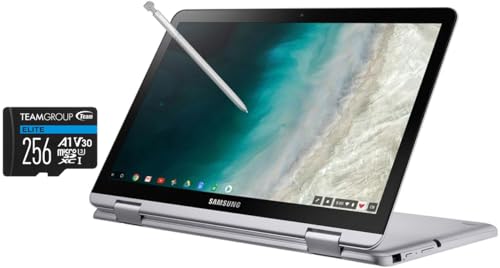
The Samsung Chromebook Plus V2 stands out with its convertible design, allowing it to seamlessly switch between a traditional laptop, a tablet, or even a tent mode for presentations. It’s built for those who value flexibility, portability, and the streamlined efficiency of Chrome OS. This isn’t just a basic laptop; it’s a productivity hub designed to adapt to your ever-changing needs.
The Brilliant Features That Stand Out
What makes the Samsung Chromebook Plus V2 a compelling option? Here are its core strengths:
- Versatile 2-in-1 Design: This is perhaps its most defining feature. Effortlessly transform it from a laptop for typing and productivity into a tablet for browsing, drawing, or media consumption. The durable hinge feels solid, inspiring confidence as you switch modes.
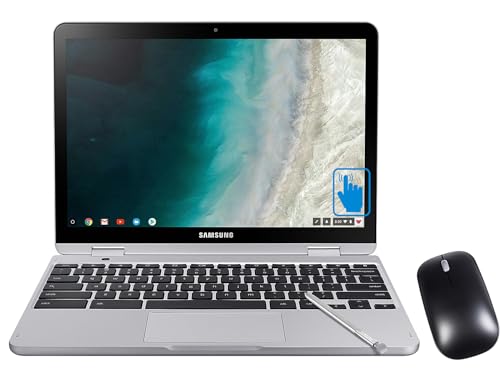
- Integrated Stylus Pen: A standout feature for creative minds and note-takers. The built-in pen is always there when you need it, perfect for jotting down notes in meetings, annotating PDFs, or sketching ideas. It slides neatly into the device, ensuring you never lose it.
- Dual Cameras for More Than Just Video Calls: Beyond the standard front-facing webcam, the Chromebook Plus V2 features a unique keyboard-side camera. This innovative addition allows you to capture photos or scan documents while in tablet mode, a surprisingly useful feature for students and professionals alike.
- Vibrant Touchscreen Display: The 12.2-inch Full HD display offers crisp visuals and responsive touch functionality. Whether you’re streaming your favorite shows or navigating apps, the screen is bright and clear, enhancing your overall experience.
- Chrome OS Advantages: Powered by Google’s Chrome OS, this device boasts lightning-fast boot-up times, robust security, and automatic updates. It’s cloud-centric, integrates seamlessly with Google services, and grants access to the vast library of Android apps via the Google Play Store, expanding its functionality significantly.
- Portability & Battery Life: Weighing in at just under 3 pounds, the Samsung Chromebook Plus V2 is incredibly lightweight and easy to carry, making it an ideal companion for commutes or travels. Its battery life generally lasts through a full workday, ensuring you’re productive on the go.
The Good, The Bad, and The Honest Truth (Pros & Cons)
No device is perfect, and the Samsung Chromebook Plus V2 is no exception. Here’s a balanced look at its advantages and limitations:
Pros:
- Exceptional Versatility: The 2-in-1 design combined with the integrated stylus offers a truly flexible computing experience.
- Highly Portable: Lightweight and compact, it’s a dream for users on the move.
- Fast & Secure Chrome OS: Enjoy quick boot times, automatic updates, and strong built-in security features.
- Access to Android Apps: The Google Play Store dramatically expands the device’s utility beyond traditional web browsing.
- Solid Build Quality: Feels durable and well-constructed for its price point.
Cons:
- Performance for Heavy Tasks: While excellent for everyday browsing, streaming, and light productivity, it’s not a powerhouse for demanding tasks like heavy video editing or complex software development.
- Limited Internal Storage: The eMMC storage is quick, but its capacity is modest. You’ll rely heavily on cloud storage (which Chrome OS excels at) or an external drive.
- Keyboard & Trackpad: While perfectly functional for most, they might not offer the premium feel and precision of higher-end laptops.
- Screen Brightness: The display can sometimes struggle in very bright outdoor conditions.
Real-World User Impressions
Users consistently praise the Samsung Chromebook Plus V2 Home & Business 2-in-1 for its practical design and user-friendliness. Many highlight the seamless transition between laptop and tablet modes as a major convenience for various tasks, from online classes to client presentations. The integrated stylus is a huge hit, particularly among students and those who enjoy digital art or handwriting notes.
Battery life is generally reported as reliable for a full workday of mixed use. While some users acknowledge that the performance isn’t meant for heavy lifting, they find it perfectly adequate for web browsing, streaming media, document editing, and a wide array of Android applications. For the price, the overall package is often seen as an excellent value, delivering on its promise of versatility.
Who Is the Samsung Chromebook Plus V2 Best For?
The Samsung Chromebook Plus V2 Home & Business 2-in-1 is an excellent fit for several user groups:
- Students: Ideal for note-taking (with the stylus!), research, online classes, and carrying to and from campus.
- Casual Home Users: Perfect for web browsing, email, streaming movies, social media, and light photo editing.
- Mobile Professionals & Sales Teams: For on-the-go presentations, quick note-taking during meetings, and managing emails and cloud documents.
- Anyone Seeking a Versatile Secondary Device: If you already have a powerful desktop, this Chromebook serves as an incredibly portable and adaptable companion for the couch, travel, or quick tasks.
- Budget-Conscious Buyers: It offers a rich feature set and flexibility at a competitive price.
It might not be the best choice for: Users who require specific Windows or macOS-only software, professional video editors, hardcore gamers, or those who need massive local storage for large files.
Ready to Enhance Your Productivity and Creativity?
The Samsung Chromebook Plus V2 Home & Business 2-in-1 truly delivers on its promise of versatility, offering a robust and adaptable computing experience that caters to both your personal and professional life. With its intuitive Chrome OS, integrated stylus, and convertible design, it’s a smart choice for anyone seeking a flexible, portable, and secure device.
If you’re looking for a reliable 2-in-1 Chromebook that seamlessly transitions between work and play, consider making the Samsung Chromebook Plus V2 Home & Business 2-in-1 your next daily driver.
Click here to learn more and get your Samsung Chromebook Plus V2 Home & Business 2-in-1 today!
FAQ
Q. What is the Samsung Chromebook Plus V2 Home & Business 2-in-1, and what makes it a “2-in-1”?
A. The Samsung Chromebook Plus V2 is a versatile laptop powered by Google’s Chrome OS. The “2-in-1” refers to its convertible design, featuring a 360-degree hinge that allows it to transform from a traditional laptop into a tablet, tent, or stand mode. This flexibility makes it adaptable for various uses, from typing documents to watching movies or giving presentations.
Q. What operating system does it run, and what are its main advantages for home and business use?
A. It runs Chrome OS, a lightweight, fast, and secure operating system designed by Google. Its main advantages include quick boot times, automatic updates, integrated Google services (like Google Drive, Docs, Sheets), and robust built-in security against viruses and malware. For business, it offers easy management, collaboration tools, and cloud-centric workflows. For home, it’s simple to use, great for browsing, streaming, and light productivity.
Q. Can I use Android apps and traditional desktop software on the Samsung Chromebook Plus V2?
A. Yes, the Samsung Chromebook Plus V2 fully supports Android apps from the Google Play Store, expanding its functionality with a vast array of mobile applications. While it doesn’t run traditional Windows or macOS desktop software directly, many popular services have web-based versions or Android app equivalents. Additionally, it supports Linux applications, further broadening its capabilities for more advanced users.
Q. What kind of storage does the Chromebook Plus V2 offer, and is it expandable?
A. The Samsung Chromebook Plus V2 typically comes with a certain amount of eMMC storage (e.g., 32GB or 64GB), which is generally used for the operating system and local files. Given its cloud-centric nature, users primarily rely on cloud storage services like Google Drive, which often includes free storage. Yes, the storage is expandable via a microSD card slot, allowing you to add more space for photos, videos, and documents.
Q. Does the Samsung Chromebook Plus V2 Home & Business come with a stylus, and how can it be used?
A. Yes, a key feature of the Samsung Chromebook Plus V2 is its built-in, pen-enabled display and a dedicated stylus (often referred to as an S Pen or similar). The stylus is integrated directly into the device for easy access and storage. It can be used for taking notes, sketching, drawing, annotating PDFs, signing documents, or simply navigating the interface with greater precision, making it excellent for creative and productivity tasks.
Q. What is the typical battery life of the Samsung Chromebook Plus V2, and is it sufficient for all-day use?
A. The battery life of the Samsung Chromebook Plus V2 is generally quite good, typically offering up to 10-12 hours on a single charge, depending on usage. This makes it well-suited for all-day use, whether you’re working through a full workday, attending classes, or enjoying entertainment on the go, without needing to constantly search for a power outlet.
Q. Is the Samsung Chromebook Plus V2 a good option for remote work or online learning?
A. Absolutely. Its lightweight and portable design, along with a robust and secure Chrome OS, makes it ideal for remote work and online learning. It handles video conferencing applications, cloud-based productivity suites, and web browsing seamlessly. The long battery life and integrated webcam/microphone further enhance its suitability for staying connected and productive from anywhere.
Related Posts:
– 10 Best Apps for Apple CarPlay: Your Ultimate Guide to a Smarter Drive
– 5 Best Wireless CarPlay Adapters for iPhone in

