

Samsung Chromebook Plus V2 Business 2-in Review: Your Ultimate Portable Powerhouse?
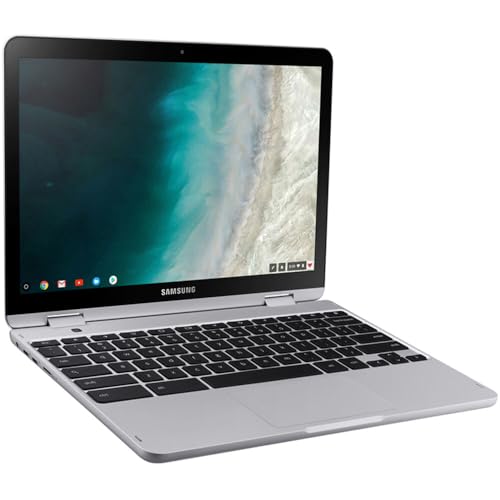
Are you on the hunt for a versatile, robust, and lightning-fast device that can keep up with your demanding business needs? In today’s hybrid work environment, the right tool can make all the difference. That’s why we’re taking a deep dive into the Samsung Chromebook Plus V2 Business 2-in-1, a device specifically engineered to empower professionals on the go.
This isn’t just another Chromebook; it’s a sleek, powerful, and incredibly adaptable machine designed to boost your productivity, whether you’re at your desk, in a coffee shop, or traveling for work. Let’s explore what makes this 2-in-1 standout and if it’s the perfect fit for your business.
Unpacking the Samsung Chromebook Plus V2 Business 2-in-1: Key Features & First Impressions
Right out of the box, the Samsung Chromebook Plus V2 Business 2-in-1 feels premium. Its sleek design and durable build quality immediately convey a sense of reliability – exactly what you want in a business device. But it’s what’s under the hood, and its transformative capabilities, that truly impress.
Here’s a closer look at its standout features:
- Ultimate Versatility with 2-in-1 Design: This is perhaps its most compelling feature. Seamlessly switch between a traditional laptop for serious typing and a tablet for presentations, note-taking, or casual browsing. The sturdy hinge allows for a full 360-degree rotation, giving you incredible flexibility in how you use it.
- Vibrant Full HD Touchscreen: The 12.2-inch Full HD display (1920×1080) delivers crisp visuals and vibrant colors, making everything from spreadsheets to video calls look fantastic. The touch functionality is incredibly responsive, enhancing the tablet experience.
- Built-in Stylus Pen: A true productivity booster, the integrated pen allows for precise writing, drawing, and annotation directly on the screen. It’s perfect for signing documents, sketching ideas, or marking up PDFs, and it cleverly tucks away into the device, so you’ll never lose it.
- Optimized for Chrome OS: Running on Chrome OS, the Chromebook Plus V2 Business boasts blazing-fast boot times and a user-friendly interface. It’s inherently secure with automatic updates and built-in virus protection, minimizing IT headaches.
- Solid Performance for Business Tasks: Equipped with an Intel Celeron processor and ample RAM, this Chromebook handles daily business applications with ease. Whether you’re juggling multiple tabs, video conferencing, or working on documents, it delivers smooth performance.
- Dual Camera System: Uniquely, it features two cameras: a standard front-facing webcam for video calls and a 13MP world-facing camera on the keyboard deck. This second camera is brilliant for taking photos of documents or objects in tablet mode.
- All-Day Battery Life: Portability means nothing if you’re constantly searching for an outlet. The Chromebook Plus V2 Business is designed to last through a full workday, ensuring you stay productive without interruption.
You can find more details and purchase the product directly via this link: Samsung Chromebook Plus V2 Business 2-in-1 on Amazon
Performance & User Experience: How Does it Feel to Use?
Using the Samsung Chromebook Plus V2 Business 2-in-1 is a delightful experience. The keyboard is comfortable and well-spaced, making long typing sessions a breeze, and the trackpad is smooth and accurate. When you flip it into tablet mode, the transition is seamless, and the device feels balanced in hand.
For most business users, the performance is more than adequate. Applications launch quickly, web browsing is snappy, and even light multitasking doesn’t cause a stutter. The integration with Google Workspace (Docs, Sheets, Slides, Meet) is excellent, making it a powerful tool for collaborative work. The instant-on feature means you’re ready to go the moment you open the lid.
The Pros & Cons: An Honest Look
No device is perfect, and it’s important to weigh the good against the not-so-good.
Pros:
- Exceptional Versatility: The 2-in-1 design with a responsive touchscreen and integrated pen is incredibly useful for various tasks.
- Highly Portable: Lightweight and compact, it’s easy to carry everywhere.
- Fast & Secure Chrome OS: Boots quickly, updates automatically, and offers robust security features ideal for business.
- Excellent Battery Life: Dependable power to get you through your workday.
- Built-in Stylus: Adds significant value for note-takers, artists, and annotators.
- Good Build Quality: Feels sturdy and durable, ready for the rigors of travel and daily use.
Cons:
- Chrome OS Limitations for Specific Software: While excellent for web-based apps, it can’t run traditional Windows or macOS desktop software directly. (Though Android apps and Linux compatibility help bridge some gaps).
- Storage Capacity: While cloud-centric, local storage might feel limited for some who need to store large files offline regularly.
- Not a Powerhouse for Intensive Tasks: While great for everyday business, it’s not designed for video editing, complex graphic design, or high-end gaming.
User Impressions: What People Are Saying
Users frequently praise the Samsung Chromebook Plus V2 Business 2-in-1 for its sheer versatility and robust build. Many professionals appreciate how easily it switches between laptop and tablet modes, making it ideal for everything from detailed report writing to quick client presentations. The integrated stylus is a particular highlight, often cited as a game-changer for those who prefer handwritten notes or marking up documents.
Some feedback highlights the seamless integration with Google’s ecosystem, making collaborative work incredibly efficient. While the price point might be a bit higher than some entry-level Chromebooks, users generally feel the added features, particularly the 2-in-1 design and included pen, justify the investment for business use.
Who is the Samsung Chromebook Plus V2 Business 2-in-1 Best For?
The Samsung Chromebook Plus V2 Business 2-in-1 is an ideal choice for:
- Mobile Professionals: Sales reps, consultants, and remote workers who need a lightweight, durable, and reliable device on the go.
- Students & Educators: Especially those who value note-taking, research, and quick transitions between lectures and study sessions.
- Small Business Owners: Looking for a secure, easy-to-manage, and cost-effective solution for their team’s productivity needs.
- Individuals Heavily Reliant on Cloud-Based Workflows: If you primarily use Google Workspace, Microsoft 365 (web versions), or other web-based business applications, this Chromebook will shine.
- Anyone Seeking Simplicity & Security: For users who want a device that’s easy to use, boots fast, and offers strong built-in security without constant maintenance.
If your work involves heavy offline software reliance or demanding graphical tasks, a traditional Windows or macOS laptop might be a better fit. But for most modern business users, the capabilities of Chrome OS combined with the flexibility of this Samsung device are truly compelling.
Final Verdict: Is it Worth It for Your Business?
The Samsung Chromebook Plus V2 Business 2-in-1 genuinely stands out as a top-tier option in the business Chromebook market. It successfully blends the simplicity and security of Chrome OS with a versatile 2-in-1 design, a brilliant touch display, and the invaluable addition of a built-in stylus. Its portability, long battery life, and robust feature set make it an excellent investment for professionals and businesses looking for an efficient, adaptable, and reliable computing solution.
If you’re ready to enhance your productivity with a device that’s as versatile as your workday demands, the Samsung Chromebook Plus V2 Business 2-in-1 is definitely worth considering.
Ready to Boost Your Business Productivity?
Don’t let a clunky, slow device hold you back. Experience the agility and power of the Samsung Chromebook Plus V2 Business 2-in-1 for yourself. Click here to learn more and purchase yours today!
Shop the Samsung Chromebook Plus V2 Business 2-in-1 on Amazon!
FAQ
Q. What are the key features and specifications of the Samsung Chromebook Plus V2 Business 2-in-1?
A. The Samsung Chromebook Plus V2 Business 2-in-1 typically features a 12.2-inch Full HD (1920×1080) touchscreen display, a convertible hinge that allows it to switch between laptop and tablet modes, and an integrated, garaged stylus. It is usually powered by an Intel Celeron or similar processor, with 4GB or 8GB of RAM and 64GB or 128GB of eMMC storage, running on Chrome OS.
Q. How does the “Business” designation differentiate this model from the standard Chromebook Plus V2?
A. The “Business” designation indicates features tailored for corporate environments. This often includes enhanced durability, extended support for IT management (such as Chrome Enterprise Upgrade license compatibility for centralized device management and policy enforcement), and potentially a focus on long-term stability and security updates suitable for large-scale deployments.
Q. Is the Samsung Chromebook Plus V2 Business suitable for productivity tasks and remote work?
A. Yes, it is highly suitable for productivity and remote work. Chrome OS provides seamless access to Google Workspace applications (Docs, Sheets, Slides, Gmail, Calendar), web-based tools, and a vast ecosystem of Android applications from the Google Play Store. The comfortable keyboard, responsive trackpad, and included stylus enhance efficiency for document creation, communication, and collaboration.
Q. What kind of battery life can I expect from the Samsung Chromebook Plus V2 Business?
A. The Samsung Chromebook Plus V2 Business is known for its excellent battery longevity. Users can typically expect up to 10-11 hours of battery life on a single charge, depending on usage patterns. This makes it ideal for full workdays, travel, and extended periods away from a power outlet.
Q. Can I run traditional Windows or macOS applications on this Chromebook?
A. Native Windows or macOS applications cannot be directly installed and run on Chrome OS. However, many business-critical applications are now web-based and fully compatible. Additionally, you can utilize Android apps from the Google Play Store, run Linux applications via a built-in container, or access Windows environments through remote desktop solutions and cloud-based virtual desktops.
Q. Does the Samsung Chromebook Plus V2 Business come with a stylus, and is it beneficial for business use?
A. Yes, the Samsung Chromebook Plus V2 Business features a built-in, garaged stylus. It is highly beneficial for business use, allowing for digital signatures on documents, annotating PDFs, precise selection and drawing, note-taking in meetings, and enhanced interaction with the touchscreen in tablet mode, adding versatility and efficiency.
Related Posts:
– 10 Best Apps for Apple CarPlay: Your Ultimate Guide to a Smarter Drive
– 5 Best Wireless CarPlay Adapters for iPhone in

