
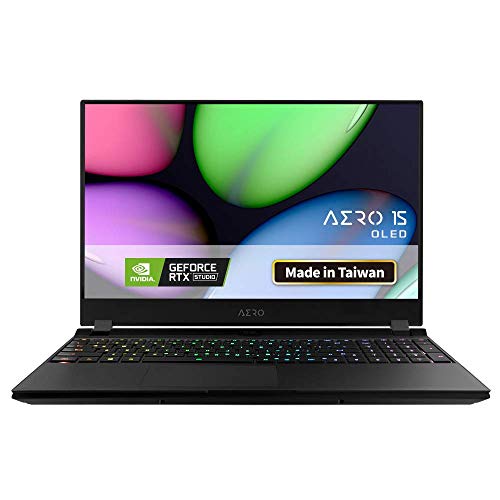
Gigabyte AERO 15 OLED SA Review: The Creative Powerhouse You’ve Been Waiting For?

Are you a digital artist, a video editor, a game developer, or a passionate gamer constantly seeking the perfect blend of power, portability, and visual fidelity in a laptop? Look no further. The Gigabyte AERO 15 OLED SA has carved out a unique niche in the competitive laptop market, promising an exceptional experience for creative professionals and entertainment enthusiasts alike.
In this detailed review, we’ll dive deep into what makes the Gigabyte AERO 15 OLED SA stand out, exploring its key features, performance, user impressions, and whether it’s truly the ideal machine for your demanding workflow.
First Impressions: Sleek Design Meets Stunning Display
Right out of the box, the Gigabyte AERO 15 OLED SA impresses with its sleek, minimalist design and robust aluminum chassis. It feels premium and surprisingly compact for the power it packs, making it a great companion for professionals on the go. But the moment you power it on, you’ll understand where this laptop truly shines: its display.
The 15.6-inch Samsung 4K UHD AMOLED display is nothing short of breathtaking. With Vesa DisplayHDR 400 True Black certification and 100% DCI-P3 color gamut coverage, colors pop with incredible vibrancy, blacks are inky deep, and details are razor-sharp. For anyone involved in color-critical work like video editing, graphic design, or photography, this display is a game-changer. It’s factory calibrated with X-Rite Pantone certification, ensuring unparalleled color accuracy right out of the box. This isn’t just a pretty screen; it’s a professional tool.
Performance That Keeps Up With Your Vision
Under the hood, the Gigabyte AERO 15 OLED SA is equipped to handle serious workloads. This model typically features a 9th Generation Intel Core i7 processor and an NVIDIA GeForce GTX 1660 Ti graphics card. While not the very latest RTX 30-series, the GTX 1660 Ti is a highly capable GPU, offering a fantastic balance of performance and efficiency.
- For Content Creators: You’ll find it excels in tasks like 4K video editing, 3D rendering, and complex graphic design. The combination of a powerful CPU and dedicated GPU ensures smooth playback, faster renders, and efficient handling of multi-layered projects.
- For Gamers: While it’s primarily marketed towards creators, the GTX 1660 Ti can comfortably handle most modern games at 1080p with high settings, and even some at 1440p. Don’t expect to push native 4K gaming on the built-in display at ultra settings, but for a creator-focused machine, its gaming prowess is more than respectable.
The AERO 15 OLED SA also boasts ample RAM and fast NVMe SSD storage, contributing significantly to its snappy performance. Applications launch instantly, and large files transfer in a flash, minimizing wait times and maximizing productivity.
Smart Features for a Seamless Experience
Gigabyte has integrated several thoughtful features into the AERO 15 OLED SA to enhance the user experience:
- Microsoft Azure AI: This unique feature uses cloud-based AI to optimize CPU and GPU performance based on the applications you’re running. It learns your usage patterns and dynamically adjusts power and fan settings, ensuring you always get the best performance with optimal cooling.
- Gigabyte Fusion RGB Keyboard: Not just for gamers, the per-key RGB backlighting allows for custom profiles, making it easy to highlight specific keys for different software shortcuts. The typing experience itself is comfortable with good key travel.
- Comprehensive Connectivity: With a good selection of ports including Thunderbolt 3 (USB-C), USB 3.1, HDMI, and an SD card reader, connecting peripherals and external displays is a breeze.
- Good Battery Life (for its class): While a powerful laptop with a 4K OLED screen is inherently demanding, the Gigabyte AERO 15 OLED SA often surprises users with its decent battery life, especially during lighter workloads, thanks to its large 94Wh battery. Expect several hours of productivity on a single charge.
User Impressions: What People Are Saying
Users consistently rave about the stunning OLED display, calling it a truly immersive experience for both work and entertainment. The raw performance for creative tasks is another frequently praised aspect. Many appreciate the compact form factor and premium build quality.
However, like any powerful machine, there are common user observations:
* Fan Noise: Under heavy load (e.g., gaming or rendering), the fans can become noticeable as they work to keep the powerful components cool. This is typical for high-performance thin and light laptops.
* Webcam Placement: The webcam is located below the screen, which can result in an unflattering “nose-cam” angle for video calls.
Pros & Cons
Pros:
* Breathtaking 4K UHD OLED Display: Unmatched color accuracy and vibrancy, ideal for creative professionals.
* Excellent Performance: Powerful Intel CPU and NVIDIA GTX 1660 Ti handle demanding tasks with ease.
* Premium Build Quality: Sleek, durable aluminum chassis.
* Compact & Portable: Surprising power in a relatively thin and light design.
* Good Battery Life for a high-performance laptop.
* Intelligent Microsoft Azure AI Optimization.
* Comprehensive Port Selection.
Cons:
* Fan noise can be noticeable under heavy load.
* Webcam placement is less than ideal.
* The GTX 1660 Ti is highly capable but not the absolute latest for high-end gaming at 4K.
Who is the Gigabyte AERO 15 OLED SA Best For?
The Gigabyte AERO 15 OLED SA is an outstanding choice for:
- Content Creators: Video editors, graphic designers, photographers, and animators who demand a color-accurate display and strong processing power for their demanding software.
- Aspiring Game Developers: Combining solid performance with a brilliant display for asset creation and game testing.
- Professionals Needing Portability & Power: Anyone who needs a robust workstation that can be easily carried between home, office, or client sites.
- Users Who Value Display Quality Above All Else: If you want the most visually stunning laptop experience available, this is it.
It’s less suited for users who primarily need an entry-level laptop for basic tasks, or hardcore competitive gamers who prioritize the absolute highest refresh rates over display resolution and color accuracy.
Conclusion: A Creative Powerhouse Worth Considering
The Gigabyte AERO 15 OLED SA makes a compelling case for anyone in the creative field or those who simply appreciate a top-tier visual and performance experience. It successfully blends powerful components with a stunning 4K OLED display and a refined design. While it has a couple of minor quirks, its strengths far outweigh them, especially for its target audience.
If you’re ready to elevate your creative workflow or enjoy your entertainment with unparalleled visual quality, the Gigabyte AERO 15 OLED SA is a highly recommended option. You can learn more and check out current pricing for the Gigabyte AERO 15 OLED SA directly on Amazon: Gigabyte AERO 15 OLED SA on Amazon.
Don’t compromise on your creative vision. Experience the difference a truly exceptional display and robust performance can make.
FAQ
Q. What kind of display does the Gigabyte AERO 15 OLED SA feature?
A. The Gigabyte AERO 15 OLED SA is equipped with a stunning 15.6-inch Samsung AMOLED display. This panel typically offers a 4K UHD (3840×2160) resolution, VESA DisplayHDR 400 True Black certification, 100% DCI-P3 color gamut coverage, and a fast response time, making it ideal for content creation and visual tasks with incredibly vibrant colors and deep blacks.
Q. What graphics card powers the Gigabyte AERO 15 OLED SA?
A. The Gigabyte AERO 15 OLED SA typically comes with an NVIDIA GeForce RTX 2060 GPU. This allows for solid gaming performance at 1080p and capable acceleration for creative applications like video editing, 3D rendering, and graphic design, leveraging NVIDIA’s Ray Tracing and DLSS technologies for enhanced visuals and performance.
Q. Is the Gigabyte AERO 15 OLED SA suitable for professional content creation?
A. Absolutely. The AERO 15 OLED SA is highly suitable for professional content creation. Its key strengths include the factory-calibrated 4K AMOLED display for accurate color work, a powerful Intel Core i7 or i9 processor, and the NVIDIA RTX 2060 GPU which provides acceleration for demanding tasks in software like Adobe Premiere Pro, Photoshop, and AutoCAD. It also typically supports up to 64GB of RAM and multiple SSDs for fast storage.
Q. What is the expected battery life of the Gigabyte AERO 15 OLED SA?
A. The Gigabyte AERO 15 OLED SA features a large 94Wh battery, one of the largest available in its class. While battery life can vary significantly based on usage (especially with the power-hungry 4K OLED display and dedicated GPU), users can generally expect around 6-8 hours for light productivity tasks and web browsing. Intensive tasks like gaming or video rendering will drain the battery much faster.
Q. How effective is the cooling system on the Gigabyte AERO 15 OLED SA under heavy load?
A. The Gigabyte AERO 15 OLED SA utilizes Gigabyte’s Windforce Infinity cooling system, which includes dual 71-blade fans and multiple heat pipes designed to efficiently dissipate heat from both the CPU and GPU. While it performs well for its thin and light form factor, sustained heavy loads will naturally lead to increased fan noise and some thermal throttling, typical for high-performance components in a compact chassis. It’s generally adequate for most professional workloads and gaming sessions.
Q. What kind of connectivity ports does the Gigabyte AERO 15 OLED SA offer?
A. The Gigabyte AERO 15 OLED SA provides a comprehensive set of ports for various needs. This usually includes multiple USB 3.1 Type-A ports, a Thunderbolt 3 (USB-C) port for high-speed data transfer and display output, an HDMI 2.0 port, a Mini DisplayPort 1.4, an RJ45 Ethernet port, an SD card reader, and a 3.5mm audio jack. This wide array ensures compatibility with a broad range of peripherals and external displays.
Q. Does the AERO 15 OLED SA come with any special software features?
A. Yes, the Gigabyte AERO 15 OLED SA comes with Gigabyte’s AI-driven Azure AI software and the Gigabyte Control Center. Azure AI is designed to intelligently optimize CPU and GPU performance, fan speed, and power settings based on the application being used, aiming for an optimal balance between performance and battery life. The Control Center allows users to manually adjust various system settings, monitor hardware, and customize keyboard backlighting.
Related Posts:
– 10 Best Apps for Apple CarPlay: Your Ultimate Guide to a Smarter Drive
– 5 Best Wireless CarPlay Adapters for iPhone in

