
Samsung Chromebook Plus V2 Home & Business 2-in-1: Your Versatile Companion Reviewed
In today’s fast-paced world, having a device that can keep up with your diverse needs is no longer a luxury, but a necessity. Whether you’re a student juggling assignments, a professional on the go, or a home user who loves to stream and browse, the right laptop can make all the difference. Enter the Samsung Chromebook Plus V2 Home & Business 2-in-1, a device that promises versatility, performance, and the seamless simplicity of Chrome OS.
We’ve put this popular Chromebook through its paces to give you an honest, detailed look at what makes it tick, where it shines, and who stands to benefit most from its unique features. Get ready to discover if this could be your next digital companion!
Unboxing the Versatility: A Deep Dive into Features
The Samsung Chromebook Plus V2 Home & Business 2-in-1 isn’t just another laptop; it’s a device designed for adaptability.
The Star Feature: 2-in-1 Design & Built-in Pen
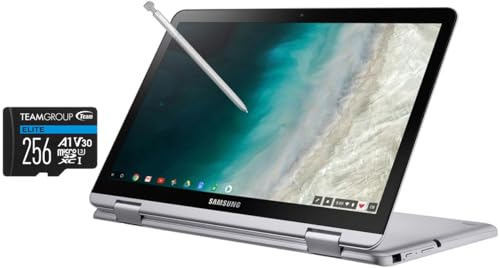
One of the most compelling aspects of this Chromebook is its incredibly versatile 2-in-1 design. It effortlessly transforms from a traditional laptop for typing documents to a tablet for relaxed browsing or reading, and even a tent mode for watching movies. This flexibility is a game-changer for different usage scenarios.
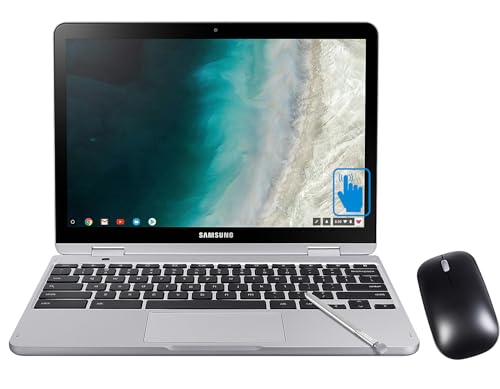
But the real magic lies with the built-in pen (stylus). Tucked neatly into the side of the device, it’s always ready when inspiration strikes. Whether you’re jotting down notes in a meeting, annotating PDFs, sketching out ideas, or simply navigating the touch screen with precision, the pen feels natural and responsive. This feature alone elevates the Chromebook Plus V2 beyond a standard laptop, making it a fantastic tool for creative minds and productivity enthusiasts alike.
Brilliant Display & Dual Cameras
The 12.2-inch Full HD (1920×1080) touch screen display offers crisp visuals and vibrant colors, making everything from video calls to streaming your favorite shows a pleasure. It’s bright enough for indoor use and provides a comfortable viewing experience.
A unique feature for a laptop is the inclusion of two cameras: a standard front-facing webcam for video calls and a rare 13MP rear-facing camera. The latter is perfect for snapping quick photos of whiteboards, documents, or anything else you need to capture on the fly when in tablet mode, adding a practical dimension often missing from other notebooks.
Performance Optimized for Chrome OS
Powered by an Intel Celeron processor and generally equipped with 4GB of RAM and 32GB of eMMC storage (expandable via microSD), the Chromebook Plus V2 is optimized for the lightweight and efficient Chrome OS. This means fast boot times, snappy performance for web browsing, document editing, and running Android apps from the Google Play Store. While it won’t be handling intensive video editing or hardcore gaming, it excels at its intended purpose: delivering a smooth and secure cloud-centric computing experience.
Portability & Build Quality
Weighing in at around 3 pounds, the Samsung Chromebook Plus V2 Home & Business 2-in-1 is remarkably portable. Its compact design slips easily into a backpack, making it an ideal companion for students and commuters. The build quality feels solid and durable for everyday use, giving you confidence in its longevity.
Long-lasting Battery Life
Battery life is crucial for any mobile device, and the Chromebook Plus V2 doesn’t disappoint. You can expect up to 10 hours or more on a single charge, depending on your usage, allowing you to power through a full day of classes, meetings, or entertainment without constantly searching for an outlet.
User Impressions: Living with the Chromebook Plus V2
In day-to-day use, the Samsung Chromebook Plus V2 feels incredibly intuitive. The touchscreen is responsive, the keyboard is comfortable for typing, and the trackpad is precise. The integration with Google services is seamless, and the ability to download Android apps truly expands its functionality, turning it into a multimedia and productivity hub.
Whether we were using it to write emails, stream Netflix, edit Google Docs, or quickly sketch an idea with the built-in pen, the device performed reliably. It’s truly a grab-and-go device that’s always ready. For those interested in picking one up, you can find the Samsung Chromebook Plus V2 Home & Business 2-in-1 right here: Samsung Chromebook Plus V2 Home & Business 2-in-1.
Pros & Cons
Like any product, the Chromebook Plus V2 has its strengths and minor weaknesses.
Pros:
* Highly Versatile 2-in-1 Design: Seamlessly switches between laptop, tablet, and tent modes.
* Integrated Pen (Stylus): Always available for notes, drawing, and precise navigation.
* Bright and Clear Full HD Touchscreen Display: Excellent for media consumption and productivity.
* Lightweight and Portable: Easy to carry for on-the-go use.
* Excellent Battery Life: Powers you through a full day of work or study.
* Fast and Secure Chrome OS: Quick boot times, automatic updates, and strong built-in security.
* Access to Android Apps: Expands functionality beyond web browsing.
* Dual Cameras: Adds unique utility for capturing images.
Cons:
* Limited Internal Storage: 32GB can fill up quickly, though expandable via microSD.
* Performance is Geared for Chrome OS: Not for heavy-duty tasks like video editing or graphic design.
* Keyboard Backlighting Missing: Can be an issue in low-light environments.
* Only USB-C Ports: May require adapters for older peripherals (though two are provided).
Who Is It Best For?
The Samsung Chromebook Plus V2 Home & Business 2-in-1 truly excels for a specific set of users:
- Students: Its portability, long battery life, note-taking capabilities with the pen, and affordability make it an ideal companion for school and college.
- Casual Home Users: Perfect for web browsing, streaming, social media, and light productivity tasks.
- Mobile Professionals: For those who primarily work within the Google ecosystem (Gmail, Docs, Sheets, Calendar) and need a lightweight, secure, and reliable device for meetings, presentations, and email on the go.
- Anyone in the Google Ecosystem: If you heavily rely on Google services, this Chromebook offers a seamless and integrated experience.
- Users Seeking Simplicity and Security: Chrome OS is known for its ease of use and robust security features, making it great for users who prefer a hassle-free computing experience.
If your primary computing needs revolve around web-based tasks, document creation, content consumption, and light productivity, this Chromebook offers exceptional value and versatility. For more details and to check current pricing, visit the product page: Samsung Chromebook Plus V2 Home & Business 2-in-1.
Conclusion: A Versatile Powerhouse for Everyday Life
The Samsung Chromebook Plus V2 Home & Business 2-in-1 stands out as a highly capable and incredibly versatile device. Its seamless transformation between laptop and tablet, coupled with the ever-present built-in pen, makes it a joy to use for a wide array of tasks. While it’s not designed to replace high-end Windows or macOS machines for intensive workloads, for the vast majority of everyday computing needs – from studying and working remotely to browsing and enjoying media – it delivers a fast, secure, and intuitive experience.
If you’re in the market for a reliable, portable, and adaptable device that brings the best of Chrome OS and Android apps together, the Samsung Chromebook Plus V2 is definitely worth considering. It’s a testament to how much functionality and flexibility can be packed into an accessible and user-friendly package.
Ready to enhance your productivity and creativity? Click here to learn more and bring home your own Samsung Chromebook Plus V2 Home & Business 2-in-1 today!
FAQ
Q. What operating system does the Samsung Chromebook Plus V2 Home & Business 2-in-1 use, and what kind of applications can it run?
A. The Samsung Chromebook Plus V2 runs on Google’s Chrome OS. This means it primarily uses web-based applications from the Chrome Web Store, but critically, it also fully supports Android apps from the Google Play Store. This significantly expands its functionality for productivity, entertainment, and creativity, allowing you to use many of your favorite mobile apps directly on the Chromebook. It cannot natively run Windows or macOS desktop applications.
Q. How does the “2-in-1” functionality work, and does it include a stylus?
A. The “2-in-1” design refers to its convertible nature, allowing you to fold the screen back 360 degrees to transform it from a traditional laptop into a tablet. It can also be used in tent or stand mode for media consumption. Yes, the Samsung Chromebook Plus V2 comes with a built-in, garaged pen that slides directly into the device for easy storage and charging. This pen is ideal for drawing, note-taking, annotating documents, and precise navigation on the touchscreen.
Q. What kind of storage does the Chromebook Plus V2 offer, and is it expandable?
A. The Samsung Chromebook Plus V2 typically comes with 32GB or 64GB of eMMC flash storage, depending on the specific model. While this might seem limited compared to traditional laptops, Chrome OS is designed to rely heavily on cloud storage (like Google Drive) for documents and files. Yes, the storage is expandable via a built-in microSD card slot, allowing you to add significant extra space for offline files, photos, and videos.
Q. What is the typical battery life of the Samsung Chromebook Plus V2 Home & Business?
A. The battery life of the Samsung Chromebook Plus V2 is generally excellent, designed to last through a full day of use. Users can typically expect to get up to 10-11 hours of usage on a single charge, depending on the specific tasks being performed (e.g., intensive video streaming will consume more power than light web browsing or document editing). This makes it highly portable and suitable for on-the-go productivity.
Q. What are the main connectivity options available on this Chromebook?
A. The Samsung Chromebook Plus V2 is well-equipped with modern connectivity. It features two USB-C ports, which are used for charging, data transfer, and connecting external displays (with a compatible adapter). It also includes one traditional USB 3.0 Type-A port for connecting older peripherals like flash drives or mice. Additionally, it has a 3.5mm headphone/microphone combo jack, a microSD card reader, and supports Wi-Fi 802.11ac and Bluetooth 4.0 for wireless connections.
Q. Is the Samsung Chromebook Plus V2 suitable for both home and business use, and for students?
A. Absolutely. Its “Home & Business” designation reflects its versatility. For home users, it’s great for browsing, streaming, social media, and light photo editing thanks to Android app support. For business and students, its light weight, long battery life, convertible design, and built-in pen make it ideal for taking notes, creating presentations, collaborating on documents (via G Suite or Microsoft Office web apps), and handling everyday productivity tasks. Its robust security features from Chrome OS also make it a reliable choice for sensitive information.
Q. What kind of processor does the Samsung Chromebook Plus V2 Home & Business typically come with, and is it powerful enough for multitasking?
A. The Samsung Chromebook Plus V2 Home & Business typically features an Intel Celeron or Intel Core m3 processor, paired with 4GB or 8GB of RAM. For Chrome OS, this configuration is generally very capable for most everyday tasks. It handles web browsing with multiple tabs, streaming video, running multiple Android apps simultaneously, and working on documents without significant slowdowns. While it’s not designed for heavy-duty video editing or gaming, it provides smooth performance for its intended use cases, including multitasking for productivity and educational purposes.
Related Posts:
– 10 Best Apps for Apple CarPlay: Your Ultimate Guide to a Smarter Drive
– 5 Best Wireless CarPlay Adapters for iPhone in

