
So, you’ve got an Android head unit in your car, but you’re missing out on the seamless integration of Apple CarPlay or Android Auto? You’re not alone! Many aftermarket Android stereos offer a world of apps and customization, but they don’t always come with native CarPlay or Android Auto support built-in. That’s where a dedicated dongle comes in handy. It’s like a magic little device that bridges the gap, allowing you to project your smartphone’s interface directly onto your car’s display.
Finding the best CarPlay dongle for Android head unit can feel like a maze, with so many options promising different features. Whether you’re looking for a wireless connection to keep your console clutter-free or a robust wired option for ultimate stability, we’ve got you covered. In this guide, we’ll dive deep into five of the top choices on the market, helping you pick the perfect one to upgrade your in-car experience. Let’s get started!
1. CarlinKit CarPlay Dongle (for Android Head Unit)
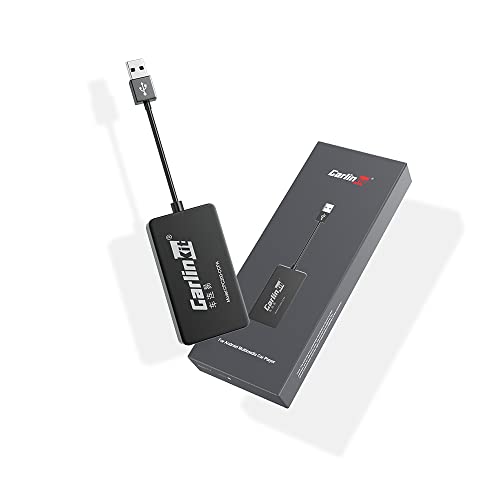
This CarlinKit dongle is a fantastic all-rounder for anyone looking to bring the power of CarPlay and Android Auto to their existing Android head unit. What makes it stand out is its versatility, offering both wired and wireless connectivity for both Apple and Android devices. It essentially transforms your car’s screen into a safer, smarter way to use your phone on the go, making navigation, music, and calls a breeze. Just remember, your Android head unit needs to be able to install the autokit.apk for this dongle to work its magic.
Key Features:
– Supports Wired CarPlay/Wireless CarPlay, Wired Android Auto/Wireless Android Auto
– Compatible with Android head units running Android 4.4.2 or above
– Works with iPhone 6+/iOS 10+ and Android phones with Android 11+
– Enables Voice Control, Siri, real-time GPS Navigation App, Online Music App, Screen Mirroring
– Operating speed dependent on your phone’s performance
Pros:
– Offers both wired and wireless options for maximum flexibility.
– Supports both Apple CarPlay and Android Auto.
– Easy to connect once the autokit.apk is installed.
– Enhances safety by minimizing phone distractions.
Cons:
– Requires autokit.apk installation, which some head units might not support.
– Not suitable for cars with OEM wired CarPlay or “boss android radio.”
– Performance can be limited by your phone’s speed.
User Impressions: Customers often praise this dongle for its dual compatibility and the convenience of going wireless. Many highlight how it truly transforms their aftermarket Android stereo into a modern, integrated system. The key to success, as many users note, is ensuring your specific Android head unit can properly install the required APK.
2. Showasaki Wired CarPlay Adapter USB Dongle for Android Car
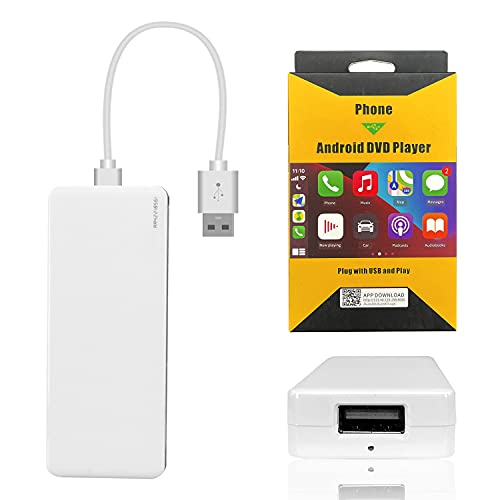
If stability and a straightforward wired connection are your top priorities, the Showasaki Wired CarPlay Adapter is an excellent choice. This USB dongle focuses on delivering a reliable connection for your iPhone or Android device to your Android car radio. It’s a simple plug-and-play solution (after the initial APK installation, of course!) that brings essential smartphone functions like navigation, calls, and music directly to your car’s screen, all controllable via voice or touch.
Key Features:
– Wired USB CarPlay/Android Auto connection
– Compatible with Android Car Radio systems 4.2 and above
– Supports iPhone 5+/iOS 9+ and Android 5.2+ phones
– Enables voice control (Siri), navigation, music, calls, and messages on car screen
– Supports online updates for the dongle
Pros:
– Provides a very stable and reliable wired connection.
– Simple plug-and-play operation after APK setup.
– Cost-effective solution for adding smartphone integration.
– Supports both Apple and Android phones.
Cons:
– Exclusively wired, so no wireless convenience.
– Requires initial APK installation, which might be a hurdle for some users.
– May require an original cell phone cable for optimal stability.
User Impressions: Users appreciate the Showasaki dongle for its consistent performance and ease of use, especially for those who prefer a wired connection for charging and data stability. It’s frequently recommended as a dependable and budget-friendly way to get CarPlay or Android Auto running on compatible Android head units.
3. CarlinKit Wireless CarPlay Car Adapter (for Android Car)

Another strong contender from CarlinKit, this wireless adapter specifically emphasizes freeing you from cables while still offering robust CarPlay and Android Auto functionality on your Android head unit. It’s perfect for those who crave a tidy car interior and quick, automatic connections every time you hop in. Beyond basic features, it also supports advanced functions like split-screen display for iOS (13 and above), making multitasking a breeze.
Key Features:
– Primarily Wireless CarPlay/Android Auto (also supports wired)
– Designed for Android head units with system 4.4.0 or above
– Compatible with Android phones 10+ and iPhone 6+/iOS 10+
– Supports Voice Control, Siri, GPS Navigation, Online Music, Phone Calls, Screen Mirroring
– Features online upgrade for dongle and AutoKit app versions
– Supports iOS (13+) multiple windows split screen display
Pros:
– Excellent wireless connectivity for a clutter-free dash.
– Offers online updates to keep firmware current.
– Supports advanced features like split-screen for iOS.
– Comprehensive compatibility with Android head units and phones.
Cons:
– Not suitable for cars with factory wired CarPlay.
– Still requires AutoKit APK installation on the Android head unit.
– Some users might need to tweak settings (frame rate, media delay) for optimal performance.
User Impressions: This dongle is highly rated for its convenience, especially the automatic wireless connection. Users love being able to just get in their car and have CarPlay or Android Auto immediately available. The troubleshooting tips provided by the manufacturer for occasional audio or lag issues are also appreciated by the community.
4. CarlinKit Wireless CarPlay & Wireless Android Auto (Built-in)

This CarlinKit dongle is geared towards delivering a truly wireless experience for both Apple CarPlay and Android Auto directly to your Android head unit. It focuses on core functionality, providing seamless access to voice commands, navigation (Google Maps, Waze, Mirrorlink), music, and messaging. It’s a great choice if you want a reliable connection without having to plug in your phone every time you drive.
Key Features:
– Exclusively Wireless CarPlay & Wireless Android Auto
– Supports Android system car head units 4.4.2 or above
– Compatible with iPhone IOS 9+ and Android mobile phones
– Enables Voice Control, Siri, GPS Navigation, Online Music, Phone Calls, Screen Mirroring
– Access messages, listen to music, use navigation, and play with U disk playback
– Requires Autokit APK installation and passing “Environment” test on car unit
Pros:
– Dedicated wireless functionality for both CarPlay and Android Auto.
– Wide compatibility with various iPhone and Android models.
– Integrates well with popular navigation and music apps.
– Manufacturer emphasizes quality control and customer support.
Cons:
– Not suitable for original car screens or cars already equipped with wired CarPlay/Android Auto.
– Requires specific Autokit APK installation and system “Environment” test to pass.
– No wired option if wireless proves unstable in rare cases.
User Impressions: Many users find this CarlinKit dongle to be a lifesaver for achieving wireless convenience. They particularly praise its robust voice control integration and the ability to connect swiftly. The key positive feedback revolves around its ability to bring a modern, wireless smartphone experience to older or basic Android head units.
5. 2-in-1 Wireless CarPlay Adapter Support Apple CarPlay & Android Auto

This 2-in-1 Wireless Adapter is a sleek, modern solution, but it’s important to understand its specific niche. Unlike the other dongles on this list that add CarPlay/Android Auto to a basic Android head unit, this one is ONLY designed for cars already equipped with wired Apple CarPlay and wired Android Auto. Its primary function is to convert that existing wired connection into a wireless one, offering cutting-edge speed and stability. If your Android head unit already has wired CarPlay/Android Auto, and you just want to go cable-free, this is a fantastic, high-tech option.
Key Features:
– Converts existing wired CarPlay/Android Auto to wireless
– Compatible with USB C and USB A ports
– Plug & Play: automatic connection via Bluetooth and 5.8 GHz WiFi
– Equipped with latest 5.8 GHz WiFi, Bluetooth 5.3, and A7 chip for fast, stable connection
– Compact, durable zinc-magnesium alloy construction
– Universal compatibility with over 1000+ car models (with existing wired CarPlay/AA)
– Supports OTA updates
Pros:
– Transforms existing wired CarPlay/Android Auto into wireless.
– Extremely fast and stable connection due to advanced chip and WiFi.
– Ultra-compact and durable design.
– Supports future updates via OTA.
Cons:
– Crucially, it does NOT add CarPlay/Android Auto to a bare Android head unit; it converts an existing wired connection to wireless.
– Not suitable if your Android head unit does not already have wired CarPlay/Android Auto.
– Higher price point compared to dongles that add the functionality.
User Impressions: Customers rave about the lightning-fast connection speeds and the convenience of cutting the cord when their car already has wired CarPlay. It’s often chosen by users with factory wired CarPlay systems who want to upgrade to wireless effortlessly. Users highlight its premium build quality and reliable performance.
Conclusion: Finding Your Best CarPlay Dongle for Android Head Unit
Choosing the best CarPlay dongle for Android head unit boils down to your specific needs. If you have an Android head unit that doesn’t natively support CarPlay or Android Auto and you want to add that functionality, the CarlinKit and Showasaki options are your go-to. The CarlinKit models offer fantastic versatility with both wired and wireless capabilities (and support for both Apple and Android devices), while the Showasaki provides a reliable wired experience.
However, if your Android head unit (or any car system) already has wired CarPlay or Android Auto, and you simply want to upgrade to a wireless connection, the 2-in-1 Wireless CarPlay Adapter is an excellent, high-tech choice. Just be sure to double-check your head unit’s compatibility and its ability to install the necessary APK (like autokit.apk) before making your final decision. Enjoy your enhanced driving experience!
FAQ Section
Q1: What exactly is a CarPlay dongle for an Android head unit?
A1: A CarPlay dongle (or Android Auto dongle) is a small USB device that plugs into your Android-based car stereo. It allows your Android head unit to run Apple CarPlay or Android Auto by projecting your smartphone’s interface onto the car screen, effectively adding functionality that isn’t natively built into the head unit.
Q2: Do I need to install any software on my Android head unit for these dongles to work?
A2: Yes, for most dongles designed to add CarPlay/Android Auto functionality to a generic Android head unit, you typically need to download and install a specific APK (like Autokit.apk) onto your head unit. This application manages the connection between the dongle and your phone. Always check the product description for the exact APK required and its download link.
Q3: Can these dongles make my wired CarPlay/Android Auto wireless?
A3: Some dongles are specifically designed for this purpose. For example, the “2-in-1 Wireless CarPlay Adapter” reviewed above is made to convert an existing wired CarPlay/Android Auto connection into a wireless one. However, most CarlinKit/Showasaki dongles target Android head units that don’t have CarPlay/Android Auto at all, adding the feature via an APK. Be sure to check the product’s primary function carefully.
Q4: Are these dongles compatible with all Android head units?
A4: Not all. Compatibility typically depends on the Android OS version of your head unit (e.g., Android 4.4.2 or higher) and its ability to install and run the required APK. Some specific head unit brands or highly customized systems might not be compatible. It’s always best to verify your head unit’s specifications and test APK installation if possible before purchasing.
Q5: What’s the difference between wired and wireless CarPlay/Android Auto dongles?
A5: Wired dongles require you to connect your phone to the dongle via a USB cable for the system to work. They offer very stable connections and often charge your phone. Wireless dongles connect your phone to the dongle via Wi-Fi and Bluetooth, allowing for a cable-free experience, but can occasionally be more susceptible to minor interference depending on the car’s environment.
Q6: What if my phone disconnects or lags while using the dongle?
A6: Disconnections or lag can occur for various reasons. For wireless connections, try ensuring your phone’s Wi-Fi and Bluetooth are stable and not interfering with other devices. Some dongles offer firmware updates (OTA updates) or specific settings adjustments (like frame rate or media delay) within their accompanying APK to improve performance. Using a high-quality USB cable for wired connections is also crucial.
Q7: Do these dongles support voice commands like Siri or Google Assistant?
A7: Yes, a primary benefit of using these dongles is gaining access to your smartphone’s voice assistant. Both Apple CarPlay and Android Auto are heavily integrated with Siri and Google Assistant respectively, allowing you to make calls, send messages, get directions, and control music completely hands-free.

