
Choosing the right dash cam is just the first step. To truly get the most out of your device, you need to nail down the best angle for dash cam placement. Think of it like a photographer trying to capture the perfect shot – a slightly off angle can miss crucial details or be obstructed. Getting your dash cam’s angle just right ensures you capture everything important on the road, from fender benders to scenic drives.
In this guide, we’ll dive into why angles matter, give you tips for finding that sweet spot, and review some top-notch dash cams and accessories that can help you achieve optimal recording, no matter your vehicle.
Why Your Dash Cam Angle Matters More Than You Think
A dash cam’s main job is to provide clear, indisputable evidence in case of an incident. But if your camera isn’t pointed correctly, that evidence might be blurry, incomplete, or even non-existent.
Here’s why finding the ideal angle is crucial:
- Comprehensive Coverage: A well-positioned camera captures not just the road ahead (or behind) but also adjacent lanes, road signs, and even pavements. This wide field of view minimizes blind spots.
- Clarity of Details: An unobstructed, level view helps the camera pick up crucial details like license plates, traffic lights, and facial features. If it’s tilted too high or low, these might be lost.
- Avoiding Obstructions: Improper placement can lead to the camera recording your dashboard, rearview mirror, or even reflections from the windshield, instead of the road.
- Legal Compliance: In some regions, there are regulations about where you can mount devices on your windshield to avoid obstructing the driver’s view. Getting the angle and position right helps you stay legal.
Ultimately, maximizing your dash cam’s effectiveness boils down to getting the best angle for dash cam operation.
Tips for Finding the Perfect Dash Cam Angle
Before we dive into our product reviews, here are some quick tips for finding that optimal recording angle:
- Mount High and Center: For front cameras, aim to mount it high on the windshield, usually behind your rearview mirror. This position offers a wide, unobstructed view and keeps the camera out of your direct line of sight.
- Level is Key: Ensure the camera is level with the horizon. Most dash cams have an adjustable lens. You want about 60% road and 40% sky in the frame. Too much sky can overexpose the video, while too much dashboard limits your view.
- Check for Obstructions: Before sticking it down, sit in your driving position and check the camera’s view. Are there wipers, tinted areas, or even dashboard reflections blocking the lens? Adjust as needed.
- Rear Camera Considerations: For rear cameras, aim to mount it high on the rear window, again, ensuring it’s level and captures the entire width of the road behind you. Avoid mounting in tinted areas if possible, as it can reduce video quality.
- Test Drive and Review Footage: The best way to confirm your angle is optimal is to take a short drive and then review the recorded footage. Look for clarity, coverage, and any missed details.
Our Top 5 Picks for Achieving the Best Dash Cam Angle
Whether you’re looking for a cutting-edge camera or the essential accessories to support perfect placement, these products have got you covered.
ROVE R2-4K Dash Cam Built-in WiFi 6 GPS Car Dashboard…
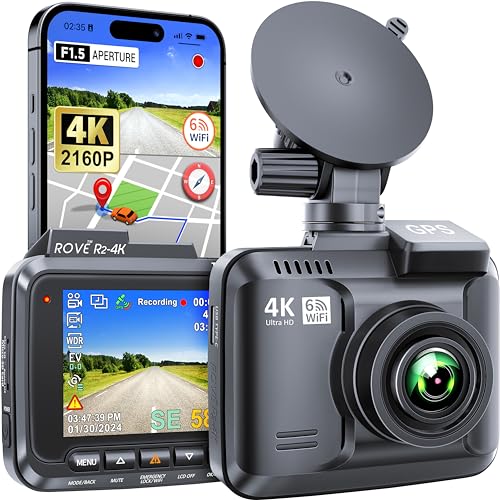
The ROVE R2-4K is a powerhouse when it comes to capturing crystal-clear footage, making it easier to ensure your chosen angle truly shines. Its 4K Ultra HD recording capability, combined with revolutionary Super Night Vision, means that even in challenging lighting conditions, the details you need are vividly captured. This camera’s advanced lens and sensor setup inherently makes the most of whatever angle you choose, providing superior clarity that often reveals details other cameras might miss.
- 4K ULTRA HD RECORDING: Captures videos up to 2160P, offering exceptional clarity and quality.
- Super Night Vision Technology: Features 6 Glass Lens + F1.5 Aperture + SONY IMX335 for clearer low-light footage.
- BUILT-IN WiFi 6: Seamlessly view and manage recordings on your smartphone via the ROVE App (up to 6MB/s download speed).
- DASH CAM WITH GPS: Accurately records driving location and speed, viewable on Google Maps via app or GPS Player.
- STATE-OF-THE-ART FEATURES: Includes Supercapacitor, 150° A+ wide-angle lens, G-sensor, loop recording, parking mode, motion detection, and supports up to 512GB SD card.
-
USA-BASED CUSTOMER CARE: Backed by a 1-YEAR WARRANTY and responsive customer support.
-
Pros:
- Outstanding 4K video quality, day and night.
- Fast WiFi 6 for quick file transfers.
- Reliable GPS tracking for location data.
- Robust build with supercapacitor for durability.
- Wide 150° field of view captures broad coverage.
- Cons:
- Memory card not included.
- No rear camera option in this model.
User Impressions: Users consistently praise the ROVE R2-4K for its stunning video quality, especially the night vision. The app connectivity is a big hit, allowing for easy access to footage. Many appreciate the responsive customer support, giving them peace of mind with their purchase.
EWAY USB C Dash Cam Power Cord 13ft, USB 2.0…

While not a dash cam itself, the EWAY USB C Power Cord is an unsung hero in achieving the best angle for dash cam installation. Its generous 13-foot length and thoughtful 90-degree USB-C connector are game-changers for clean, discreet wiring. This means you can easily route the cable along your windshield trim and down to your power source without unsightly dangling wires or having your camera dictated by cord length, allowing you the freedom to mount your dash cam precisely where it needs to be for the perfect view.
- USB C Dash Cam Cable: Compatible with all Type-C connector dash cameras, delivering consistent 5V power.
- 90 Degree Design: Space-saving right-angle USB-C connector, ideal for tight spaces and reducing cable stress.
- Stable Working Performance: Made of 20AWG pure copper wire for better heat dissipation and stable power transmission.
- Universal USB 2.0 Input: Works with any 5V USB 2.0 port (cigarette lighter, laptop, power adapter).
-
13ft USB C Cable: Extra-long 4-meter cord for versatile installation in various vehicle types (cars, SUVs, trucks).
-
Pros:
- Long length provides flexible routing options.
- 90-degree connector is excellent for discreet installations.
- Durable construction with pure copper wire for stable power.
- Universal USB A compatibility.
- Cons:
- Specific to USB-C dash cams.
- Only a power cable, no data transfer functionality.
User Impressions: Customers love the extra length and the angled connector, which makes professional-looking installations much easier. They report consistent power delivery, and many appreciate that it helps them hide wires, contributing to a cleaner car interior and an unobstructed view.
Maixbomr 90 Degree Dash Cam Micro USB Power Cable 11FT,…
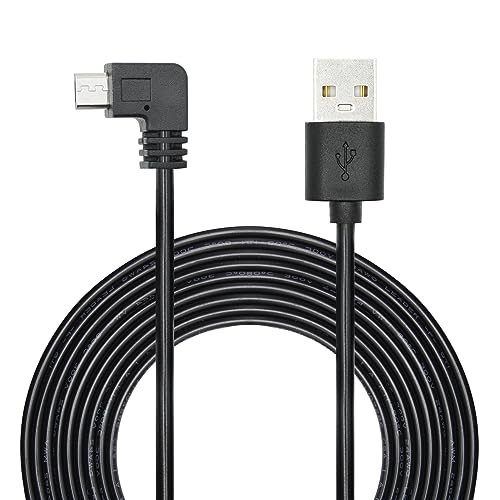
Just like its USB-C counterpart, the Maixbomr 90 Degree Micro USB Power Cable is an essential accessory for anyone looking to optimize their dash cam setup, especially if your camera uses a Micro USB port. Its 90-degree connector is a blessing for snug installations, preventing awkward cable bends and allowing you to tuck your dash cam right up against the windshield or headliner. The ample 11-foot length offers plenty of slack to route the cable discreetly, letting you place your dash cam exactly where you need it for the best angle for dash cam recording, without being constrained by short, rigid cables.
- Please Note: This is a power/charging cable only, no data sync.
- Right Angle Design: 90-degree micro USB connector for tight spaces, preventing cable damage and extending lifespan.
- High Quality Material: Made of high-quality PVC and 24AWG pure copper wire for lower resistivity and better conductivity.
- 3.5M/11FT Cable Length: Generous length for longer distance equipment use and discreet routing.
-
Widely Compatible: Works with most micro USB devices including dash cams, phones, tablets, and more.
-
Pros:
- Right-angle connector is perfect for stealthy installs and preventing cable stress.
- Long 11FT cable provides flexibility for routing.
- Durable materials for longevity.
- Compatible with a wide range of Micro USB devices.
- Cons:
- Does not support data transfer.
- Only for Micro USB devices.
User Impressions: Users highly recommend this cable for its right-angle design, which makes a significant difference in tight mounting spots. The long length is frequently praised for enabling neat, hidden wire setups, ensuring the dash cam is positioned perfectly without messy cables interfering.
Dash Cam Front and Rear: 4K Dual Channel Dash Cam…

The WANLIPO A13 dual dash cam simplifies achieving comprehensive coverage from both the front and rear of your vehicle. With 4K Ultra HD for the front and 1080P for the rear, it captures critical details with clarity. What truly makes this standout for finding the best angle for dash cam setup is its wide-angle lenses (170° front, 120° rear), which inherently reduce blind spots. The compact design allows for discreet mounting behind your rearview mirror, ensuring an unobstructed view while driving. Plus, with 5GHz WiFi and smart app control, fine-tuning your view and reviewing footage is incredibly seamless.
- 4K + 1080P Dual Recording: Crystal-clear 4K front and Full HD 1080P rear footage.
- Wide Angle Lenses: 170° front and 120° rear minimize blind spots for full coverage.
- 5GHz WiFi & Smart App Control: Connect via “Viidure” app (iOS/Android) for fast viewing, playback, and downloading.
- Loop Recording & 64GB SD Card: Ensures continuous recording by overwriting old files; includes a 64GB SD card.
- Built-In G-Sensor: Detects collisions and automatically locks footage to prevent overwriting.
- Parking Surveillance: Automatically records when vibrations/impacts are detected, even in low light.
- Compact & Easy to Install: Sleek design allows discreet mounting for an unobstructed view; 2.0″ IPS screen.
-
Exceptional After-Sales Support: Backed by a 1-Year Warranty and dedicated customer service.
-
Pros:
- High-resolution dual recording provides excellent coverage.
- Wide field of view reduces blind spots.
- Fast 5GHz WiFi and user-friendly app.
- Includes a 64GB SD card, ready to use out of the box.
- Effective G-sensor and parking mode for security.
- Cons:
- Some app features require membership.
- Rear camera resolution is 1080P, not 4K.
User Impressions: Reviewers often highlight the ease of installation and the reliable dual-channel recording. The clarity of the 4K front camera is a consistent highlight, and users appreciate the included SD card. The parking surveillance feature is also a big plus for vehicle security.
ROVE R2-4K DUAL Dash Cam Front and Rear, STARVIS 2…

For those who want absolute top-tier performance for both front and rear recording, the ROVE R2-4K DUAL is a stellar choice, making it easy to capture the best angle for dash cam footage from all directions. Its front camera boasts a Sony IMX675 STARVIS 2 sensor, ensuring unparalleled image quality, especially in low-light conditions, while recording at true 4K. Paired with a 1080P rear camera, you get comprehensive coverage. The ultra-fast 5G WiFi allows for rapid video downloads, making it convenient to check your angles and review footage quickly. This dual system, coupled with advanced features like 24/7 parking mode and built-in GPS, offers complete peace of mind.
- 4K FRONT + 1080P REAR RECORDING: Dual-channel recording (3840x2160P @30fps front, 1920x1080P @30fps rear) with wide 150° front and 140° rear angles.
- SONY STARVIS 2 SENSOR/SUPER NIGHT VISION: Front camera uses Sony IMX675 STARVIS 2 for exceptional image quality and vivid colors in challenging light; F1.5 front and F1.8 rear apertures.
- ULTRA FAST 5G WIFI: Built-in dual-band 5GHz and 2.4GHz WiFi for rapid video downloads (up to 20 MB/sec) and app management.
- CAR CAMERA WITH GPS: Built-in GPS displays real-time speed/compass on screen and records precise routes/locations for PC/Mac viewing.
- STATE-OF-THE-ART TECHNOLOGY: Includes free 128GB microSD card, f1.5 aperture, motion detection, G-sensor, loop recording, emergency lock, screen saver, voice guidance, supercapacitor, and up to 1TB microSD support.
-
24/7 CUSTOM DESIGNED PARKING MODE: Offers 1fps timelapse, motion detection, and collision detection (requires hardwire kit), with voice alerts for events.
-
Pros:
- Superior 4K front video quality with STARVIS 2 sensor for incredible low-light performance.
- Ultra-fast 5G WiFi for quick video transfers.
- Includes a generous 128GB microSD card.
- Comprehensive 24/7 parking mode options.
- Built-in GPS for speed and location tracking.
- Cons:
- Parking mode requires a separate hardwire kit.
- Rear camera is 1080P, not 4K.
User Impressions: Users are highly impressed with the ROVE R2-4K DUAL’s video clarity, especially its night vision capabilities. The fast WiFi and included large SD card are frequently cited as major advantages. Many find the extensive parking mode features and voice guidance very useful, although they note the need for the separate hardwire kit.
Frequently Asked Questions About Dash Cam Angles
Q1: How high should I mount my dash cam on the windshield?
A: Generally, it’s best to mount your front dash cam high on the windshield, usually behind or slightly to the side of your rearview mirror. This provides the widest, most unobstructed view of the road and keeps the camera out of your direct line of sight while driving.
Q2: What is the ideal angle for a front dash cam?
A: The ideal angle for a front dash cam is one that captures about 60% road and 40% sky. You want the horizon to be roughly in the middle of the frame. This ensures you capture enough of the road for details like license plates and traffic lights, without too much sky causing overexposure.
Q3: Should a rear dash cam be angled up or down?
A: Similar to a front dash cam, a rear dash cam should be angled to capture a balanced view of the road behind you. Aim for a level view that includes the entire width of the road, typically about 50-60% road and 40-50% sky/rear window area. Avoid pointing it too high (just sky) or too low (just bumper).
Q4: Can a dash cam installation be illegal?
A: Yes, in some jurisdictions, mounting a dash cam in a way that significantly obstructs the driver’s view can be illegal. Always check local laws regarding windshield obstructions. Mounting it high and centrally, behind the rearview mirror, is generally compliant and safest.
Q5: Does extreme heat or cold affect dash cam placement?
A: While placement doesn’t directly affect temperature, where you place it can matter. Avoid direct sunlight exposure for prolonged periods if possible. Opt for dash cams with supercapacitors (instead of batteries) as they are much more resistant to temperature extremes, ensuring reliable operation regardless of the weather.
Q6: What if my dash cam obstructs my view?
A: If your dash cam is obstructing your view, it’s likely mounted incorrectly. Try moving it higher, behind your rearview mirror, or to a less intrusive spot on your windshield, always prioritizing an unobstructed view of the road. Test different positions before permanently affixing it.
Q7: How does a wide-angle lens affect the best angle?
A: A wide-angle lens (e.g., 150° or 170°) helps capture a broader field of view, reducing blind spots. While beneficial, you still need to ensure the camera is level and not pointing too high or low. The wide-angle helps capture more within that optimal vertical alignment, making it easier to get comprehensive coverage without missing details on the sides.
Final Thoughts
Finding the best angle for dash cam installation might seem like a small detail, but it makes a world of difference in the effectiveness of your device. By choosing a quality dash cam and pairing it with the right accessories for flexible, discreet installation, you can ensure that your vehicle is always protected and every important moment on the road is captured with clarity. Drive safe, and happy recording!

