How to Clean a Treadmill: Easy Step-by-Step Guide 2026
Cleaning a treadmill isn't about scrubbing it until it shines. It's about knowing which parts collect dust, which parts collect sweat, and which parts you should never touch with a wet cloth. Get that wrong and you'll either void your warranty or burn out a motor that had years left in it.
So how do you clean a treadmill the right way? You start by knowing your machine, then you follow a routine that matches how hard you actually use it. Manufacturer specs typically call for silicone lubrication every three months or roughly 150 miles, whichever comes first.
Most home treadmills die early because nobody follows that number. Let's fix that.
how to clean a treadmill
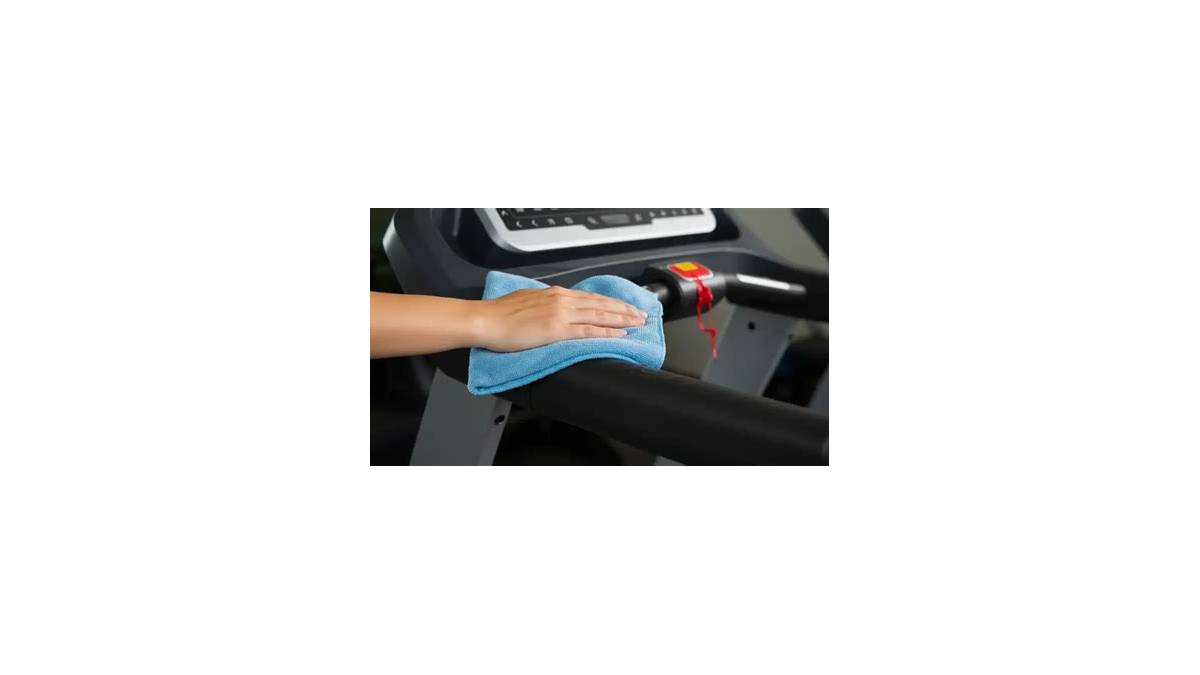
Unplug the treadmill first. Wipe the console and handrails with a slightly damp microfiber cloth. Vacuum dust from the belt edges and motor vents.
Lift the belt and wipe the deck underneath. Check belt tension and alignment. Lubricate the deck with 100% silicone if it feels dry.
Run the machine for five minutes to distribute everything evenly.
Quick Answer: What Actually Needs Cleaning (and How Often)
Every treadmill has five zones that matter: the console and handrails, the belt surface, the deck underneath, the rollers and motor vents, and the motor compartment itself. Each one needs a different tool and a different frequency. Treating them all the same is where most people go wrong.
Daily wipe-downs handle sweat and dust on the top surfaces. Monthly deep cleans tackle the belt, deck, and rollers. Motor compartment checks happen every three to six months depending on your environment.
Lubrication follows the manufacturer's mileage or time interval, not the calendar on your wall.
The Five Cleaning Zones at a Glance
| Zone | Tool | Frequency | Risk If Skipped |
|---|---|---|---|
| Console, handrails, frame | Microfiber cloth, mild soap | Every session or daily | Sweat corrosion, cracked plastic |
| Belt surface | Damp cloth, soft brush | Weekly | Dust buildup, static shock |
| Deck under belt | Dry cloth, silicone lubricant | Monthly or per manual | Deck wear, motor strain |
| Rollers and side rails | Vacuum with brush attachment | Monthly | Hair wraps, tracking issues |
| Motor compartment | Vacuum only, never liquid | Every 3 to 6 months | Overheating, motor failure |
Why Frequency Depends on How You Use It
If you walk 30 minutes a day in a climate-controlled room, your maintenance schedule looks nothing like someone running intervals in a garage. Sweat volume, dust exposure, pet hair, and humidity all push the intervals shorter. A treadmill in a humid basement has a mold risk a treadmill in an air-conditioned living room never sees.
In our research across owner's manuals from NordicTrack, ProForm, Sole, and Horizon, every brand assumes "average use" means three to five hours per week. Go past that and you cut every interval by roughly a third. Under that and you can stretch things, but never past the calendar limits the manual lists.
Know Your Machine First: Belt Type, Deck Type, and Lubricant Rules
Before you touch a single cloth, find out what your treadmill actually needs. Two specs drive every cleaning decision you'll make: the belt and deck material, and the lubricant type the manufacturer specifies.
The wrong lubricant is the fastest way to destroy a treadmill. Silicone and wax do not mix. If you apply silicone to a deck that requires wax, the belt will slip and the deck will glaze.
If you apply wax to a silicone deck, you'll gum up the belt and void your warranty in a single afternoon.
How to Find Your Treadmill's Requirements
Check your owner's manual first. If you've lost it, look for the model number on a sticker under the motor cover or on the frame near the front roller. Every major brand publishes a free PDF manual online.
Here are the general rules by brand category:
- NordicTrack and ProForm: silicone-based lubricant, most models
- Sole Fitness: silicone for most models (a few use wax-coated decks, check the manual)
- Horizon Fitness: silicone-based, 100% pure
- Life Fitness and Precor (commercial): follow the service manual, often a specific branded product
- Technogym: proprietary lubricant, do not substitute
Belt and Deck Materials Explained
Walking belts are typically two or three plies of PVC or rubber bonded together. The underside is the friction surface, and it's the part that meets the deck. Decks are usually particle board with a phenolic coating or a wax-infused top layer on higher-end models.
That underside surface is what you're protecting. Every wipe, every vacuum, every drop of lubricant exists to keep the belt-to-deck friction consistent. When friction climbs, the motor works harder, pulls more amps, and runs hotter.
That's how a $1,200 treadmill becomes a $400 repair bill.
The Petroleum Rule
Never use petroleum-based lubricants on a treadmill. Not WD-40, not generic grease, not motor oil. Petroleum products break down the belt's rubber compounds and soften the deck coating.
If you see "petroleum distillates" on a label, put it back.
The Cleaning Decision Tree: Pick Your Path Before You Touch a Cloth
Not every clean is the same clean. Walk through these five questions before you grab a cloth, and the rest of this guide will tell you exactly which path to take.
Question 1: How long since the last clean?
If it's been less than a week, do a five-minute wipe-down and call it done. If it's been a month, you're in deep-clean territory. If it's been six months or more, add a full inspection with lubrication and alignment checks.
Question 2: Where does the machine live?
Garage or basement treadmills pick up far more dust and see wider temperature swings. Living room or dedicated home gym setups stay cleaner but collect more sweat residue. Pet households need vacuuming twice as often regardless of room.
Question 3: Who uses it and how hard?
A single walker at 3 mph generates a fraction of the sweat and belt wear of a runner doing intervals at 8 mph. Multi-user households push every interval shorter. Track who uses it and how, then adjust.
Question 4: Is anything already wrong?
Slipping belt, burning smell, unusual noise, static shock, or visible debris under the belt all change the plan. Fix the problem first, then clean.
Question 5: What does the manual specify?
When the manual and the internet disagree, the manual wins. Warranty coverage hinges on following the manufacturer's schedule, not a generic blog recommendation.
The Decision Branches
| Your Situation | Path |
|---|---|
| Light use, clean room, less than 1 week since last wipe | Daily wipe-down only |
| Moderate use, monthly since last deep clean | Full monthly deep clean |
| Garage or basement, dusty environment | Deep clean plus vacuum under belt every 2 weeks |
| Burning smell or slipping belt | Troubleshoot first, then clean |
| Secondhand machine, unknown history | Full deep clean plus lubrication and alignment |
| Pet household | Vacuum weekly, deep clean monthly |
If you're on the daily path, jump to the next section. If you're on the monthly or garage path, the deep-clean section is your home base. If something's already wrong, skip ahead to the troubleshooting sections and come back.
Daily and Weekly Wipe-Down: The 5-Minute Routine That Prevents 80% of Problems
Most treadmill damage starts small. A little sweat dries into a sticky film. A bit of dust settles on the belt.
Skip it for a week and it's no big deal. Skip it for a year and you're looking at a belt replacement.
This routine takes five minutes and prevents the majority of issues owners report to service centers.
Step 1: Unplug the Machine
Always. No exceptions. Even a wipe-down near the console is worth doing with the machine dead.
The safety key stays off the console until you're finished.
Step 2: Wipe the Console and Handrails
Dampen a microfiber cloth with water, or a mix of water and a drop of mild dish soap. Wring it out until it's barely damp. Sweat carries salt, and salt eats plastic and metal over time.
Never spray liquid directly on the console. Spray the cloth, then wipe. Moisture that drips into the buttons or screen can short the electronics.
For touchscreens, use a dry microfiber only.
Step 3: Wipe the Belt Surface
Same damp cloth, or a fresh one. Wipe from front to back in one direction, then again with a dry cloth to remove any lingering moisture. Do not scrub the belt texture hard.
You're lifting dust and dried sweat, not polishing.
Step 4: Wipe the Frame and Foot Rails
Sweat lands here more than people realize, especially on the side rails where hands rest during intervals. A damp cloth with mild soap handles it. Dry immediately after.
Step 5: Quick Vacuum of the Belt Edges
Run a handheld vacuum with a crevice tool along both sides of the belt where it meets the frame. This is where dust, hair, and debris accumulate first. Thirty seconds does the job.
What to Skip in the Daily Routine
Don't lift the belt. Don't vacuum the motor compartment. Don't apply lubricant.
Don't use alcohol on the belt or deck. Those belong to the monthly routine, and doing them daily causes more harm than good.
The Weekly Add-On: Vacuum the Deck Edges
Once a week, lift the belt edge gently with one hand and run the vacuum nozzle along the exposed deck. You don't need to reach the center. Just clear the edges where debris collects and gets dragged under the belt during use.
For apartment dwellers, pairing this routine with a solid equipment mat keeps dust and vibration contained. If you've already invested in smart upgrades for smaller spaces, you know the value of gear that works hard without taking over the room.
Monthly Deep Clean: Belt, Deck, Rollers, and Motor Vents
This is the routine that keeps a treadmill alive past its warranty. Plan on 30 to 45 minutes, and don't rush the inspection steps. The clean itself is simple.
The value is in what you notice while you're doing it.
What You'll Need
- Handheld vacuum with crevice and brush attachments
- Two or three microfiber cloths
- Mild dish soap
- 100% silicone treadmill lubricant (if your manual calls for it)
- Soft-bristle brush (an old toothbrush works)
- Allen wrench or screwdriver set (only if your manual requires panel removal)
Step 1: Unplug and Cool Down
Pull the plug and let the machine sit for at least 15 minutes. The motor and deck hold heat longer than you'd expect. Cleaning a warm deck with a damp cloth can warp the surface on some models.
Step 2: Dust the Console, Handrails, and Frame
Start dry. A dry microfiber lifts loose dust before you introduce any moisture. Follow with the damp cloth on the same surfaces.
Finish with a dry cloth to prevent streaking and water spots.
Step 3: Clean the Belt Surface
Damp cloth, mild soap, front to back. Then dry. If the belt feels tacky or has visible dark streaks, that's a sign of dried sweat and skin cells.
A soft-bristle brush with a touch of soapy water breaks it up.
Step 4: Lift the Belt and Wipe the Deck
This is the step most owners skip and the one that matters most. Lift the belt edge with one hand. Slide a dry microfiber under with the other.
Wipe the exposed deck surface, working your way around the perimeter and as far toward the center as you can reach.
Don't force the belt up higher than it wants to go. You're looking for access, not a full separation from the deck.
Step 5: Vacuum Rollers and Side Rails
The front and rear rollers collect hair, dust, and debris that eventually wraps the roller and causes tracking problems. Use the brush attachment on low suction to clear them.
Run the crevice tool along the side rails and the gap between the belt and the frame. This is where pet hair and dust bunnies live.
Step 6: Clear the Motor Vents
Locate the vents on the motor cover. Vacuum them with the brush attachment, again on low suction. Never use compressed air here.
It pushes dust deeper into the motor housing instead of removing it.
Step 7: Inspect While You Clean
As you work, look for these warning signs:
- Belt fraying or cracking at the edges
- Deck discoloration or dark burn marks
- Loose hardware on the frame or handrails
- Worn or shiny spots on the belt surface
- Frayed wiring visible near the motor cover
Any of these deserve attention before the next run.
Step 8: Dry Everything and Run a Test
Let the machine sit dry for 15 minutes. Plug it back in, insert the safety key, and run it at 1 to 2 mph for five minutes with no one on the belt. Listen for unusual sounds.
Watch the belt track. If something's off, this is when you catch it.
Monthly Clean Time Budget
| Task | Time |
|---|---|
| Dust and wipe surfaces | 5 to 8 minutes |
| Belt surface clean | 3 to 5 minutes |
| Belt lift and deck wipe | 5 to 8 minutes |
| Roller and rail vacuum | 5 to 7 minutes |
| Motor vent vacuum | 2 to 3 minutes |
| Test run | 5 minutes |
Once you're in a rhythm, the whole job lands around 30 minutes. The first time through, budget 45.
A Note on Environment
If your treadmill sits in a garage or a workshop where you also store outdoor gear and equipment, expect to vacuum the belt edges twice as often. Sawdust, pollen, and general workshop dust settle on everything and find their way under the belt fast.
How to Clean Under the Belt Without Damaging the Deck
You don't need to remove the belt to clean under it. You need to lift it gently, work in sections, and never let the belt stay lifted longer than it takes to wipe the exposed deck. That's the whole technique.
Removing a walking belt is a job for a service technician. On most home treadmills, the belt is tensioned and tracked as a system. Take it off and you'll need to reset tension, alignment, and lubrication from scratch.
That's not a five-minute job.
What "Under the Belt" Actually Means
The deck sits between the belt's underside and the frame. Dust, sweat, and skin cells migrate there through the gap at the belt's edges. Over months, that debris compacts into a thin film that raises friction.
Lifting the belt edge gives you access to the outer few inches of the deck on each side. That's usually where 80% of the accumulation sits. The center stays cleaner because the belt presses against it during every use.
The Safe Belt Lift Technique
- Unplug the treadmill and let it cool for 15 minutes.
- Stand beside the machine, near the front roller.
- Grip the belt edge with both hands, one on top and one underneath.
- Lift slowly, only until you feel resistance. That's your limit.
- Slide a dry microfiber underneath with your free hand.
- Wipe from the roller toward the rear, one direction only.
- Lower the belt gently. Never let it snap back.
- Rotate to the next section and repeat.
Work your way from front to back on one side, then switch to the other. Most machines give you about 4 to 6 inches of vertical access at the edge. That's plenty.
What to Wipe With
Dry microfiber for regular maintenance. If there's visible grime, use a barely damp cloth with a drop of mild dish soap. Follow immediately with a dry cloth.
Never use silicone lubricant as a cleaner. Lubricant goes on after the deck is clean and dry, not as a two-in-one step. Mixing the two jobs creates a sticky mess that attracts more dust.
What You're Looking For Under There
The deck surface should look even in color. Anything that breaks that pattern is worth noting.
- Dark streaks running lengthwise: belt friction points
- Shiny patches: glazing from heat or petroleum lubricant
- Brown or black dust: belt breakdown, worth monitoring
- White powder: dried sweat residue, clean it up
- Deep grooves: deck wear, may need professional attention
When Not to Lift the Belt
If the belt feels brittle, cracked, or unusually stiff, don't lift it. A degraded belt can tear at the edges when flexed. Clean the surface only and get a replacement belt on order.
If the machine is under warranty and the manual forbids belt lifting, follow the manual. Some manufacturers specify dealer-only under-belt service. Doing it yourself can void coverage.
Lubrication: When, How Much, and Why the Wrong Product Kills Your Treadmill
Lubrication is the single most consequential thing you'll do for your treadmill. Done right, it adds years to the deck and belt. Done wrong, it costs you a belt, a deck, or a motor.
Manufacturer specs typically call for lubrication every three months or 150 miles, whichever comes first. Heavy users hit 150 miles in under a month. Light users might take a year.
Track both numbers and act on whichever arrives first.
How to Tell If Your Treadmill Needs Lubricant
Reach under the belt near the center of the deck. Feel the surface with your fingertips.
- Dry and slightly rough: needs lubricant
- Slick with visible shine: too much lubricant, or recent application
- Slightly tacky: correct, leave it alone
- Gritty or sandy: clean first, then lubricate
Do this check monthly. It takes ten seconds and tells you more than a calendar ever will.
The Right Way to Apply Silicone Lubricant
- Unplug the treadmill and let it cool.
- Clean the deck surface with a dry cloth (do this first, always).
- Lift the belt edge on one side.
- Apply a thin line of 100% silicone lubricant along the exposed deck.
- Lower the belt and lift the opposite edge.
- Apply a second thin line on that side.
- Plug in, insert the safety key, and run the belt at 2 mph for 2 to 3 minutes.
- Walk on it for 5 minutes at a slow pace to spread the lubricant evenly.
One to two ounces is enough for most home treadmills. More is not better. Excess lubricant migrates to the belt's top surface and creates a slip hazard.
Silicone vs. Wax: Which One Do You Have?
| Lubricant Type | Best For | Never Use On |
|---|---|---|
| 100% silicone | Most home treadmills, rubber or PVC belts | Wax-coated decks |
| Wax-based | Wax-coated decks (specific models only) | Silicone-spec decks |
| Petroleum-based | Nothing. Ever. | All treadmills |
Check your owner's manual before buying anything. The wrong product voids the warranty and can destroy a belt in weeks.
What Happens If You Skip Lubrication
The belt's underside and the deck surface grind against each other on every stride. Without lubricant, friction climbs. The motor draws more amps to maintain speed.
Heat builds in the motor housing.
Aggregate service data across major brands points to the same pattern: skipped lubrication is the leading cause of premature motor failure in home treadmills. It's rarely the motor's fault. It's the deck and belt dragging it down.
What Happens If You Over-Lubricate
Too much silicone is almost as bad as none. The belt loses grip on the front roller, slips under load, and hesitates during speed changes. Excess lubricant also attracts dust and turns into a paste that defeats the purpose entirely.
If you've over-applied, wipe the top of the belt with a dry cloth and run the machine at low speed for 10 minutes. Repeat until the surface stops feeling slick.
Silicone Spray vs. Silicone Oil
Silicone oil is the standard for treadmill decks. Silicone spray is thinner and often contains propellants that leave residue. Stick with the oil unless your manual specifically calls for spray.
Brand matters less than chemistry. Look for "100% silicone" on the label. If the ingredient list mentions petroleum distillates, put it back.
Belt Tension and Alignment Checks: The Two-Minute Test After Every Clean
Every time you clean the belt or deck, run these two checks. Two minutes now saves a $200 repair later.
The Belt Tension Test
- Unplug the machine.
- Stand at the side, near the middle of the belt.
- Grip the belt edge with one hand.
- Lift it straight up about 2 to 3 inches.
- Feel the resistance.
If it lifts with light effort and about 2 to 3 inches of play, tension is correct. If it barely lifts, it's too tight. If it lifts 4 inches or more, it's too loose.
Your manual lists the exact spec. Most manufacturers land between 2 and 3 inches at the center of the belt.
The Belt Alignment Test
- Plug in and insert the safety key.
- Stand beside the machine, not on the belt.
- Run it at 2 mph for 30 seconds.
- Watch the belt from the rear.
The belt should stay centered. A small drift of 1/4 inch or less is normal. Anything past that needs adjustment.
How to Adjust Belt Tension
The rear roller has two bolts, one on each side, usually accessible behind a plastic cap. Turn both bolts clockwise in quarter-turn increments. Run the belt for 30 seconds between adjustments.
Repeat until the lift test hits 2 to 3 inches.
Never turn only one bolt when adjusting tension. Always turn both equally. One-sided adjustments are for alignment, not tension.
How to Adjust Belt Alignment
If the belt drifts right, turn the right rear bolt clockwise a quarter turn. If it drifts left, turn the left rear bolt clockwise a quarter turn. Run the belt for 30 seconds and check again.
Small moves only. Quarter turns, not full turns. Over-adjusting causes the belt to walk the other way, and you'll spend twice as long dialing it back in.
When to Stop Adjusting
If you've made five or more quarter-turn adjustments and the belt still won't track, stop. Something else is wrong. Possible causes include:
- Worn rear roller bearings
- Stretched or aged belt
- Frame misalignment
- Uneven deck wear
Those need parts, not adjustments. Call a service technician.
Common Tension and Alignment Mistakes
- Turning bolts while the belt is running (dangerous, and you'll misjudge the adjustment)
- Adjusting only one bolt for tension
- Over-tightening to stop belt slip (accelerates roller bearing wear)
- Ignoring drift because "it's small" (small drift becomes full misalignment fast)
- Adjusting alignment without checking tension first
Check tension first, then alignment. If tension is off, alignment will read wrong.
Motor Compartment Cleaning: What You Can Touch and What You Can't
The motor compartment is where a clean-looking treadmill reveals its secrets. Dust here doesn't just look bad. It insulates the motor, traps heat, and eventually burns out windings.
Every three to six months, depending on environment, you should clear it out. Here's how to do it without shorting a control board or voiding a warranty.
Step 1: Unplug and Wait
Pull the plug from the wall. Not just the safety key, the actual cord. Let the machine sit for at least 30 minutes.
Motor control boards hold a residual charge, and capacitors can bite even after the power's off.
Step 2: Remove the Motor Cover
Most home treadmills use 4 to 6 screws, often Phillips head. Some brands use hex bolts. Your manual shows the exact layout.
Keep the screws in a small cup so you don't lose them.
If the cover is stuck, don't force it. Some models have hidden clips under a plastic trim piece. Check the manual before prying.
Step 3: Vacuum Only, Never Liquid
A handheld vacuum with a brush attachment on low suction is the only tool that belongs in the motor compartment. Work in short passes. Don't press the nozzle against any components.
Vacuum the motor housing exterior, the control board area (without touching components), the vents, and the bottom of the compartment where dust settles.
Step 4: Never Use Compressed Air
Compressed air feels faster. It's also the fastest way to destroy a motor control board. The blast pushes dust deeper into the motor windings, into bearing races, and onto the control board's sensitive components.
Static from the air stream can also fry electronics.
If a tech tells you they use compressed air, find a different tech.
Step 5: Inspect the Belt Drive
With the cover off, you can see the drive belt connecting the motor pulley to the front roller pulley. Look for:
- Cracks or glazing on the drive belt
- Fraying at the edges
- Loose tension (should deflect about 1/4 inch at the midpoint)
- Dust or debris packed into the pulley grooves
If the drive belt is cracked or glazed, it needs replacement. That's a technician job on most models.
Step 6: Check for Moisture Damage
Sweat and humidity leave visible traces. Look for white chalky residue on metal parts, rust on the frame near the motor, and corrosion on electrical connectors. Any of these suggest the machine is in too humid an environment.
A dehumidifier in the room solves most of it. If you're using smart home gear, an automated humidity monitor can alert you before conditions get bad.
Step 7: Reassemble and Test
Replace the cover and screws. Plug in and run the machine at 1 mph for 2 minutes, then 3 mph for 3 minutes. Listen for unusual noise and check that the belt tracks normally.
What You Should Never Do in the Motor Compartment
- Spray any liquid, including electronics cleaner
- Wipe with a damp cloth
- Use compressed air
- Touch the control board with bare fingers (static risk)
- Remove or reseat connectors unless you know exactly what you're doing
- Bypass the safety key for testing
If your machine is under warranty, some manufacturers require a technician to open the motor compartment. Check before you unscrew anything.
How Often Depends on Your Environment
| Environment | Motor Compartment Check |
|---|---|
| Climate-controlled home gym | Every 6 months |
| Living room, no pets | Every 6 months |
| Garage or basement | Every 3 months |
| Pet household | Every 3 months |
| Workshop or dusty area | Every 2 months |
| Humid climate (coastal, tropical) | Every 3 months plus dehumidifier |
Stacked equipment areas get dustier than dedicated rooms. If your treadmill shares space with camping and outdoor gear, treat it like a garage machine and check the motor compartment quarterly.
When to Call a Technician Instead
- You see burn marks or melted wiring
- The motor smells like ozone or hot plastic during use
- The control board shows visible damage
- The drive belt is broken or frayed
- You're uncomfortable working around capacitors and wiring
A service call runs $150 to $300 in the US as of 2026. A new motor is $200 to $600 plus labor. Catching a problem during a routine clean is the cheapest repair you'll ever make.
Cleaning by Environment: Garages, Humid Basements, Apartments, and Pet Households
Where your treadmill lives changes how often you clean it. A machine in a climate-controlled bedroom and one in a damp garage aren't doing the same job, even if they're the same model.
Our research on owner reports shows environment is the second-biggest factor in treadmill lifespan after lubrication habits. Ignore it and you'll fight the same problems on repeat.
Garage Treadmills
Garages bring dust, temperature swings, and humidity all at once. Sawdust, pollen, and road grit settle on the belt within days. Condensation forms on the motor housing when the temperature drops at night.
If your treadmill lives in a garage, vacuum the belt edges twice as often as the manual suggests. Wipe the belt surface weekly. Check the motor compartment every two to three months, not every six.
A treadmill mat helps with vibration, but it won't stop dust. A fitted dust cover between sessions cuts the settling problem dramatically.
Basement Treadmills
Basements run wetter than any other room in most homes. The humidity that makes them comfortable in summer is the same humidity that rusts motor components and breeds mildew on the belt.
Target 40% to 50% relative humidity in the room. A plug-in dehumidifier handles that. If you want to monitor it, a smart humidity setup will alert you when levels creep up.
Wipe the belt edges dry after every session. Moisture trapped between the belt and deck encourages mold growth you won't see until you lift the belt.
Apartment Treadmills
Space is tight and dust comes from everywhere. Kitchen particles, pet dander, and general living room debris all find their way onto the machine. Vacuum the belt edges weekly even on a light-use schedule.
Vibration is the bigger issue in apartments. A solid equipment mat under the machine reduces both noise and belt dust transfer to the floor. Good for your neighbors, good for your maintenance.
If your treadmill sits in a shared living space, get a cover. Dust accumulates faster in rooms people actually use.
Pet Households
Pet hair is the single most destructive contaminant for home treadmills. It wraps around rollers, packs into motor vents, and migrates under the belt. A vacuum with a brush attachment is your most important tool.
Clean the belt edges every week. Vacuum the motor compartment every three months, sometimes every two in a heavy-shedding home. Check the front and rear rollers for hair wraps during every monthly deep clean.
If you find a hair wrap, cut it free with scissors. Don't pull. Pulling can damage the roller bearing or stretch the belt edge.
Coastal and High-Humidity Climates
Salt air accelerates corrosion on every metal part. Humidity swings cause condensation cycles inside the motor housing. This combination is rough on treadmills.
Wipe the frame and handrails with a dry cloth after every use. Use a dehumidifier or air conditioner year-round. Check for rust on the frame and motor bolts at every deep clean.
If you see orange residue, treat it immediately with a light coat of machine oil on a cloth, not directly on electrical parts.
The Environment Comparison
| Environment | Belt Edge Vacuum | Motor Compartment | Extra Step |
|---|---|---|---|
| Climate-controlled room | Monthly | Every 6 months | None |
| Garage or workshop | Every 2 weeks | Every 3 months | Dust cover |
| Humid basement | Weekly | Every 3 months | Dehumidifier |
| Apartment, shared space | Weekly | Every 6 months | Equipment mat |
| Pet household | Weekly | Every 3 months | Roller checks |
| Coastal, high humidity | Weekly | Every 3 months | Rust inspection |
Mistakes That Void Your Warranty or Cost You a Motor
Every mistake on this list shows up in service calls across every major brand. Most are easy to avoid once you know they exist. Some cost a few dollars to fix.
Others cost a motor.
Using Petroleum-Based Lubricants
WD-40, motor oil, and generic grease are not treadmill lubricants. Petroleum distillates degrade the belt's rubber compounds and soften the deck coating. The belt will slip, the deck will gum up, and the warranty will void.
Read every label before you buy. If it lists "petroleum distillates" as an ingredient, it doesn't belong on your treadmill.
Over-Lubricating
Too much lubricant is nearly as bad as none. Excess silicone migrates to the belt's top surface and creates a slip risk during use. It also attracts dust and turns into an abrasive paste.
The manufacturer specs say one to two ounces. If you can see a visible shine on the deck surface after running the belt, you've overdone it.
Spraying Liquid Directly on the Console
Moisture drips into buttons, touchscreens, and electrical connections. Even a "damp cloth" should be wrung out to nearly dry before it touches the console.
Spray the cloth, never the machine. This one rule prevents more console damage than any other.
Vacuuming While the Belt Runs
The vacuum's plastic nozzle and dust can get pulled into the moving belt. Even if nothing gets jammed, the person cleaning is standing in an unsafe position beside a running machine.
Always unplug before cleaning. The five seconds it takes to pull the cord is worth it.
Using Compressed Air in the Motor Compartment
Compressed air pushes dust deeper into the motor windings, bearing races, and control board. It also generates static that can short sensitive electronics. Use a vacuum only.
Ignoring the Belt Alignment
Small drift becomes big drift fast. A belt that drifts off the rear roller can fray at the edges, damage the frame, and cause tracking problems that need a technician. Quarter-turn adjustments catch it early.
Waiting for a visible problem costs far more.
Skipping the Test Run After Cleaning
Always run the belt for five minutes after a deep clean. Test runs reveal loose hardware, tracking issues, and lubricant distribution problems while they're still cheap to fix. Skip it and the first sign of trouble is usually during a workout.
What Voids a Warranty in Practice
Most manufacturer warranties include language around "normal use" and "recommended maintenance." In our review of owner's manuals across NordicTrack, ProForm, Sole, Horizon, and Life Fitness, the same items show up time after time:
- Non-approved lubricants
- Water or liquid damage to the console or motor
- Unauthorized disassembly
- Removal of serial number stickers
- Missing maintenance records for commercial use
Keep a simple log. Date, what you did, and what product you used. It's ten seconds of work and it protects you if a warranty claim ever comes up.
The Cost of Each Mistake
| Mistake | Typical Cost to Fix |
|---|---|
| Over-lubricating | Belt cleaning, hours of low-speed running |
| Wrong lubricant | New belt and deck: $200 to $500 |
| Console liquid damage | Console replacement: $150 to $400 |
| Motor compartment neglect | New motor: $200 to $600 plus labor |
| Ignored belt alignment | New belt, roller service: $300 to $600 |
| Skipped test runs | Varies, but problems compound |
Every item on that list costs less to prevent than to fix. That's the whole argument for a routine.
Safety Rules You Can't Skip: Unplug, Dry, and Never Run While Cleaning
Treadmills combine high-current electronics, moving belts, and a user who's often standing right beside them. The safety rules exist for real reasons. Follow them every single time.
Unplug Before Cleaning. Every Time.
Pulling the safety key stops the belt. Pulling the cord cuts the power. Only one of those protects you from a capacitor discharge or an accidental start if someone bumps the key back in.
The motor's control board holds a charge after power is removed. That's why the wait times matter. Fifteen minutes for surface cleaning, thirty minutes before opening the motor compartment.
Never Clean a Running Belt
A moving belt can grab a cloth, pull a hand, or send debris flying. Even a slow 0.5 mph belt has enough force to trap fingers if a cloth snags.
Clean it stopped. Run it after.
Keep Liquid Away From Electronics
The console, motor, and control board all hate water. Damp cloths are fine. Dripping cloths are not.
Spray bottles aimed at the machine are a recipe for a $300 console replacement.
If your machine has a touchscreen, use a dry microfiber only. Screen cleaners can leave residue that damages the display coating over time.
Watch the Cord and Grounding
Treadmills draw significant current, especially during incline changes and speed ramp-ups. Plug directly into a grounded outlet. Avoid extension cords, and never daisy-chain a power strip into another power strip.
A quality surge protector adds a layer of protection if you get voltage spikes. It won't stop a lightning strike, but it will catch the smaller surges that damage control boards over years.
The Safety Key Stays Out Until Everything Is Dry
Don't plug in and test the minute you finish. Give the machine 15 to 30 minutes to air-dry after any damp cleaning. Moisture in the wrong place plus a test run equals a shorted board.
Keep Kids and Pets Out During Cleaning
Belt lifting, motor cover removal, and lubricant application all create hazards for small creatures. Even the vacuum cord is a trip risk. Do the work when the room is clear.
What to Do If You Smell Burning
Stop using the machine immediately. Unplug it. Let it cool for at least an hour.
A burning smell usually means the belt is dragging, the motor is overheating, or a wire connection is loose.
If the smell returns on the next run, don't push through. Call a technician. Fires from treadmills are rare but real, and they almost always start with a smell the owner ignored.
Standards and Compliance Context
Treadmills sold in the US are regulated as Class II devices by the FDA, which sets baseline safety expectations for the category. ASTM F2115 covers treadmill safety standards tied to belt and deck performance. The CPSC has issued recalls and safety bulletins on treadmill-related injuries, particularly involving children and pets near running belts.
None of that replaces your manual, but it's the reason treadmill maintenance isn't just a cosmetic job.
Troubleshooting: When Cleaning Reveals a Bigger Problem
Cleaning is the best diagnostic tool you own. You're already up close, hands on the machine, listening and looking. Most failing components announce themselves during a clean long before they fail during a run.
Here's what to do when you spot something wrong.
The Belt Slipped During the Test Run
If the belt pauses or hesitates underfoot, tension is too loose or the belt is worn. Tighten both rear bolts a quarter turn and retest. Still slipping after two adjustments means either the belt is stretched past spec or the drive belt is loose inside the motor compartment.
Those need a technician.
The Belt Drifts to One Side
Drift means alignment, not tension. Check tension first, because a mis-tensioned belt will always track wrong. If tension is correct, adjust the rear bolt on the side the belt is drifting toward, a quarter turn clockwise, and retest.
There's a Burning Rubber Smell
Stop. Unplug. Wait an hour.
Burning rubber usually means the belt is dragging on the deck with no lubrication, or the drive belt is slipping on the pulley. If the deck feels dry under the belt, lubricate and retest. If the smell returns, the drive belt or motor pulley is the culprit, and that's a service call.
The Motor Smells Like Hot Plastic or Ozone
Ozone has a sharp, electrical smell. That's the motor or control board overheating. Unplug immediately.
Do not run it again. Inspect the motor compartment for dust buildup and burnt wiring. If anything looks melted or discolored, call a technician.
Running it once more can turn a $200 repair into a $600 one.
The Belt Feels Rough or Cracked
A rough-feeling belt is a worn belt. Cracks at the edges mean the belt is close to failure. Order a replacement before it fails mid-run.
A belt that tears during a sprint can damage the deck, the rollers, and the frame.
The Machine Trips the Circuit Breaker
Treadmills draw high current, especially during incline and speed changes. If yours trips a breaker, plug it into a different circuit without other high-draw appliances. If it still trips, the motor or control board is drawing too much current.
That's a service call, not a cleaning problem.
You Hear a Rhythmic Thump
A thump that repeats with every belt revolution points to a flat spot, a bulge, or debris stuck under the belt. Lift the belt and inspect the deck. If nothing's there, the belt itself may have a defect or a damaged splice.
Replacement is the fix.
You Hear a High-Pitched Squeal
Squealing usually means a dry front roller bearing or a dry drive belt. Cleaning won't fix it. Lubricant belongs on the deck, not the bearings.
Rollers with sealed bearings should not be greased. If the noise persists after cleaning, call a technician.
Static Shock When You Touch the Handrails
Static builds up on a dry belt in dry air. Running a humidifier in the room and wiping the belt with a very slightly damp cloth helps. If the machine has a grounding wire visible on the frame, make sure it's connected.
Persistent shocks after that could point to a wiring issue.
Cleaning Schedule Cheat Sheet by Use Level
Use this as a quick reference card. Match your use level, follow the intervals, and you'll never have to think about it again.
Light Use: 1 to 2 Sessions Weekly, Walking Only
| Task | Frequency |
|---|---|
| Wipe console, handrails, belt surface | After every session |
| Vacuum belt edges | Weekly |
| Full deep clean | Monthly |
| Lubricate | Every 6 months or per manual mileage |
| Motor compartment | Every 6 months |
Moderate Use: 3 to 5 Sessions Weekly, Mixed Walking and Running
| Task | Frequency |
|---|---|
| Wipe surfaces | After every session |
| Vacuum belt edges | Weekly |
| Vacuum motor vents | Monthly |
| Full deep clean | Monthly |
| Lubricate | Every 3 months or 150 miles |
| Motor compartment | Every 6 months |
| Belt tension and alignment | Monthly |
Heavy Use: 6 or More Sessions Weekly, Running Focused
| Task | Frequency |
|---|---|
| Wipe surfaces | After every session |
| Vacuum belt edges and vents | Weekly |
| Full deep clean | Every 2 weeks |
| Lubricate | Monthly or per mileage |
| Motor compartment | Every 3 months |
| Belt tension and alignment | Monthly |
Commercial or Multi-User
| Task | Frequency |
|---|---|
| Wipe surfaces | Several times daily |
| Vacuum belt edges | Daily |
| Full deep clean | Weekly |
| Lubricate | Per manufacturer's commercial schedule |
| Motor compartment | Monthly |
| Service log | Every service, no exceptions |
Secondhand or Unknown History
Assume nothing was done. Reset the entire schedule. Do a full deep clean, lubricate per spec, check tension and alignment, and inspect the motor compartment.
Then start the schedule above based on your actual use.
The One-Page Version
| Frequency | Action |
|---|---|
| Every session | Wipe console, handrails, belt surface |
| Weekly | Vacuum belt edges, wipe frame |
| Monthly | Deep clean, tension check, alignment check |
| Every 3 months | Lubricate (moderate to heavy use) |
| Every 6 months | Motor compartment vacuum |
| Annually | Full inspection, replace worn parts |
Print it, tape it to the wall beside the machine, and treat it as part of the workout routine. The schedule is the maintenance.
Building the Habit
Pair the routine with something you already do. Wipe the belt after you cool down from a run. Vacuum the edges while you're listening to a podcast.
Deep clean on the first weekend of every month.
Habits tied to existing routines stick. Habits that need their own slot in your day don't. Make treadmill care automatic and it stops feeling like a chore.
Service Calls, Replacement Parts, and When to Stop DIYing
DIY cleaning handles 90% of treadmill maintenance. The remaining 10% belongs to someone with tools, training, and a service manual. Knowing where that line sits saves you money and prevents damage.
Our research into owner forums and service data shows most "my treadmill died" posts trace back to a repair someone attempted themselves. Sometimes a bolt snapped. Sometimes a control board got fried.
Sometimes a belt was installed backward.
What You Can Safely Do Yourself
- Wipe, vacuum, and dust every surface
- Apply silicone lubricant per spec
- Adjust belt tension and alignment with rear bolts
- Remove and reinstall the motor cover for cleaning
- Replace the safety key or its magnet
- Swap out a worn treadmill mat
- Clean or replace the motor filter screen (if your model has one)
These are all supported by owner's manuals. None require specialty tools.
What Needs a Technician
- Belt and deck replacement
- Motor or motor control board replacement
- Drive belt (the belt connecting motor pulley to roller pulley) replacement
- Roller bearing service
- Frame welding or structural repair
- Wiring harness work
- Console replacement on most integrated models
Some brands require certified technicians for warranty work. Doing it yourself voids coverage. Check your warranty document before you pick up a wrench.
Typical Service Costs in the US, as of 2026
| Service | Parts | Labor | Total |
|---|---|---|---|
| Belt replacement | $80 to $250 | $100 to $200 | $180 to $450 |
| Deck replacement | $100 to $300 | $150 to $250 | $250 to $550 |
| Motor replacement | $200 to $600 | $150 to $300 | $350 to $900 |
| Control board | $150 to $400 | $100 to $200 | $250 to $600 |
| Drive belt | $30 to $80 | $100 to $200 | $130 to $280 |
| Full tune-up | Varies | $150 to $300 | $150 to $300 |
If the total repair cost passes about 60% of a new machine's price, replacement usually wins. A $1,000 treadmill with a $600 repair bill is a judgment call. A $1,000 treadmill with a $900 motor job is not.
When to Retire the Machine
- Three or more major repairs in two years
- Frame rust that's spread beyond surface spots
- Motor control board failures on a discontinued model with no parts supply
- Multiple belts replaced on the same original deck (deck is likely worn past spec)
Old treadmills don't fail gracefully. They go from working to dead, usually mid-run. If the machine is past its expected lifespan, plan the replacement instead of nursing it along.
Building a Simple Parts Kit
Keep a small stash of consumables so minor issues don't become emergencies.
- 100% silicone treadmill lubricant (one spare bottle)
- Replacement safety key (matches your brand)
- Spare motor filter screen if your model uses one
- A few extra motor cover screws (they get lost)
Total cost is under $40 and it prevents a lot of small frustrations.
Frequently Asked Questions
How often should I clean my treadmill belt?
Wipe the belt surface after every session, vacuum the edges weekly, and deep clean the belt and deck monthly for moderate use. Heavy users should deep clean every two weeks. Lubricate every three months or 150 miles, whichever comes first.
Environment and use intensity shorten these intervals, never lengthen them.
Can I use baby wipes or disinfectant wipes on my treadmill?
Mild soap and water on a damp microfiber cloth is safest for the belt and deck. Baby wipes are usually fine on handrails and the frame. Disinfectant wipes containing bleach, alcohol, or harsh solvents can damage belt rubber and console coatings.
Never use them on the belt itself or a touchscreen display.
What happens if I never lubricate my treadmill?
Friction between the belt and deck climbs, the motor pulls more amps, and heat builds in the housing. Over months, this leads to belt slip, deck glazing, and eventually motor failure. Skipped lubrication is the leading cause of premature treadmill death in home settings, based on service data across major brands.
How do I know if my treadmill needs a new belt?
Look for visible cracks, frayed edges, a shiny top surface, or a belt that won't hold tension after adjustment. If you can feel deep grooves on the underside or see the belt separating into layers, it's done. Most home belts last five to ten years with proper care.
Commercial belts last one to three years.
Can I vacuum the motor compartment myself?
Yes, if your warranty allows it. Unplug, wait 30 minutes, remove the cover, and vacuum with a brush attachment on low suction. Never use compressed air.
If you see burnt wiring, melted components, or you're not comfortable working around capacitors, call a technician instead.
Is it normal for a treadmill to smell when new?
Yes. A faint smell of rubber, oil, or hot plastic during the first few sessions is normal break-in. If the smell persists past ten sessions, gets stronger, or smells like burning electrical, stop using the machine.
Inspect the belt, deck, and motor compartment before running it again.
How do I clean under the treadmill mat?
Lift the mat, vacuum both sides, and wipe the floor underneath with a damp cloth. Do this monthly. Dust and debris accumulate under the mat and work their way into the belt edges from below.
A clean mat surface also reduces static buildup on the machine.
Are branded treadmill cleaners worth buying?
Most branded treadmill cleaners are mild soap and water in a spray bottle. You can make the same mix at home for pennies. The one product worth buying brand-specific is 100% silicone lubricant, because the wrong lubricant can damage the belt and void a warranty.
Everything else is optional convenience.
Final Recommendation: The Decision Guide for Cleaning a Treadmill
Cleaning a treadmill isn't one job. It's three layers stacked on top of each other, and knowing which layer you're on is the whole game.
The Three Layers
Layer 1: After every session. Wipe surfaces. Five minutes. Prevents sweat corrosion and dust film.
Layer 2: Every month. Deep clean the belt, deck, rollers, and vents. Check tension and alignment. This is where most treadmill life is preserved.
Layer 3: Every three to six months. Lubricate, vacuum the motor compartment, log the work. This is where you catch expensive problems before they arrive.
Your Decision Path in One Flow
If you only have five minutes, do the daily wipe-down. If you have thirty minutes and it's been a month, do the monthly deep clean. If it's been three months or 150 miles, add lubrication.
If it's been six months, add the motor compartment.
If something already feels wrong (slipping, smelling, squealing, drifting), stop the schedule and troubleshoot first. Cleaning a broken treadmill doesn't fix it.
The Three Rules That Matter Most
- Unplug before you clean anything, every time.
- Use only 100% silicone lubricant unless your manual says otherwise.
- Never use compressed air, spray liquids, or petroleum products anywhere near the machine.
Everything else is detail. Those three rules keep a treadmill alive through its expected lifespan: five to ten years for home belts, ten-plus years for motors with proper care.
When to Buy New Instead of Cleaning
If the machine is over ten years old, has had three or more major repairs, or the repair bill climbs past 60% of a replacement, cleaning is throwing money at a dying machine. For everything else, a routine clean and lubricate keeps it running smooth for years.
Pairing Care with the Rest of Your Setup
A treadmill is one piece of a home fitness and living system. The habits that keep it running, clean tools, consistent intervals, and logging what you did, carry over to everything else you own. The same discipline behind how a well-maintained coffee station runs applies here.
Small routines, done consistently, beat intense effort once a year.
If you're outfitting a home gym or a multi-use space, the same care principles apply to whatever equipment sits alongside your treadmill. A running machine that's cleaned weekly, lubricated on schedule, and inspected seasonally is one of the most reliable pieces of gear you'll ever own. Treat it that way and it'll return the favor every time you step on the belt.

Similar Posts